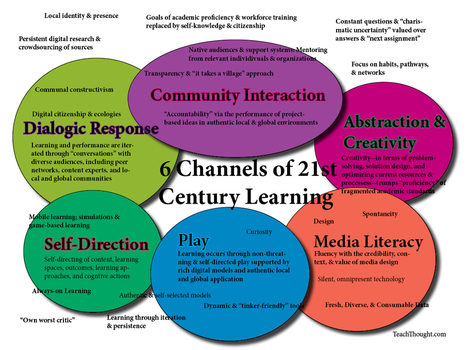
"At TeachThought, we constantly wrestle with two big questions: How do people learn, and how can they do it better in a constantly evolving context?
I
"n pursuit, the theme of “21st century learning” often surfaces, a popular label that, while perhaps cliche, still seems to be necessary as we iterate learning models, fold in digital media resources, and incorporate constantly changing technology to an already chaotic event (i.e., learning).
"This has produced our 9 Characteristics of 21st Century Learning, a kind of overview we created in 2009, and our Inside-Out School model that is meant to be a kind of bridge between current school design and what’s possible moving forward."
www.EasyFilms.eu More explanatory videos, whiteboard animation and other explainers on our web page Mehrere Beispiele für Erklärfilme, Erklärvideos und Kurzf...
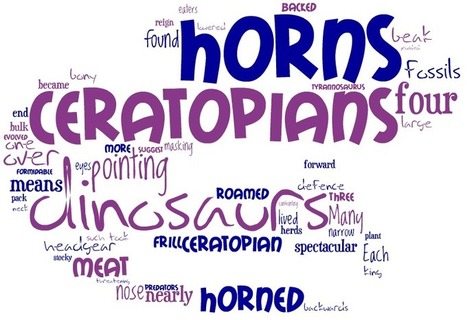
Word clouds are a popular way of representing information and they can be seen everywhere. But how can we use them in the classroom? Here's a list of ten easy tried and tested ways to use them to s...
To me the biggest difference is in how flipping adds context. For instance, working with a particular piece of literature, say, Romeo & Juliet, offers many ways to use the flipped format to add learning experiences beyond what one might have time to share within the restraints of the class hour. Some examples of what could be flipped for students reading Romeo & Juliet:
Google maps of the area of Italy where the play is setHistorical info on Queen Elizabeth I, London, or William Shakespeare3D rendering of the Globe TheaterGoogle Lit Trip, which uses Google Earth to move through the play’s localesVideo clips from West Side Story, Shakespeare in Love, or any available version of the playRenaissance food recipes and photosVideo and image parodies, such as this one.Your own screen casts explaining texts, like this one, using Jing.com.Online texts, including side-by-side modern translations, e.g. No FearBlogging as Romeo or JulietDiscussion boards regarding choices the characters makeVocabulary practice via Spelling and Vocabulary City, for instance.Suggesting students create a quick rap using uJam.com
Of course, the possibilities are nearly endless. While no teacher wants to replace the core discussions and interactions of the language arts class (nor should they), adding a flipped element creates opportunity to craft meaning and connection to the world in ways simply not possible by sending home worksheets or packets with information.
The management of this material requires a strong interactive platform for teachers to easily share these resources. There are several free or inexpensive options for this. Moodle, Edmodo,Schoology, Google Sites, Wikispaces and several others could form that connective tissue to allow for these flipped resources. I prefer Schoology, even though I used Edmodo for years, because the design is very clean, and students always know where to find resources, even if they were from many weeks ago. I think it is a matter of preference.
While engagement was long thought of as simply showing up to class and listening intently, a new study coauthored by a University of Pittsburgh researcher looks at student engagement through a new lens.
27 creativity & innovation tools is an overview of various commonly used techniques in creativity, innovation, research & development processes. All in one-pag
Explore the chasm between deep, project-based instruction and rich tech integration. Educators from leading schools from across the country will share killer...
How can we integrate web-based collaborative and connective tools with research-based effective instructional practices? Explore tools that support effective...
How do we best take advantage of an information, knowledge, and teacher- filled world? We'll look at the latest best practices for connected student learning.
Learn how to effectively integrate Educreations and QR codes into the Edmodo platform by participating in a dynamic, creation-filled lesson using these tools.
This article is really interesting. It talks about the difference between merely using technology, and actually integrating it into the classroom. It gives scenarios, examples, and compares and contrasts the ideas of "using" and "integrating". I found it to be a good reminder of the ideas that our lessons should not be based around the technology itself, but instead, used in the same way as any other learning tool, to help make learning accessible.
Being purposeful about incorporating technology in our learning tasks will be vital to being an effective teacher. Students need to be taught how to use these tools and navigate the volume of information the internet presents. Using technology without direction and purpose can create problems and wastes tremendous potential.
Elsa Mansfield-This article talks about using technology to learn instead of learning how to use technology. Integration involves making technology a part of the everyday classroom, and using it to engage studetns with information or content. I like the idea of being very purposeful with employing technology in a variety of ways and incorporating technology in our learning tasks constantly. Using technology without direction and purpose can create problems and wastes tremendous potential.
With PBL, students are empowered to work at their own pace and ability level which provides them with the opportunity to challenge themselves. Students will instinctively follow the "Flow Channel" when they take ownership ...
Primal does a lot of heavy lifting in knowledge representation and content filtering. If you ask it to grab you some relevant content around your interests, it will do precisely that.
But what if you don’t want to have to ask? Search engines are fantastic, but they still require that you go to them and then try to figure out how to formulate your query in a way that gets you decent results.
Primal already has the ability to understand what you want, and we’re now working on some technology that will let Primal deliver you the content that you truly care about before you know you want it.
Read on to learn more about Primal’s new software agent and content streaming framework.
There was a lot of talk about software agents about ten years ago -- computer code that would seek, filter, and deliver information specific to your interests I have not tried this yet, but I'm interested that people are trying with today's technology -- and that RSS is one of its building blocks.
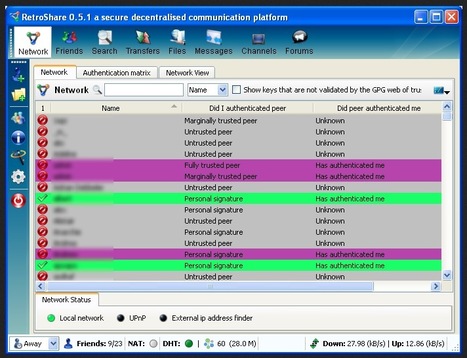
RetroShare is a cross-platform, open-source, trusted and distributed P2P communication software and social sharing network.
Retroshare allows you to chat and share files of any size with your friends and family, using a web-of-trust to authenticate peers and OpenSSL to encrypt all communication.
RetroShare provides filesharing, chat, messages, forums and channels. Other key features include:
Serverless, completely decentralised
Multiple simultaneous downloads / uploads
Search Friends
Messages
Forums
Channels
Voice over IP
Instant messaging
Groupchat
GnuPG Authentication
OpenSSL Encryption
adding downloads via website links
Plugins support
UPnP / NAT-PMP port forwarding support
Graphical User Interface written with Qt4 toolkit
System tray integration
RetroShare has been inspired by the design of the Turtle algorithm:
"When designing Turtle, we were inspired by the way people living under oppressive regimes share information deemed "hostile" by their government (this can be books, newsletters, video and audio recordings, or even political jokes). Because of the potentially very serious consequences raising from being caught possessing/distributing such material, no single individual is willing to share it, except with close friends. Experience has repeatedly shown that, even in the most repressive environments, this "friends-to-friends" delivery network is remarkably effective in disseminating information, with relatively little risks for the participating parties; if one chooses his friends carefully, the chance of being caught doing the forbidden exchanges becomes very small."
Retroshare "... makes it difficult to intrude and hardly possible to monitor from an external point of view." This makes government monitoring and prosecution impossible beyond the will of Retroshare users
At the recent Google I/O event, Google’s take on social network, Google+ saw a revamp to their design with new features. Together with that, Google also introduced Hangouts to replace Google Talk and Messenger.
"You're so talented!", "You are gifted - a natural!", "You're doing so well in school, you must be really smart!" - children receive these messages (or their negative counterparts), along with many...
Author and educational technologist Adam Bellow delivers the closing keynote of ISTE 2013 with a high-energy presentation reveling in the joys of being a con...
As we increasingly communicate and share work online, we are creating our digital images and digital tattoos. Learn how you can help your students design the...
For educators ready to try the idea of design thinking, you'll be glad to know it does not require extensive transformation of your classroom. That said, it can be a transformative experience for all involved.
To get content containing either thought or leadership enter:
To get content containing both thought and leadership enter:
To get content containing the expression thought leadership enter:
You can enter several keywords and you can refine them whenever you want. Our suggestion engine uses more signals but entering a few keywords here will rapidly give you great content to curate.


 Your new post is loading...