


Social media is evolving at an incredible pace, and - let’s face it - many marketers are still finding it difficult to measure what matters.
What should we be paying attention to after we post, promote, tweet and pin? How should we do it?

 Your new post is loading...
 Scoop.it! Social media is evolving at an incredible pace, and - let’s face it - many marketers are still finding it difficult to measure what matters. What should we be paying attention to after we post, promote, tweet and pin? How should we do it? 
No comment yet.
Sign up to comment
Scoop.it!
You'll learn a load of hints and tips for broadcasting your own live events, starting with...
Scoop.it!

Internet firm sends in two sturdy employees with backback-mounted cameras to trek along alleys of watery Italian city
Scoop.it!

I recommend using circloscope to manage you circles.
Scoop.it!

Different ways to to look at your Notifications: Now it's the Bell icon instead of the red box... But otherwise the same.
Scoop.it!

Official Google Calendar Help Center where you can find tips and tutorials on using Google Calendar and other answers to frequently asked questions.
Scoop.it!

Google+ Discuss Weekly Round-Up
Jaana Nyström's insight:
This post is by yours truly! :-)
Scoop.it!

Previously, every channel you created needed to have its own Google account login. If you’re a creator that manages many channels, you might even have a spreadsheet to organize the various email addresses and passwords you use to log in to your channels.
Scoop.it!

John Skeats has shared a Circle with everyone and recommends 42 people or pages to you. Check this Shared Circle and find interesting people with CircleCount.com.

Jaana Nyström's comment,
July 12, 2013 5:05 AM
The direct Google+ link: https://plus.google.com/117167305186723867672/posts/QqV6xHtm47p
Scoop.it!

Google now highlights some of your friends' posts on Google+.
Scoop.it!

Most bloggers simply have no idea what Google+ is all about. They assume that the only social networks they need to promote blogs are Twitter and Facebook.
Scoop.it!

For those of you who have taken the plunge and are using desktop Hangouts in Gmail, Google+, and the Chrome extension, we've heard loud and clear that you miss the ability to make calls from Gmail, so today, we're happy to announce it's back - and better than before! Even better: calls to the US and Canada are now free from all countries where Hangouts calling is available. And international rates remain super, super low.
Scoop.it!

Discover posts that your friends have +1’d
|
Scoop.it!

Names and Google+
Google+ makes connecting with people on the web more like connecting with people in the real world. It's recommended that you go by your first and last name because it will help you connect with people you know and help them find you.
This policy applies only to Google+ profiles. Google+ profiles are for individuals. If you want to use Google+ to represent someone or something other than yourself -- like your business, your band, your family, or your pet -- you should create a Google+ page instead.
Scoop.it!

Chrome Remote Desktop is a cross-platform extension used to provide remote access to Windows OS, Mac OS and Linux users.
Scoop.it!

Learn how your content and social work together to build you Google subject ranking authority.
Scoop.it!

Google Plus has been written off as a universal flopbut a deeper look proves that we will all eventually succumb to its siren song.
Scoop.it!

With unlimited photo and video uploads, Google+ makes it easy to upload photos to share with the people you care about.
Scoop.it!

Events allow you to easily organize a get-together, be it in-person or online. All attendees of the event can share comments, upload photos automatically while attending the event, and add new friends to their circles all from the event.
Scoop.it!
Google Ranking Factors: Social Is The New SEO.
Scoop.it!
Hangouts on Google+ This is the fifth video in a series of five, covering everything you need to know about Google+
Scoop.it!

Want proof? Global retailer H&M experienced a 22 percent increase in click-through rates from its Google+ presence alone.
Still not yet convinced? Here are the top four reasons why marketing your brand on Google+ is a must.
Scoop.it!

There’s a lot of debate around the value that Google+ has to offer businesses in comparison to Facebook and Twitter. After all, Facebook and Twitter have already captured the market and that’s where most people are, so the media make out...
Scoop.it!
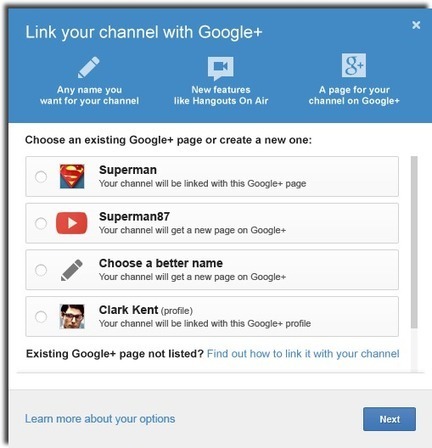
Connecting with Google+ will unlock great new features for your channel, so we want you to understand all of your options. When you connect a channel with Google+, the channel will have a shared name and avatar with Google+, so making the right choice is important. A couple quick notes before starting:
Scoop.it!

This summer we’re posting regularly with privacy and security tips. Knowing how to stay safe and secure online is important, which is why we created our Good to Know site with advice and tips for safe and savvy Internet use.
|




