


Ashampoo Slideshow Studio 2012 – Kostenlose Vollversion 1.0.2.10: kostenlos, deutsch, virengeprüft, schnell und sicher!


 Your new post is loading...
 Scoop.it! Ashampoo Slideshow Studio 2012 – Kostenlose Vollversion 1.0.2.10: kostenlos, deutsch, virengeprüft, schnell und sicher! 
No comment yet.
Sign up to comment
Scoop.it!

The blog post presents new Mysterious Black in Web Design Infographic stylized as animated comic book, providing comprehensive information on color usage and its dark unknown sides.
Scoop.it!

Zombies, surely you’ve heard this undead creatures.
Scoop.it!

Tolle Monster für Halloween basteln ? Hier gehts zum download...
Cut out your own crew of papercraft monsters designed by the animation directors Jens & Anna...
Scoop.it!

Have patent lawsuits become the large corporations’ substitute for innovation?
With the Apple-Samsung trial coming to an end and more and more cases heading to the courts, CEO.com decided to take a look at the driving forces behind these patent wars and what is being done to stop the rising number of casualties.
By CEO.com. http://bit.ly/ON5gRH Source. http://bit.ly/N2LhQs Via maxOz
Scoop.it!

What Does It Mean To Us SEO's? It proves even further that search users – and the target audience of your website – are a mixed bag. Some favor personalization; others don’t. Some limit access of bots to their search history; others are clueless about how to do that. Add a variety of location and language settings, and you will get a whole patchwork of search results just like your real users get. And it is not really obvious how you can track them. From this Infographic, you will learn: Why exactly your site ranks differently for different users. How you can simulate miscellaneous search scenarios to see if your site really gets enough visibility.
By Aleh Barysevich. http://bit.ly/T1JJnU Source. http://bit.ly/R5RxUa Via maxOz
Scoop.it!

Do you know where and how are your website data files such as CSS, Html and images are stored and how it is served for the users? If you’ve ever considered building or getting your own website, you’ve probably compared building your own site to getting one from a source like Blogger. Doing either of these things comes with their own sets of pros and cons, but what do they look like when matched up against each other? Is one the better, more profitable idea than the other? It’s common with people to get confused in choosing the right hosting plans for their business online and this featured chart will help you to choose wisely. Learn all about the web hosting industry with these clearly designed Infographics:
By CSS Reflex. http://bit.ly/OzUbVA Source. http://bit.ly/QW5TWK Via maxOz
Scoop.it!

Ever thought about how graphic design affects business? Wonder what the best places are for graphic designers to work/live? Check out InVision's Infographic and find out!
By InVision. http://bit.ly/QVorXB Source. http://bit.ly/OrHG03 Via maxOz

Natalia Blus's curator insight,
January 8, 2020 8:53 AM
Infografika pokazuje jak projektowanie graficzne działa w biznesie, jak różnią się zarobki w różnych rejonach kraju (na przykładzie Stanów Zjednoczonych), zamieszczone są też krótkie wskazówki jak zmaksymalizować swój sukces.
Scoop.it!
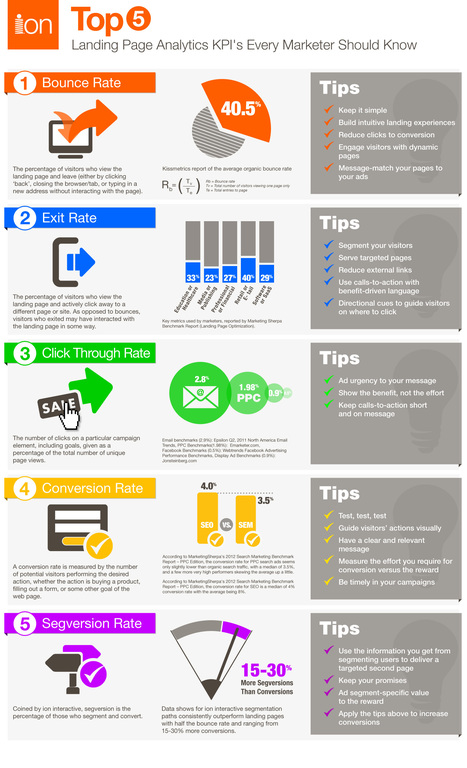
Analytics matter but not every marketer knows where to start – especially when it comes to landing page analytics. ion interactive have outlined five critical analytics you should know when assessing your landing page optimization performance. With added additional best practices to improve these key metrics and industry benchmarks.
By ion interactive. http://bit.ly/PMxI4B Source. http://bit.ly/Qq0gSl Via maxOz
Scoop.it!

Should You Integrate Texting With Customer Service? In this fast-moving digital world, consumers want instant and on-demand service. And with 90% of the world’s population covered by a cell signal, it’s really no surprise that text is becoming a vital mode of communication for small businesses. See who’s looking to reach out to their customer base by texting — which is a way that is both efficient and friendly — in this Infographic by Column Five created with Demandforce.
By Column Media. http://bit.ly/MFc6J3 Source. http://bit.ly/OMrgQ9 Via maxOz
Scoop.it!

Are you a little overwhelmed by the browser choices available to you? Have you been sticking to your old favorite because you never had time to really see what the other browsers had to offer? Does your current browser have advanced security options? Does it sync your settings across devices? Can you manage your tabs easily? These are all things Firefox can do for you, and you can find out more in “Tackling Firefox: The Unofficial Manual". http://bit.ly/Sue5DZ You’ll learn about: Add-ons Core features Security tools Bookmarks Advanced tab management Web developer tools Syncing across devices Automatic form filling Search tools And much more
By MakeUseOf. http://bit.ly/VBUbFY Source. http://bit.ly/QBGnHV Via maxOz
Scoop.it!

Ideas have been stolen for centuries and protection against this behaviour is extremely difficult. Beyond the Internet, companies just copy the unprotected parts of complete products, hence not truly in violation of any law. For online entrepreneurs it is far more difficult. Code is only partially protectable as code under U.S. law no property represents. "Cloners" occur as a result of this gap in the U.S. legal system. Under current law, without morals, code and design are copied / cloned. Clones can create problems. When you come up with an idea, you want that idea to be yours so that authenticity becomes operative. Why should someone who steals something you created leech off of your success? In this age of computer//internet intangibility it’s hard sometimes to draw the line. With this Infographic, ReputationsVerteidiger, wanted to show how this industry has evolved and how startups can protect themselves.
Source Reputation Defender. http://bit.ly/RQgljH Via maxOz
Scoop.it!

The Foundations Of Coding HTML Email Creating HTML emails that will look awesome on the dozens of email programs out there is tricky. If you’re new to the email world (or have picked up HTML in the last several years), learning how to get an email to look good can be a little trying. Worse, there are no email-specific standards in place. For best results: #Keep your design simple: avoid drop shadows, fancy fonts, rollovers and other interactivity #Use tables for layout, and basic inline CSS for formatting #Know your audience: testing to see which email clients your subscribers use to read messages can help you know where to focus your efforts #Test regularly: email programs change frequently, often with little notice Check the Infographic for more specific tips!
By Litmus. http://bit.ly/RP60tN Source. http://bit.ly/Qcfu0e Via maxOz
|
Scoop.it!

Serial Number of GiliSoft Slideshow Movie Creator For FREE, Newest Download, Serial Number of GiliSoft Slideshow Movie Creator For FREE...
Scoop.it!

Tough rivalry is out there in the market and each competing firm desires to become the number one. Even the most minor mistake could be the most awful problem you could have made to eliminate your company.
Scoop.it!

Free Download Bad Piggies for Windows PC with our latest giveaway. Get the full version of Genuine Bad Piggies game without cracks, keygen or patch. Enjoy.
Scoop.it!

Want to get started learning Illustrator, but feel overwhelmed? Check out “Getting Started With Illustrator,” from MakeUseOf and TrueKolor.net. With easy-to-follow instructions and plenty of annotated screenshots, this manual makes learning Illustrator simple. Adobe Illustrator is a vector drawing program. It is often used to create logos, icons, illustrations, charts, Infographics, t-shirts, business cards, stationery, envelopes, packaging design – you name it.
All in all, it is mostly used to create high resolution graphics, which can later be printed as well. Unlike Photoshop, which stores image information in dots, Illustrator uses mathematical equations when you draw shapes. Vector drawings can be scaled to fit skyscraper-size banners; raster images cannot. Because of this, Illustrator is used to make drawings that needs to scale easily – things like logos and all the basic tools needed for designing a logo. Open Illustrator and follow along to really get a feel for Adobe’s amazing vector art program. The Manual includes: Learning where things are in the Illustrator workspace Basics of logo design, including step-by-step examples of which tools to use for what. Step-by-step instructions with easy-to-follow, annotated screenshots. Everything from basic drawing to rounded corners to effects to rotating to circles. Creating and manipulating 3D text in Illustrator Useful tips for every Illustrator user
By TrueKolor. http://bit.ly/RkoXCr & MakeUseOf . http://bit.ly/PIzXqm Download Getting-Started-Guide-To-Adobe-Illustrator-TrueKolor [PDF] http://bit.ly/NsBcI8 Source. http://bit.ly/QdIWUe Via maxOz
Scoop.it!

Smartphones are becoming an integral part of our lives, and not just for their capacity to make phone calls. Some might even say our smartphones define us, telling the world more about us than we even realize. Our Smartphones have become our music players, our GPS systems, our photography studios, our link to breaking news, the way we entertain ourselves—truly they have become extensions of ourselves. Some might even say our Smartphones define us, telling the world more about us than we even realize. They keep us connected to friends, help with directions and give us access to the Internet’s infinite wonders. But how awesome is too awesome? And when does appreciation become addiction? 15% of respondents to a recent Gazelle.com survey said they’d go rather go without sex for a weekend than give up their iPhone for a few days. 4% said they’ve actually used their iPhone during sex, and 65% said they couldn’t live without their trusty device. 40% of respondents said they’d rather go without bathing than without their iPhone. The Internet education portal OnlineColleges recently gathered data from a number of sources including Gazelle, comScore and the Pew Internet & American Life Project to produce the following Infographic. It shows not only that we may be getting a little too attached to our Smartphones, but also why we love our devices and what we use them for most. Among many interesting findings: iPhone and Android owners have more positive outlooks on life than their Blackberry-carrying brethren; city dwellers are the most mobile savvy; and social media, gaming and weather apps rule the market. But whether addicted or simply enthusiastic, it’s easy to see why Smartphone owners are so appreciative of modern mobile technology; More importantly, where do you fall into the Smartphone personality spectrum? Does your Smartphone define you? If so, what is it saying about you?
By Kristin Marino. http://bit.ly/Ne6cjA Source. http://bit.ly/QnNbek Via maxOz
Scoop.it!

Landing pages are composed of a group of definable elements. The building blocks presented below can be used as a guide when defining and creating a perfect landing page of your own! This Infographic by KISSmetrics dives into the intricacies of the ultimate web design and the perfect landing page.
The Blueprint For A Perfectly Testable Landing Page is a great example of sources that you can derive information and knowledge from about what other people have found works. Sometimes these guides can start you off in the right direction and from there you can go ahead and refine it for your audience and visitors. And if you are currently designing or re-designing you website or blog this template may be of use: Download the Web Strategy Planning Template. http://bit.ly/TABrbn By BlueWireMedia. http://bit.ly/QAipM5 ; By KISSmetrics. http://bit.ly/Swvw7M Source. http://bit.ly/OzCXFp Via maxOz
Scoop.it!
Ever thought about how graphic design affects business? Wonder what the best places are for graphic designers to work/live? Check out InVision's Infographic and find out!
By InVision. http://bit.ly/QVorXB Source. http://bit.ly/OrHG03 Via maxOz
Natalia Blus's curator insight,
January 8, 2020 8:53 AM
Infografika pokazuje jak projektowanie graficzne działa w biznesie, jak różnią się zarobki w różnych rejonach kraju (na przykładzie Stanów Zjednoczonych), zamieszczone są też krótkie wskazówki jak zmaksymalizować swój sukces.
Scoop.it!

Another year has passed since the 2011 edition of 79 Link Building Resources where Kristi Hines listed various blogs, their top link building posts, and some great link building tools to add to your toolkit. Those blogs, to this day, are still great resources to visit when looking for posts on link building.
Since that post was published, a lot of things have changed in the link building world. In this 2012 edition of link building resources, covered is the big changes that have happened in the link building world as well as what works (and doesn’t) when it comes to link building strategy.
There you have it! A Comprehensive Compilation of 79 Great Link Building Resources to chew on.
By Kristi Hines. http://bit.ly/R0GL19 Source. http://bit.ly/PRAt7V Via maxOz
Scoop.it!

The majority of websites today include social media sharing options in their websites. One of the effective ways is to include social media sharing options in your blog posts and let your readers share your piece of writing through different social media platforms. The more options you include, the better it is, at least to a certain extent. Noupe have compiled some of the most useful WordPress social network for you and hope that you will find this list useful.
By Nousheen Aquil.http://bit.ly/RrXnyM Source. http://bit.ly/RhDSie Via maxOz
Scoop.it!

We’ve pulled together a resource which rather than aiming to tell you everything, instead tells you exactly what you need to know to get your own website up and running in no time.
Business owners are aware of the increasing importance of having an online presence; regardless of whether their key objective is using their website to sell online, to generate enquiries, or act as a branding tool. However the costs associated with building and particularly maintaining a website can quickly become a drain on business owners. WordPress is a platform that appeals to many, as even if you have no coding experience you can set up a website and manage it yourself. This step-by-step guide takes the guesswork out, so you'll be up and running in no time.
By Jasper Martens / Hannah Smith. http://bit.ly/UGsxHk Source. http://bit.ly/S6x6XC Via maxOz

France Lafleur's curator insight,
March 6, 2014 10:03 AM
Ce tableau pourrait vous aiguiller et vous permettre de commencer sur le bon pied avec WordPress. 
Alain Theriault MBA's curator insight,
March 11, 2014 9:49 AM
a step-by-step approach to a WordPress site for a small business
Scoop.it!

Use Google Docs as a free website monitoring tool to track unlimited number of domains and receive instant email and SMS text alerts when any site is down. You can use Google Docs to monitor your website’s uptime and get instant alerts if your site is down or unavailable to visitors. The latest version of this Google Docs based website monitoring tool is even better: You can now monitor multiple websites and blogs for downtime/uptime in one go. In addition to email alerts, you can now choose to receive SMS alerts on our phone if any of your sites are down.The text alerts are routed through Google Calendar and are therefore free. In fact, this is probably the only tool that lets you monitor unlimited number of website domains and offers both SMS and email based alerts without charging a penny. Here’s how you can install the monitor in Google Docs in less than 60 seconds: Real-time Website Monitor with Text Alerts Click here to create a personal copy of the Website Monitor HD sheet in your own Google Docs account. You’ll see a new Website Monitor menu in the toolbar. Click Initialize and you’ll get a pop-up asking for authorization. Just say Yes. Put your Website URLs in cell B2 (comma separated) and your email address in cell B3. Go to the Website Monitor menu again and choose “Start Monitoring”.That’s it. Close the Google Docs sheet and it will monitor your sites in the background. If you do not wish to receive SMS alerts, simply change the value of cell B4 from Yes to No. The full source code of the project is available at ctrlq.org – no one else has access to your data and you can disable the script anytime by setting the email address in cell B3 to blank.
By Amit Agarwal Source. http://bit.ly/U5c0NI Via maxOz
Scoop.it!

Creating a digital strategy, or any strategy for that matter, you need to: #Know where you want to be To decide on your destination, consider how various digital capabilities – email marketing, social media, paid search, and so on – will help your business accomplish its near term business goals and longer term strategies. Bring knowledge of your business objectives to a strategy session. Combine them with industry and competitor research, knowledge of your customers, and analysis of digital trends to define your 'Desired Future'.
#Know where you are at With your destination in mind, examine and document the relevant aspects of you 'Current State'. A thorough assessment of your current state will include more than a listing of your websites and eBusiness IT projects. It will include a look at your governance, culture, processes and capabilities as well. It is also likely that your desired future will have impact on the culture and processes of Marketing and Operations; impacting Sales and Product Development.
#Understand what separates you from your goal Perform a 'Gap Analysis' by determining how the various aspects of your current state need to change in order for you to reach your desired future.
#Determine how to get there Take the initiatives list into a planning session and prioritize them against competing priorities and put together a multi-year program, a 'Digital Roadmap'.
Hopefully, this roadmap will guide you to your future state by addressing the gaps you’ve identified Plan to routinely revisit and update your strategy and roadmap.
By BigThunk. http://bit.ly/TfDIJ3 Source. http://bit.ly/OelHbZ Via maxOz
|






