Part 2 of our series with Explain Everything. Here we look at how to export animations from Explain Everything and publish them as an ebook in iTunes U.

 Your new post is loading...
 Scoop.it! Part 2 of our series with Explain Everything. Here we look at how to export animations from Explain Everything and publish them as an ebook in iTunes U. No comment yet.
Sign up to comment
Scoop.it!

Online educational tools are changing the way we learn. Noodle predicts which free apps and tools will be most influential in the education sphere in 2015.
Scoop.it!

Scientix collects and promotes best practices in science teaching and learning in Europe, and organises trainings and workshops for STEM teachers 
Jovi Buendia's curator insight,
October 4, 2015 5:48 PM
This is an amazing resource for Science. I signed up for teacher courses and looked at some of the video resources such as Yenka 3D Shapes. This platform allows to investigate shapes, 3D, volume, area, very hands on and visual. 
Diane Johnson's curator insight,
October 19, 2015 9:43 PM
Interesting site with a range of resources for classroom teachers. 
Jan Klassiek's curator insight,
October 22, 2015 3:59 PM
Nuttig en nodig!
Met dank aan Ana Cristina Pratas op Digital Delights for Learners: http://www.scoop.it/t/digital-delights-for-learners?page=2
Scientix is 'The community for science education in Europe'.
Scoop.it!

Educators from around the country share their favorite educational apps.
Scoop.it!

Make crossword puzzles, print them out as PDFs, share them, and solve them online with Crossword Labs. It's free, fast and easy. No registration required! 
Marcelo Triviño's curator insight,
September 29, 2015 11:12 AM
Crosswords maker - creador de crucigramas 
Rosemary Tyrrell, Ed.D.'s curator insight,
September 30, 2015 6:06 PM
This is pretty nifty. You can export as a Word or PDF. I'd like it better if they also provided an embed code so you could place it into your class website, but you can't have everything!
Scoop.it!

Our colleagues in the IT department began talking about SMAC technologies several years ago, and slowly these have been
Scoop.it!

KB...Konnected's curator insight,
September 30, 2015 12:33 PM
I love when Jane Hart's "Top 100 Tools" comes out each year. I always find something new.
Scoop.it!

EdCast is the Professional Knowledge Network to share articles, videos, quotes, create polls and live stream your knowledge.
Scoop.it!

Set your kids up for success this year with our Back to School Tech advice.
Scoop.it!
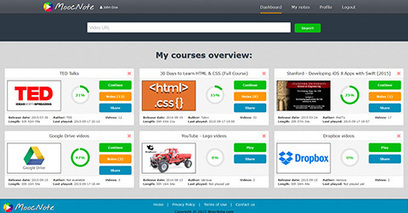
Take notes that are link back to the appropriate place in the videos and are collected into one central place.
Rosemary Tyrrell, Ed.D.'s curator insight,
September 27, 2015 4:49 PM
I like the ability to save your notes and come back to training later.
Scoop.it!

Cincopa is the most popular and simple way to embed media plugin to your website. Choose media player plugin by CMS or by your preferred skin style. |
Scoop.it!

Lexile leveled current events, lesson plans, quizzes, assessments
Scoop.it!
Ana Cristina Pratas's insight:
RECEIVE
Scoop.it!

Create and Share Crossword activities online for free, discover our Crosswords maker and create your owns for your class easily. Free!
Scoop.it!

Source: Butler University Library, adapted from Meriam Library at CSU, Chico What are Your Favorite Tools and Techniques for Helping Students Learn how to Assess Web Content? One of my favorite lessons to teach is about evaluating the credibility of
Scoop.it!

Edusight provides the world's best user experience for K-12 teachers. Gradebook and Notes are simple, beautiful apps that help K-12 teachers assess student learning with more than just a grade.
Scoop.it!

MATRIX is a simple, powerful, cloud-hosted LMS for businesses that makes it easy to deliver online training.
Scoop.it!

Standards Planner quickly organizes teachers lesson plans to the Common Core and other standards, as well as provides thousands of resources and material for the classroom. Create, share, and collaborate with your peers. |