Google Sheets activities for students including Random Generators, Educational Games, Pixel Art, Learning Databases, and Analyzing Data

 Your new post is loading...
 Scoop.it! Google Sheets activities for students including Random Generators, Educational Games, Pixel Art, Learning Databases, and Analyzing Data 
JoanneMorris's curator insight,
February 17, 2017 12:41 PM
Great tools for using Sheets in the classroom.
Sign up to comment
Scoop.it!
Ana Cristina Pratas's insight:
Esri Story Maps let you combine authoritative maps with narrative text, images, and multimedia content. They make it easy to harness the power of maps and geography to tell your story. 
Ressources pour les cours d'anglais's curator insight,
February 14, 2017 4:27 AM
Créer des cartes interactives en langues, en lettres et en histoire-géographie par exemple. Un scénario en EPI pourrait être construit.
Scoop.it!

RooClick is the latest in interactive video technology for education. It's free to teachers! We allow you to provide clickable events within any video, including hyperlinks, text, and quizzes.
Scoop.it!

USC Rossier's Toolkit for Digitally-Literate Teachers provides teachers with how-to guides, actionable strategies and real-life examples of the benefits of digital literacy in the classroom.
Scoop.it!

Animaker is an online do-it-yourself (#DIY) animation video maker that brings studio quality presentations within everyone's reach. Animated Videos, Done Right!
Scoop.it!

AMAZE creates fun, honest videos to help teens + tweens make sense of sex, relationships + growing up. AMAZE is #MoreInfoLessWeird when it comes to sex ed.
Scoop.it!

Reading logs track reading minutes inaccurately rather than having students engage with the text. Try these reading log alternatives.
Ressources pour les cours d'anglais's curator insight,
February 14, 2017 4:41 AM
J'aime beaucoup "booksnaps" ou comment demander aux élèves de rendre compte de leur lecture en prenant une photo d'un passage, en commentant ce qu'ils ont compris et en ajoutant une image. C'est une façon d'utiliser snapchat à des fins éducatives.
Scoop.it!

A community where students engage in high-interest writing for an authentic audience and teachers help students grow through the entire writing process.
Scoop.it!

Explore the online teaching tools we've rounded up for you in this list. There are 50 of them for lesson planning, assessment, collaboration, and more.
Scoop.it!

Using search engines effectively is now a key skill for researchers, but could more be done to equip young researchers with the tools they need. Here, Dr Neil Jacobs and Rachel Bruce from Jisc’s digital infrastructure team share their top ten resources for researchers from across the web. 
David Baker's curator insight,
January 9, 2017 10:31 PM
I needed an academic search engine for a presentation. Here are 10.
Scoop.it!

I’ve compiled several “The Best…” lists that sites where you can learn about the geography, data, languages, and holidays of different countries around the world. Those reso… 
Ericka Wheeler's curator insight,
January 5, 2017 9:03 PM
Diversity has always been a passion of mine and I love learning about people and cultures. What a great resource.
Scoop.it!

Wixie is a creative platform for powerful teaching and learning in the cloud. |
Scoop.it!
Please LIKE our video and Subscribe to our channel! http://www.TeacherCast.net | TeacherCast Educational Broadcasting Network Video recorded by Jef 
Codie Bower's curator insight,
February 16, 2017 5:14 PM
Quick, easy Assessment tool at your fingertip!
Scoop.it!
Quick Rubric – FREE, fast and simple rubric creator
Scoop.it!

Support for the Australian Curriculum Digital Technologies with lesson plans, case studies, advice for school leaders, activities for students and for families. See links to the digital technologies industry events and programs. Get support with the development of computational thinking and coding skills in Australian students. 
Raph Svensen's curator insight,
May 11, 2017 12:57 AM
Great resource for lesson plans that incorporate digital technologies that aren't simply 'add ons' but are redefined tasks. There's step by step instructions on how to implement the lessons as well as how it links to the Australian Curriculum. 
Carly Robbins's curator insight,
May 12, 2017 6:51 AM
This website has a really great infographic titled 'ICT vs Digital Technologies'. It sets out the relationship between ICT Capabilities (one of the General Capabilities in the Australian Curriculum) and Digital Technologies (a learning area for F-10 in the Australian Curriculum). I found it useful because it details some examples of ICT in action in the classroom. The website also has some great lesson plans that may be able to be repurposed to suit my learning areas. There is a lesson plan in particular which is targeted towards Years 7-8 which involves creating a computer program to count votes and makes reference to the voting system used by the Australian Parliament. (https://www.digitaltechnologieshub.edu.au/teachers/lesson-ideas/there-can-only-be-one) This could be used in a Civics and Citizenship Year 8 class as one of the skills listed in the Curriculum is "Use democratic processes to reach consensus on a course of action relating to a civics or citizenship issue and plan for that action (ACHCS072). Students could explore and discuss voting and collaborate to achieve a fair voting system. ICT could be incorporated by having the students creating the the computerised voting system that is referenced in the lesson plan. Students could also critically evaluate the issues with using a computerised voting system and explore why our voting system still uses a paper system.

Nic Gibson's curator insight,
June 1, 2017 12:40 AM
Australian Curriculum are essential and should be Incorporated into every lesson plan. By basing a lesson around the curriculum you are ensuring the improvement of student learning. the inclusion of digital technology into lessons can aid activities to support student learning.
Scoop.it!

QuoteItWithMe helps you quickly get quotations into your writing assignments. Protect yourself from plagiarism and use quotes like an 'A' student!
Scoop.it!
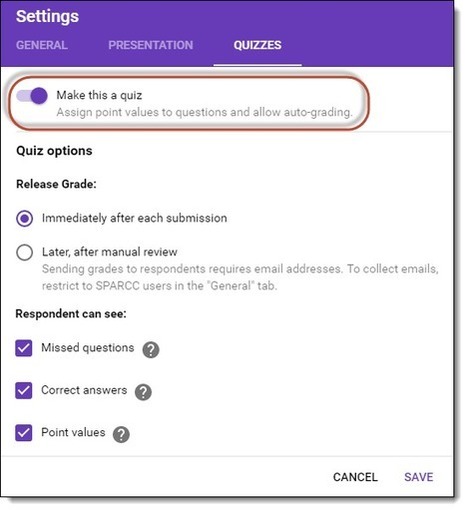
Use Google Forms to create randomized sequencing questions where students have to put the items in the correct order.
Scoop.it!

Collaborative writing - done differently. Unleash your creativity with us.
Scoop.it!

Interactive Ink extends digital ink to allow users to more intuitively create, interact with, and share content in digital form.
Scoop.it!

Kiddle is a visual search engine for kids powered by Google, offering safe kids web, image, and video search. Results are vetted by editors. 
paul rayner's curator insight,
January 20, 2017 5:15 PM
Most Kiddle search results are illustrated with big thumbnails, which makes it easier to scan the results, differentiate between them, and click the most appropriate results to your query. Thumbnails serve as visual clues and are especially beneficial to kids as they don't read as fast as adults.
Kiddle use a .co instead of a .com domain?: In Kiddle's case "co" stands for "children only". Kiddle is powered by Google Safe Search but is not affiliated with Google Inc. |