


Digital Delights for Learners
742.0K views |
+4 today
Filter by date
Tags
Sites for learning & developing creativity
Curated by
Ana Cristina Pratas
 Your new post is loading...
 Scoop.it! 
Tynker creative computing platform unlocks STEM skills for educators, kids and parents 
mrsjgarcia's comment,
April 15, 2013 3:30 PM
This looks very similar to scratch. I would be interested in hearing back from others using it, for their take on it.
Scoop.it!

Ariana Amorim's curator insight,
April 11, 2013 10:26 AM
Can't wait to try it! With Scoot & Doodle’s you can get together for creative jam sessions, face-to-face, anytime, anywhere and you can create with up to 9 of your friends at the same time. The thought provoking challenges are also great fun. 
Drora Arussy's comment,
April 11, 2013 12:32 PM
What a wonderful way to help students with homework, allow students to collaboratively create something, or conduct an online short class with small groups! No writing necessary so no problem with Hebrew typing, but you can draw, write and discuss.
Scoop.it!

Download and send large files with Pando. Bypass email upload limits with a free, easy to use program.

Richard Seal's curator insight,
April 10, 2013 10:02 AM
Looks like a great resource for Primary Students.
Scoop.it!
Ana Cristina Pratas's insight:
Howtoons are cartoons showing kids of all ages "How To" build things. Each illustrated episode is a stand-alone fun adventure accessible to all. Our Howtoons are designed to encourage children to be active participants in discovering the world through Play-that-Matters -- fun, creative, and inventive -- and to rely a lot less on mass-consumable entertainment. 
Paula Correia's curator insight,
April 19, 2013 7:57 AM
"Howtoons são cartoons que mostram às crianças de todas as idades "como" se constroem coisas. Cada episódio ilustrado é uma aventura acessível a todos. Os Howtoons são projetados para encorajar as crianças a serem participantes ativos na descoberta do mundo através do jogo - divertido, criativo e inventivo - e a confiar muito menos no entretenimento consumível das massas". Para mais projetos relacionados com este assunto veja beta Howtoons projects. e http://www.howtoons.com
Scoop.it!

A Google alternative safe search engine for students offering information and reference sites: art, social sciences,social issues,social problems, history, biography, magazines, newspapers,encyclopedias,science, chemistry, biology, lesson plans,...
Paula Correia's curator insight,
April 19, 2013 8:10 AM
Infotopia é um motor de busca do Google seguro e que oferece aos alunos informações e sites de referência em muitas áreas do conhecimento (arte, ciências sociais, história, biografia, ciência, química, biologia etc..), e acesso a revistas, jornais, enciclopédias, planos de aula, ...
Scoop.it!

What is a video recording tool you may ask and why would I need one? 
Thomas Wooldridge's curator insight,
April 9, 2013 7:14 AM
Outstanding list of 10 free tools to help you create your own products.
Paula Correia's curator insight,
April 19, 2013 7:27 AM
O que é uma ferramenta de gravação de vídeo? 10 melhores ferramentas de vídeo gratuitas ( Krut; Jing; JScreenRcorder 0.2; CamStudio; Webineria; Koyote Screen to Video; Windows Media Encoder; BB Flashback Express; TipCam). A lista é ordenada pelo sistema operacional (OS) e apresenta a descrição de cada uma das ferramentas
Scoop.it!

There are many free ebook options for children across various devices. Here are 12 ebooks you can download right now.
Scoop.it!

Joann McRell's curator insight,
April 7, 2013 11:35 PM
Great ideas to consider for Common Core instruction
Scoop.it!

Inspired by Twitter’s character-limited posts, students practice writing concisely.
Scoop.it!

The Aniboom Animation Marketplace is a place where everyone can get animation work done by professionals from all over the world.
Paula Correia's curator insight,
April 19, 2013 7:46 AM
O Aniboom Animation é um lugar onde qualquer um pode começar a trabalhar com projetos de animação contando com a ajuda de profissionais de todo o mundo. Pode ainda ver animações (com prémios atribuídos) feitas por animadores independentes.
Scoop.it!

Semester Planner is a online student planner where students can keep track of their classes, Notes, Assignments and much more |
Scoop.it!

List of 15 Authoring Tools For Enabling Your eLearning For iPads. These tools also help you convert your legacy eLearning content for delivery to iPads & tablets. 
Karen Johnson's curator insight,
April 16, 2013 3:30 PM
I use my iPad whenever I'm on the move - I can't remember when I last opened a laptop. For those of you finding yourself in a similar situation I re-scooped this from Ana Cristina Pratas. Some of the apps are familiar some I must try out. Have a go and let me know how you get on with them. 
Annarita Bergianti's curator insight,
May 20, 2013 1:01 PM
#Antonio: Per gli amanti dell'iPad (vedi Leonetti). 
Progressive training's curator insight,
July 30, 2013 11:10 AM
Some ipad apps for elearning
#elearning #ipad #training http://goo.gl/ivsB2S
Scoop.it!
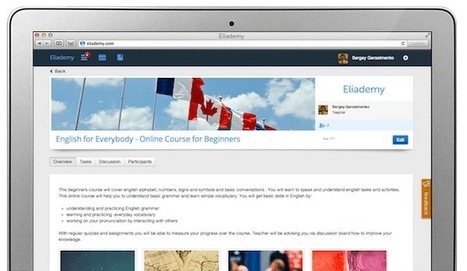
Eliademy support educators and students with free online classrooms that enable them to create, share and manage courses. Eliademy works for universities, colleges, coaches, trainers and their students. 
academiPad's curator insight,
April 12, 2013 11:30 AM
Eliademy could be your solution when you are looking to offer a course online, or maybe even only when you want to support your in-class activities with an online environment.
Scoop.it!
Education is only one element of e-safety, risk assessing is an important part of school governance particularly if you are looking at new technology. 
Graham Williamson's curator insight,
March 18, 2016 10:53 PM
I have scooped this topic as it relates to me, and the work I am engaged in. I have chosen this scoop to go over a little about me. I am employed as a safety advisor, I have worked in construction, underground mining and metals refining industry for around 30 years. Only the past 10 have been in a safety role working in construction of an underground mine, minerals smelting, minerals bulk storage transport and shipping and Minerals refining. Allot of my day to day activity’s in my current role involves facilitation in assessing risk for particular activity’s and processes.
Scoop.it!

Comparison of Evernote vs OneNote, going over the pros and cons of each in the following categories: Cost, Interface, Features, and Platforms. 
Susan's comment,
April 10, 2013 2:08 PM
I'm used to Evernote and like it more and more but I guess it's worth comparing the two!
Scoop.it!

Etoys is an educational tool for teaching children powerful ideas in compelling ways. Etoys is a media-rich authoring environment and visual programming system.
Scoop.it!
Ana Cristina Pratas's insight:
Scoop.it!

Students use mobile phones or voice recorders to deliver instructions that include phrasal verbs.
Scoop.it!
A brief overview of how to use the iPad for visual recording/notetaking. Includes things to consider when doing this; how this is different from traditional ... |










In Drafts, text comes first – open the app and get a new, blank draft. Don’t get bogged down in a timeline to tweet or post to Facebook and App.net. Don’t tap through multiple screens to compose an email or SMS. Don’t navigate folders, create files and name them just to jot down a note or create a todo. Drafts is available for both iPhone and iPad.