


SAT vocabulary word test and practice using Sadlier-Oxford Vocabulary Workshop to help at Vocab Test.com with SAT tests

 Your new post is loading...
 Scoop.it! SAT vocabulary word test and practice using Sadlier-Oxford Vocabulary Workshop to help at Vocab Test.com with SAT tests
Scoop.it!

Tracy Hanson's curator insight,
May 18, 2013 10:26 PM
Just learning how to do iBooks Aurthor so this should come in very handy!
Scoop.it!

The Following is a Featured Post by Glogster Ambassador Joli Barker. If you're interested in a Featured Post of your own, you can tweet us @GlogsterEDU, comment on this blog, or message us on Faceb...
Ana Cristina Pratas's insight:
Love Glogster! Don't you? 
GwynethJones's curator insight,
May 19, 2013 1:02 PM
I still want BLUE highlight circles rather than PI
Scoop.it!
Get Infomous on the App Store. See screenshots and ratings, and read customer reviews.
Scoop.it!

From
fastr

Add your own books in ePub format and read them in speed reading mode, add articles from the web and news to practice speed reading. Two reading modes and dropbox support provide an outstanding speed reading experience on iPad.
Scoop.it!

An extensive set of links regarding iPad implementations, the experiences of teachers and students with iPads in the classroom, scholarly articles, and reviews of iPad apps.
Ana Cristina Pratas's insight:
Apple iPad Education Sites
These are just some sites; John Larkin has an excellent compilation of papers and resources regarding teaching with iPads. 
Francisco Javier 's curator insight,
May 12, 2013 8:22 PM
Resources for the iPad - An Extensive Set of Links & Resources for iPad | @scoopit via @juandoming http://sco.lt/...
Scoop.it!

Provide books and quizzes to your students easily
Scoop.it!
Get Vocab Junkie on the App Store. See screenshots and ratings, and read customer reviews.
Ana Cristina Pratas's insight:
• Over 800 flashcards for some of the most useful yet difficult vocabulary words in the English language, complete with definitions, sample sentences, and synonyms
Scoop.it!

MobyMax is a completely integrated curriculum and teaching system with progress monitoring, goal setting, fluency practice, motivation tools, and much more.
Scoop.it!

Benettonplay! creative entertainment from FABRICA
Scoop.it!

From
fluency21
via Tech and Learning “You can have brilliant ideas, but if you can’t get them across, your ideas won’t get you anywhere.” – Lee Iacocca Brainstorming is an important process for any subject... |
Scoop.it!

academiPad's curator insight,
May 20, 2013 5:46 AM
I can see this as a useful tool for creating and sharing ad-hoc presentations in group work during class. 
PublishME's comment,
July 9, 2013 11:01 PM
We take care of working with groups in closed or open environments. Check out PublishME http://vimeo.com/68740723 http://www.publishmeapp.com
Scoop.it!

Apps for Class - Learning Apps for the Classroom
Ana Cristina Pratas's insight:
Mostly for young learners and K12. With some Tutorials included.
Scoop.it!

Oak is an app for outlining your ideas in plain text. It’s free, doesn’t require an account, because your outline is stored in your browser's local storage.
Scoop.it!
Ana Cristina Pratas's insight:
With thanks to Nic Peachey 
Nik Peachey's curator insight,
May 10, 2013 6:48 AM
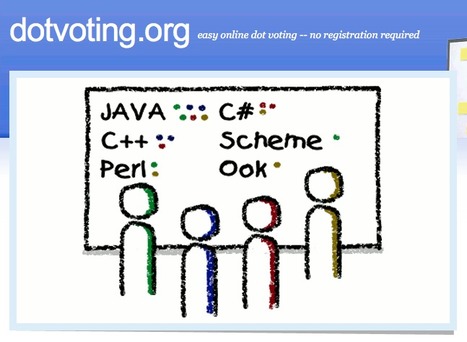
This is a very simple to use web based voting tool. Great way to get instant feedback during lessons or training sessions. It doesn't require any registration and can be set up on the fly in just a few minutes 
Leslie Buford's curator insight,
May 10, 2013 10:05 AM
The voting 'eggs' in the suitcase, where each needed to be programmed, are obsolete. Students and teachers can use their web devices to quickly set up polls and other interactive feedback quickly and easily with web based options, of which this is one of the simplest. For iPad users, check out NearPod, Socrative, or Doceri, each with its own feature ist, to see which works best for you! It can be difficult to move from traditonal modes of presentation to building interaction into instruction, but I am trying to plan future PD courses using this type of technology. I would love feedback from teachers and professional development specialists about what works, pitfalls to look out for, and any other resources that you may suggest. 
Alessandra's curator insight,
May 16, 2013 9:54 PM
This looks like a nice tool to collect your students' opinions. Thanks, Nick, for sharing.
Scoop.it!

From
edgalaxy
Google Docs has revolutionised the way we create and edit content on the web. 
Richard L. Edwards's curator insight,
May 11, 2013 11:01 AM
I'm a fan of Google Docs. I rely on these tools all the time, and like many great pieces of software, it has many more capabilities and tools than most people know about. This blog post is a good overview of some of the key functions that would be useful to almost any educator trying to do a collaborative project with students - I see Google Docs as a great tool for collaborative and constructivist pedagogies.
Scoop.it!

Articles and excerpts based on Reflect and Write: 270 Poems and Photographs to Inspire Writing by Elizabeth Guy and Hank Kellner. |









De très bons tests tous niveaux, interface simple et clair (pas de pubs) - bons exercices... adaptables en sur mesure pour des projets spécifiques.