




InfoActive lets you create and share interactive, visual stories.

 Your new post is loading...
 Scoop.it! InfoActive lets you create and share interactive, visual stories.
Scoop.it!
Get Who Am I? Race Awareness Game on the App Store. See screenshots and ratings, and read customer reviews.
Scoop.it!
Ana Cristina Pratas's insight:
Part computer game, part educational classroom tool, COOL SCHOOL: Where Peace Rules! is a whimsical interactive game where children, ages five to seven, journey to a whimsical world, where everything—from erasers to desks to books to basketballs—are alive and full of personality. At Cool School, you’ll find a vibrant game-like setting where children are taught invaluable social, communication, and problem-solving skills that promote conflict resolution through negotiation, compromise, cooperation, and reconciliation. 
Sofia Speranza's curator insight,
October 10, 2013 2:04 PM
Cool game for learning to avoid bulling and conflict at school
Scoop.it!

10 Google Drive Tips & Tricks For Students 
Josh Harris's curator insight,
October 9, 2013 2:29 PM
Esepcially good for folks who are in newly converted #GAFE districts, and in 1:1 settings. 
Alfredo Corell's curator insight,
October 12, 2013 8:09 AM
Like the tractor beam on the Death Star, the nebulous world of networked online storage is slowly pulling in all digital information. If you haven’t yet gotten on board, 2013′s Google Drive would be a perfect place for a college student to start, whether for educational purposes like collaborating on class projects, or storing all those Instagrams of your food. What follows are some of the coolest tips and tricks Drive users have found in the last few months and shared with the rest of us.
Scoop.it!

Credly is the universal way to recognize, share and celebrate achievement in any setting. Give and earn credit, credentials, or digital badges that matter. 
Ian Fairhurst's curator insight,
November 18, 2013 1:54 PM
Online Community Motivation and Rewards Systems - Give Credit Where Credit is Due
Ian Fairhurst's curator insight,
November 18, 2013 5:12 PM
Online Community Feedback, Motivation and Rewards Systems

Stephanie Sapp's curator insight,
January 11, 2015 9:51 PM
I like the idea of this. Maybe we will start a learning series at BBE to finish off the school year. Staff can earn badges for completing goals/objectives.
Scoop.it!
Ana Cristina Pratas's insight:
An alternative to Elluminate
Scoop.it!
Ana Cristina Pratas's insight:
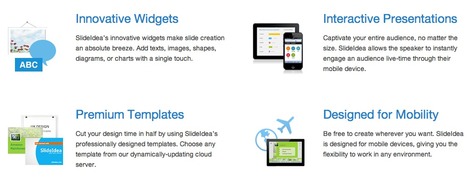
SlideIdea allows the speaker to instantly engage an audience live-time through their mobile device. Add texts, images, shapes, diagrams, or charts with a single touch. Includes templates to choose from as well. 
Gust MEES's curator insight,
January 16, 2014 8:42 AM
iPad tool: Impress your audience with SlideIdea’s audience interaction tools. 
Deborah Fillman's curator insight,
January 16, 2014 12:35 PM
Makes iPad even more useful. Impressive audience interaction tools.
Alfredo Corell's curator insight,
January 20, 2014 12:50 PM
audience could be engaged through direct interaction tools (polls or quizzes)
Scoop.it!
A demo on how the app Socrative works. Socrative can be used on the iPad, iPod Touch, or web. 
iCoachP's curator insight,
October 25, 2013 6:56 AM
Teachers you want to use this. It will make the Smart Response clickers obsolete.
Scoop.it!
If you have a tutorial request, please let us know in the comments section or by contacting us at http://dakinane.com and we will make your tutorial for free...
Scoop.it!

Free online Adobe Connect tutorial for teachers and students. TeacherTrainingVideos.com provides free step by step camtasia screencasts that take you through a whole range of ict and web2.0 tools
Ana Cristina Pratas's insight:
A great tutorial by Russell Stannard. |
Scoop.it!
Get Middle School Confidential 1: Be Confident in Who You Are on the App Store. See screenshots and ratings, and read customer reviews.
Scoop.it!

This free toolkit has the resources schools need to take an effective stand against cyberbullying.
Scoop.it!

nomusa keninda's curator insight,
October 8, 2013 9:13 AM
Google, this, that and that..google everything. 
silvermanmc's curator insight,
October 11, 2013 9:33 AM
A fun and appropriate technique for engaging and focusing primary school students using WWW.
Scoop.it!
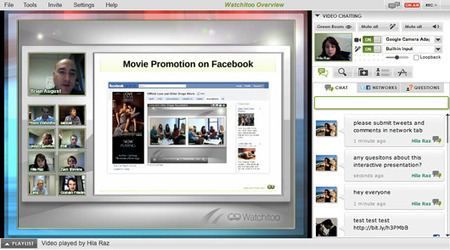
A screenshot from Watchitoo, an inventive and powerful new addition to the Web conferencing field.
Scoop.it!
Scoop.it!

Anita Vance's curator insight,
October 5, 2013 3:40 PM
learning to work together in new ways - good ideas!
Scoop.it!
Here's a tutorial on how to create an online rubric with Google Forms
Scoop.it!
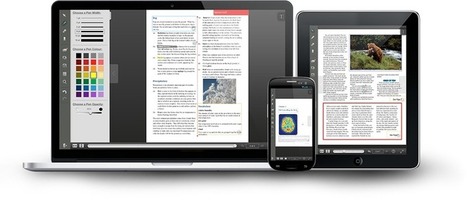
Interactive Textbook Software from Evident Point.
Ana Cristina Pratas's insight:
"Turn your vision into reality by creating your own version of an existing PDF or textbook. Give it a dynamic touch, jot down notes, add video/audio clips, and discuss materials with your readers within your interactive content. Use Active Textbook to learn, teach or simply share your documents online – it's easy! Best of all, Active Textbook is free and works on most devices!" |












"Infoactive" is a simple and interactive resource, suitable for both teachers and the upper primary student.
this enagaging website allows users to create andmost importantly share viual stories. It allows the audience/ the reader to explore their ideas through a collaboration of images, videos, audio and text.
perfect for the modern day classroom teacher, this website is sure to engage students by placing a fun, interesting and interactive vibe on a average lesson in the classroom.
Henry Cortez