Creating online content isn’t just for teachers that teach exclusively distance courses. Putting some course content online can be useful in any type of blended learning scenario, or even just to have the information available to in-person students for their use as they need it throughout the year. That said, putting your course content online …
Hi Ana, first of all thanks for all the interesting stuff you find and scoop. You are a treasure trove. I'd appreciate though a bit more vetting of your sources and their content as to avoid articles like these which do provide a set of tools names but include no links, references, screenshots or an omogeneous way to review them. On the surface and from the title it looks great, but as you dig into it, you leave with quite a different impression. Given you are my trusted guide on some of these, I'd love for you to be a bit more severe in your selections in spite of quantity of scoops.
Hi Robin, point taken! Sometimes I add posts in my curation so that I can return to them with more time, as was the case with this posting. There are a couple of sites I wanted to check but haven't had the time to yet.
We're a global community dedicated to teaching digital skills and web literacy. We explore, tinker and create together to build a web that's open and made by everyone.
-FREE FEATURES- Subtext is a digital reading program built for K12 classrooms. Read and collaborate with your classroom for free with these features: • Create Private Groups: to make it easy to share content with students, keep discussions closed and differentiate instruction. Archive groups to stay organized, without losing notes. • Embed Discussions: to help students engage with their reading. • Find Content: using our in-app book search or clip articles from the web with ‘Save to Subtext’. • Login Quickly: through top social networks and Renaissance Learning (™) accounts. • Read on Carts: to easily share devices while keeping student work separated. • Stay on Task: double finger tap on a page to get students to the same page instantly. • Read Offline: view and add discussions without internet access, they’ll sync when you connect. • Restrict Students: if desired, limit student access to the web, content, messages and groups. • Research: double-tap to look up any word in the dictionary or the Web. • Write: paste tagged passages or annotations into a Google Docs.
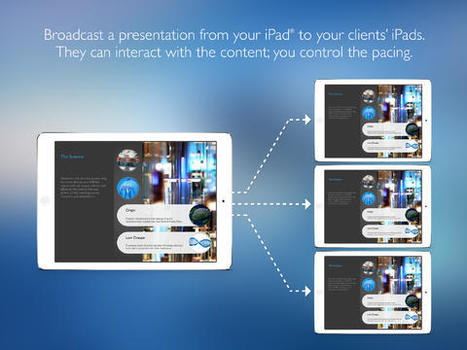
A TouchCast is a video that is fully browsable, responsive, and alive. Webpages, images, and an assembly of video Apps (vApps) can be tapped for a two-way video experience.
An iPad app designed to encourage creative writing as well as prompting narrative and opinion pieces. The app includes 125 interesting images and 375 text + voice prompts.
Play fun games to study for school subjects like math, science, and social studies tests. Review for english, economics, foreign language exams with free educational online games
TinyTap is the best way to create personalised games for kids on the iPad. TinyTap allows parents and their kids to turn the moments they share together into personal games. Free on the App Store.
Get Write-on Video - Explain, express, and share with your own words in storyboards or videos! on the App Store. See screenshots and ratings, and read customer reviews.
Need a getting started guide for Google Classroom? Help and support is on hand in this step-by-step tutorial for Google's new online learning platform for schools.
Smallpdf - the platform that makes it super easy to convert and edit all your PDF files. Solving all your PDF problems in one place - and yes, 100% free.
Free audience response system for up to 250 people, use it in 25 classes or presentations per year, use it for up to 100 questions per presentation, get automated reports.
Record audio or video of yourself giving a lecture. Write and draw directly in PowerPoint, just like you would on the whiteboard.
Work in PowerPoint.
Creating a mix is as simple as making a PowerPoint document. Just install our PowerPoint add-in, and then create lessons from your existing PowerPoint presentations or new ones.
To get content containing either thought or leadership enter:
To get content containing both thought and leadership enter:
To get content containing the expression thought leadership enter:
You can enter several keywords and you can refine them whenever you want. Our suggestion engine uses more signals but entering a few keywords here will rapidly give you great content to curate.


 Your new post is loading...















This new tool has some fascinating implications and capabilities but most important, it is fun! Check it out!