Your new post is loading...

|
Scooped by
nrip
September 23, 2013 2:15 PM
|
“There are two kinds of people in this world: the workers and the hustlers. The hustlers never work and the workers never hustle.”
Yes, I just quoted a line from “Cocktail.” It’s a movie that aligns well with the world of tech as we know it today. Being an entrepreneur today involves getting noticed in a hyper competitive environment — if you are not backed by Andreessen Horowitz or partnered with a celebrity investor like Ashton Kutcher, you are going to have to hustle to get noticed.
Nobody knows you, and they don’t know about your product. Where do you go from here?
If you’re building apps, that initial obstacle may seem especially steep. There are more than 900,000 apps in the Apple App Store and more than 850,000 apps available for Android. You have to smartly promote your app, otherwise you’re a drop in the ocean. When my co-founder and I built our own app, we knew we had to stand out. That’s why we took my 1973 Volkswagen bus, which happened to be orange, and drove 2,000 miles for six weeks, at an average of 55 miles per hour.
|
|
Scooped by
nrip
September 23, 2013 2:17 AM
|
Snapseed integration in Google+ photo editing isn’t just some fancy web programming; the implementation takes advantage of Google Chrome technologies that will help the browser continue to mature as a platform with apps of its own.
If you’ve edited photos on Google+ lately, you might have noticed some handy new tools. And if they look familiar, that’s because they’re part of Snapseed: A mobile app for iOS and Android that Google bought in 2012. The new editing tools offer a glimpse into Google’s ongoing Chrome strategy: Finding ways for web apps to have the power of traditional software for mobile devices and computers.
The Snapseed tools work offline, even though you access them through the browser. How’s that work? Two of Google’s main Chrome technologies — Packaged Apps and Native Client — are the answer. These allow apps to be more robust than traditional web apps and can even be written in non-web programming languages such as C and C++. By doing this, Google is taking advantage of Chrome’s large user base to boost web engagement.
|
|
Scooped by
nrip
September 20, 2013 10:53 PM
|
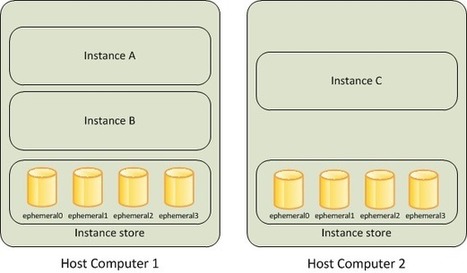
Each Amazon EC2 instance, unless it's a micro or M3 instance, can access storage from disks that are physically attached to the host computer. This disk storage is referred to asinstance store. Instance Storage Concepts An Amazon EC2 instance store provides temporary block-level storage for use with an Amazon EC2 instance. The size of an instance store ranges from 150 GiB to up to 48 TiB, and varies by instance type. Larger instance types have larger instance stores. For more information, see Instance Stores Available on Instance Types.
An instance store consists of one or more instance store volumes. Instance store volumes must be mounted before they can be used.
By default, instances launched from an Amazon EBS-backed instance have no mounted instance store volumes. Instances launched from an instance store-backed AMI have a mounted instance store volume for the virtual machine's root device volume, and can have other mounted instances store volumes, depending on the instance type. For more information about instance store-backed AMIs and Amazon EBS-backed AMIs, see Storage for the Root Device.
Instance store volumes are usable only from a single instance during its lifetime; they can't be detached and then attached to another instance. If you create an AMI from an instance, the data on its instance store volumes isn't preserved and isn't present on the instance store volumes for the instances that you launch from this AMI. While an instance store is dedicated to a particular instance, the disk subsystem is shared among instances on a host computer, as shown in the following figure.
|
|
Scooped by
nrip
September 16, 2013 3:30 AM
|
In this article I will show you how you can Run Ruby program and compile sources using Notepad++ and how to configure Notepad++ to edit Ruby programs.
Notepad++ is for sure one of the most popular text editing software of the present and in this post I will show you how you can use it to run Ruby program and compile sources. It is preferred by most of the programmers and software & web developers due to an extended use over different platforms and its capability to offer features like syntax highlighting for most programming languages. It can also be configured to run external tools such as Java, Ruby or C++ source files.
|
|
Scooped by
nrip
September 12, 2013 4:06 AM
|
CompuLab's soon-to-be-released inexpensive ARM-powered Utlite PC can run Android or Ubuntu.
Cheap, low-end PCs -- such as the Raspberry Pi and Parallella -- have become quite popular with do-it-yourself fans. Now, CompuLab, an Israeli computer OEM, is throwing its hat into the ring with its $99 Utilite mini-PC, which might also serve businesses well. Unlike the $25 bare-bones Raspberry Pi PC, the Utilite will come in a paperback-book sized, 5.3-inch × 3.9-inch × 0.8-inch container. It also boasts far more processing power. The Utilite, which will start shipping in August, is powered by a Freescale i.MX6 system-on-chip with a single, dual, or quad-core ARM Cortex-A9 processor running up to speeds of 1.2GHz.
This miniature computer can hold up to 4GBs of Double data rate synchronous dynamic random-access memory DDR3 RAM. For storage it can come with up to a 512GB mini-Serial ATA, Solid-State Drive (SSD). The front-panel micro-SD socket supports Secure Digital extended Capacity (SDXC) cards with up to 128GBs of room.
For video output, the Utilite uses High-Definition Multimedia Interface (HDMI) 1.4 and a second Digital Video Interface-Digital (DVI-D) port. Both display outputs support resolutions up to 1920 x 1200 and can be operated in dual-head mode. 5.1 channels audio is available through HDMI and through Sony/Philips Digital Interconnect Format (S/PDIF). In addition there are standard 3.5mm jacks for stereo line-out and line-in.
To connect it with your network and other devices, the Utilite comes with a pair of Gigabit Ethernet ports and built-in 802.11n Wi-Fi and Bluetooth. It includes four USB 2.0 ports: two on the back and two on the front. It also has a mini RS232 connector.
Users will have their choice of Android or Ubuntu Linux for their operating system. CompuLab has experience in delivering Linux-based systems with its Mint-based MintBox line. No further operating system details are available at this time.
|
|
Scooped by
nrip
September 11, 2013 1:37 PM
|
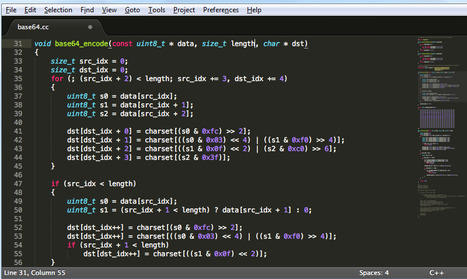
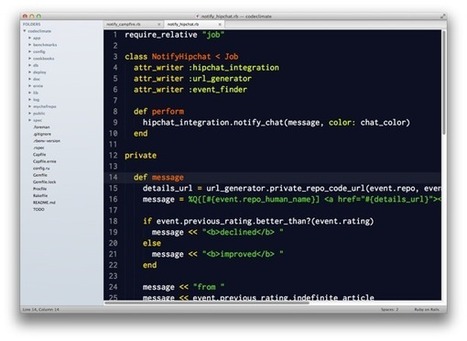
Setting up Sublime Text 2 (or the new Beta Release of version 3) as the default editor used by Git is not overly challenging, but not necessarily obvious either. Really, we're still simply setting up the .gitconfig file with a path to sublime text. However, given that there is not, presently, a standard installation directory for Sublime Text, we first need to know where to point our .gitconfig file. Also, there are some non-obvious flags which need to be set as part of the configuration, or Sublime Text will not work properly as the Git editor.
Tell Git Where Sublime Text Lives To set the default editor in our .gitconfig file from the terminal, we can use the following command: $ git config --global core.editor "subl -n -w" Notice the –n and –w flags at the end? These arguments are passed to Sublime Text, and essentially tell it to run without loading any previously open windows (the –n flag), and to wait until the user exits to pass execution back to the calling process (the –w flag, for "wait"). In this case, the calling process is Git. Trouble Shooting If the above doesn't work for you, then you may not have the alias or Bash script in your /usr/bin/ directory, or you may have installed Sublime Text to a different directory altogether. In this case, the command is the same, but you need to change it to include either the script name you chase, or the the full-path to Sublime Text itself: $ git config --global code.editor " <Full Path or Script> -n -w" Of course, you can always open the .gitconfig file in Sublime Text itself (or any other editor on your system), and edit the file directly, but if you are learning Linux, where's the fun in THAT?
|
|
Scooped by
nrip
August 19, 2013 7:23 AM
|
ecently, something remarkable happened on Twitter: On Saturday, August 3 in Japan, people watched an airing ofCastle in the Sky, and at one moment they took to Twitter so much that we hit a one-second peak of 143,199 Tweets per second. (August 2 at 7:21:50 PDT; August 3 at 11:21:50 JST)
To give you some context of how that compares to typical numbers, we normally take in more than 500 million Tweets a day which means about 5,700 Tweets a second, on average. This particular spike was around 25 times greater than our steady state.
During this spike, our users didn’t experience a blip on Twitter. That’s one of our goals: to make sure Twitter is always available no matter what is happening around the world.
This goal felt unattainable three years ago, when the 2010 World Cup put Twitter squarely in the center of a real-time, global conversation. The influx of Tweets –– from every shot on goal, penalty kick and yellow or red card –– repeatedly took its toll and made Twitter unavailable for short periods of time. Engineering worked throughout the nights during this time, desperately trying to find and implement order-of-magnitudes of efficiency gains. Unfortunately, those gains were quickly swamped by Twitter’s rapid growth, and engineering had started to run out of low-hanging fruit to fix.
After that experience, we determined we needed to step back. We then determined we needed to re-architect the site to support the continued growth of Twitter and to keep it running smoothly. Since then we’ve worked hard to make sure that the service is resilient to the world’s impulses. We’re now able to withstand events like Castle in the Sky viewings, the Super Bowl, and the global New Year’s Eve celebration. This re-architecture has not only made the service more resilient when traffic spikes to record highs, but also provides a more flexible platform on which to build more features faster, including synchronizing direct messages across devices, Twitter cards that allow Tweets to become richer and contain more content, and a rich search experience that includes stories and users. And more features are coming.
|
|
Scooped by
nrip
July 19, 2013 5:14 AM
|
For years, developers asked Google to enable PHP on App Engine. In May, Google finally relented, and the most-requested language for Google App Engine is becoming one of the most popular languages on Google cloud offerings. This makes a lot of sense. After all, with over five million developers, PHP is the most-used language on the web. In addition, according to Google, PHP runs a staggering 75 percent of the web. That made it a no-brainer to add in addition to Python, Google’s language of choice. If Google wants to compete with the big boys of cloud — such as Amazon and Microsoft’s Azure — PHP is a necessity.
|
|
Scooped by
nrip
May 2, 2013 3:45 PM
|
One of the hurdles that new Python developers have to get over is understanding the Python packaging ecosystem. This blog post is based on material covered in our Python for Programmers training course, which attempts to explain pip and virtualenv for new Python users. pip Let's dive in. pip is a tool for installing Python packages from the Python Package Index. PyPI (which you'll occasionally see referred to as The Cheeseshop) is a repository for open-source third-party Python packages. It's similar to RubyGems in the Ruby world, PHP's Packagist, CPAN for Perl, and NPM for Node.js. Python actually has another, more primitive, package manager calledeasy_install, which is installed automatically when you install Python itself. pip is vastly superior to easy_install for lots of reasons, and so should generally be used instead.
|
|
Scooped by
nrip
April 29, 2013 8:24 AM
|
Git is being widely adopted in companies for its ability to drive agility and innovation for leading-edge mobile, social and cloud-based applications. More Than 40 Percent Use Git Originally created by Linux creator Linus Torvalds, Git is a free and open source distributed version control system “designed to handle everything from small to very large projects with speed and efficiency,” in theproject's own words. Not only that, but it's fast and easy to learn, and it offers a diminutive footprint. Written in C, Git was built to work on the Linux kernel and was designed with speed and performance in mind. Today, all the many advantages that have long made the system appealing to independent developers are apparently attracting enterprises as well. This April marks both the eighth anniversary of Git and the fifth anniversary of GitHub, so it should come as no great surprise that the distributed revision control and source code management (SCM) system has been the focus of extra attention this month. Case in point: Enterprise cloud development firm CollabNet recently announced the results of what it calls the first major industry survey on Git adoption in the enterprise. In a nutshell, the survey found that Git is being widely adopted in companies for its ability to drive agility and innovation for leading-edge mobile, social and cloud-based applications.
|
|
Scooped by
nrip
April 29, 2013 8:12 AM
|
Windows Azure Web Sites provide a nice selection of ways to deploy a site from source code. You can deploy from: a local git repositorya TFS projecta git project on GitHuba git or Mercurial project on Bitbucketa git or Mercurial project on CodePlexcode in a Dropbox folder One thing that all these approaches have in common is that you own the code. e.g. in the GitHub case, you must be an admin on the project. The reason is that Azure needs to set up a hook in the project to enable continuous deployment, and only project owners can do that.
|
|
Scooped by
nrip
April 23, 2013 5:00 PM
|
When you run a normal Python program, the program execution starts at the first line and goes down line by line. Loops and function calls may cause the program execution to jump around, but it is fairly easy to see from the code which line will get executed next at any given point. You can put your finger on the first line of code in the .py file on the screen, and then trace through the next lines of code that are executed. This is single-threaded programming. However, using multiple threads is like putting a second finger down on your code. Each finger still moves the same way, but now they are executing code simultaneously. Actually, they aren’t executing simultaneously. Your two fingers are taking turns at which one executes code. Computers with multicore CPUs can actually run multiple instructions simultaneously, but there is a feature of Python programs called the GIL (Global Interpreter Lock) that limits a Python program to one core only. The Python interpreter will run one thread for a while, and then pause it to run another thread for a while. But it does this so fast that it seems like they are running simultaneously. You can start dozens or hundreds of threads in your program (that’s a lot of fingers). This doesn’t automatically make your programs dozens or hundreds of times faster though (all the threads are still sharing the same CPU) but it can make your program more efficient. For example, say you write a function that will download a file full of names, then sorts the names, and then writes these names to a file on your computer. If there are hundreds of files your program needs to process, you would put a call to this function in a loop and it would handle each file serially: download, sort, write, download, sort, write, download, sort, write… Each of these three steps use different resources on your computer: downloading uses the network connection, sorting uses the CPU, writing the file uses the hard drive. Also, there are tiny pauses within each of these steps. For example, the server you are downloading the file from may be slow and your computer’s Internet connection has bandwidth to spare. It would be better if you could call this function hundreds of times in parallel by using one thread for each file. Not only would this make better use of your bandwidth, but if some files download sooner than others, the CPU can be used to sort them while the network connection continues to work. This makes more efficient use of your computer. What makes multithreaded programming tricky? Of course, in the above case, each thread is doing its own separate thing and doesn’t need to communicate or synchronize anything with the other threads. You could just write the simple single-threaded version of the download-sort-write program and run the program hundreds of times separately. (Though it might be a pain to type & click each time to run the program each with a different file to download.) Many multithreaded programs share access to the same variables, but this is where things can get tricky.
|
|
Scooped by
nrip
April 20, 2013 12:22 AM
|
Reflection is generally defined as a program’s ability to inspect itself and modify its logic at execution time. In less technical terms, reflection is asking an object to tell you about its properties and methods, and altering those members (even private ones). In this lesson, we’ll dig into how this is accomplished, and when it might prove useful. At the dawn of the age of programming, there was the assembly language. A program written in assembly resides on physical registers inside the computer. Its composition, methods and values could be inspected at any time by reading the registers. Even more, you could alter the program while it was running by simply modifying those registers. It required some intimate knowledge about the running program, but it was inherently reflective. As higher-level programming languages (like C) came along, this reflectivity faded and disappeared. It was later re-introduced with object-oriented programming. Today, most programming languages can use reflection. Statically typed languages, such as Java, have little to no problems with reflection. What I find interesting, however, is that any dynamically-typed language (like PHP or Ruby) is heavily based on reflection. Without the concept of reflection, duck-typing would most likely be impossible to implement. When you send one object to another (a parameter, for example), the receiving object has no way of knowing the structure and type of that object. All it can do is use reflection to identify the methods that can and cannot be called on the received object.
|
|
|
Scooped by
nrip
September 23, 2013 6:29 AM
|
Glass works two ways, either by issuing verbal commands or touching and swiping on the right side of the headset.
Glass’s voice recognition was very good — much better than Siri. Quiet environments better suit the verbal commands than do crowded areas, though. In the right conditions, using voice commands and texting are great. If not, using the swipe navigation provides a solid alternative. Imagine if you’re running late for a meeting – the Glass user can simply dictate the command “OK Glass, send a message to [recipient]. I’m running late, see you soon.” As soon as they respond, you receive their response complete with their Google Plus profile image.
This feature makes inbound messages more personal, while not distracting from the task at hand. Of course, this is never something to try while driving.
Glass’ amazing responsiveness allows you to send text messages verbally, answer phone calls, navigate a new city, and even learn basic phrases in a foreign language without having to pull out your smart phone and engage an application. The images and text appear before your eyes without interrupting conversation or walking. Perhaps my favorite feature is the projected maps in unfamiliar territory — without local knowledge of a neighborhood, you can instantly find your way.
For activities such as composing longer messages or emails, playing immersive games, or composing documents, a smartphone or tablet will still be the best solution. In this way, Glass is to your smart device what a mobile gadget has become to a laptop — it doesn’t replace the device, but rather enhances the experience it provides and makes technology fit even more seamlessly with day-to-day life.
|
|
Scooped by
nrip
September 21, 2013 12:29 AM
|
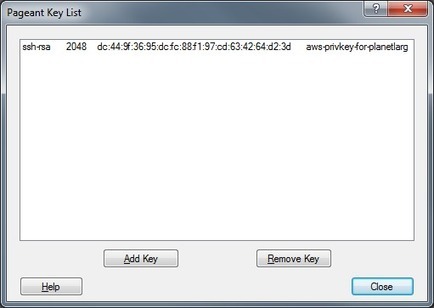
Nick Hardiman shows you how to set up a secure connection to an Amazon EC2 machine using PuTTY and Pageant to handle your private key.
Contents:
Install PuTTY
Copy from the PEM file to a PPK file using PuTTYgen.
Load the PPK file into Pageant, the SSH authentication agent
|
|
Scooped by
nrip
September 16, 2013 3:32 AM
|
Why Sublime Text 2?
Speed. It’s got the responsiveness of Vim/Emacs but in a full GUI environment. It doesn’t freeze/beachball. No need to install a special plugin just to have a workable “Find In Project” solution.
Polish. Some examples: Quit with one keystroke and windows and unsaved buffers are retained when you restart. Searching for files by name includes fuzzy matching and directory names. Whitespace is trimmed and newlines are added at the end of files. Configuration changes are applied instantly.
Split screen. I never felt like I missed this that much with TextMate, but I really appreciate it now. It’s ideal for having a class and unit test side-by-side on a 27-inch monitor.
Extensibility. The Python API is great for easily building your own extensions. There’s lots of example code in the wild to learn from. (More about this later.) ST2 support TextMate snippets and themes out-of-the-box.
Great for pair programming. TextMate people feel right at home. Vim users can use Vintage mode. When pairing with Vim users, they use command mode when they are driving. I just switch out of command mode and everything “just works”. (It also works on Linux, if that’s your thing.)
Updates. This is mainly just a knock on TextMate, but it’s comforting to see new dev builds pushed every couple weeks. The author also seems to be quite responsive in the user community. A build already shipped with support for retina displays, which I believe is scheduled for a TextMate release in 2014.
|
|
Scooped by
nrip
September 12, 2013 1:27 PM
|
Coder is a free, open source project that turns a Raspberry Pi into a simple platform that educators and parents can use to teach the basics of building for the web. New coders can craft small projects in HTML, CSS, and Javascript, right from the web browser.
Getting to Know Coder. Coder is designed for creating, editing, and running simple web apps. Coder apps are built using the standard building blocks of the web (HTML, CSS, and Javascript), and they can be crafted directly in your web browser.
Your Coder's landing page contains all of your apps, organized by most recent. You can create new apps by clicking the Green '+' app in the top left. The gear in the top right opens your Coder's settings where you can change things like your name, password, wireless settings, and more.
|
|
Scooped by
nrip
September 11, 2013 6:24 PM
|
Although the security concerns are now over two years old, Imperva has called for the removal of one of PHP's features that could allow attackers to take over servers.
Research company Imperva is calling for the removal of a feature in PHP, citing that it opens the door for attackers to turn servers across the globe into their own botnet army.
In a report (PDF), the company takes particular issue with the use of PHP's "SuperGlobal" parameters and how they can be abused. The vulnerability described in the report is not particularly new, and requires chaining together vulnerabilities CVE-2011-2505 and CVE-2010-3065 in order to execute arbitrary code on a server, with CVE-2011-2505 first disclosed in July 2011 and CVE-2010-3065 in August 2010. Combined, they allow attackers to modify the SESSION SuperGlobal variable, and write data to a local file on the server. This file will be later parsed and executed by PhpMyAdmin, a popular web-based tool used to manage MySQL databases, allowing the attacker to execute any code they wish.
However, the company considers the use of SuperGlobal parameters, which enable both vulnerabilities, to be overpowered, and is advocating for their removal.
"SuperGlobal parameters in requests should be blocked — since there is no reason for these parameters to be present in requests, they should be banned," the report says.
|
|
Scooped by
nrip
September 6, 2013 3:44 PM
|
Five years after it shook up the Web with its unexpected debut, Chrome gambles again as it takes the Web offline with its new 'packaged apps.'
What's a Chrome App?
"This is the way to deliver native apps for Chrome OS," said Erik Kay, Chrome's engineering director who's worked on the browser since before it launched.
Some of the more notable apps that are available include Pixlr Touch Up for lightweight photo editing; Wunderlist and Google Keep for to-do list management; and games like Spelunky and Tank Riders
In many ways, Kay explained, the new apps are a mashup between native code and browser development.
The new apps are available offline, have access to lower-level system resources such as Bluetooth and USB, and can interact with digital cameras and other peripherals, which Web sites can't really do yet. The apps auto-update and leverage Chrome's sandboxing for security, offer syncing and in-app payments like cloud apps and mobile apps, and can display desktop notifications. But developers are freed from the design constraints imposed by the browser, said Kay.
"[A Chrome App] has full control over its appearance, down to how it interacts with the system," he said. That means that developers aren't dependent on the browser's chrome, its interface, for how the app looks, and can develop apps that look more like mobile apps. .
|
|
Scooped by
nrip
August 1, 2013 4:35 PM
|
Nothing is hotter right now than developer tools. More individuals are learning to code, and companies are hiring the best of them to build new cloud and mobile apps. Hackers and investors alike are beginning to figure out that whoever makes the best tools stands to make a huge amount of money. With this list, we’ll name and keep track of 10 cloud-based, XaaS (everything as a service) companies that boast not only innovative products but also market momentum, cross-platform capabilities, and a forward-looking vision. These might not be the most popular, most commonly used services — heck, some of these names might be totally new to you. But that’s part of what VentureBeat does: We try to bring you new tools to try out before they blow up and become hugely popular. Google Cloud PlaygroundNew RelicAdobe Edge & Creative CloudParseGitHubHerokuMicrosoft AzureJoyentKinveyUrban Airship
|
|
Scooped by
nrip
May 2, 2013 3:51 PM
|
WebRTC is a proposed standard — currently being refined by the W3C — with the goal of providing a web-based set of tools that any device can use to share audio, video and data in real time. It’s still in the early stages, but WebRTC has the potential to supplant Skype, Flash and many native apps with web-based alternatives that work on any device. It’s still going to be some time before WebRTC technology starts to deliver cool apps, but even today developers are quickly moving from the realm of cool WebRTC experiments, like the Mozilla/Google phone call demo, to useful apps like Codassium.
|
|
Scooped by
nrip
May 1, 2013 1:04 AM
|
Windows 8 introduced a new type of application set named “Windows 8 Store app” which has a new look & feel (earlier named as “Metro UI”). Developers can host & sell these WinRT apps from Windows Store, a new digital platform from Microsoft. Windows Store will allow both free and paid applications where the ranges may vary from $1.49 to $999.99 in case of paid version.
If you are a Visual C#, Visual Basic, Visual C++ and/or JavaScript application developer, you can build applications for Windows 8 Store using any one of those languages. I have started building a Tutorial series on WinRT (Windows 8 Store) application development using Visual C#, XAML templates.
Based on readers feedback, I built this page listing all the chapters of this tutorial series and will continue updating this page with the coming chapters of the tutorial. Start learning this new technology and build applications for Windows Store.
|
|
Scooped by
nrip
April 29, 2013 8:21 AM
|
Chrome’s experimental Canary channel and Safari’s WebKit nightly builds both now support all of the Photoshop-inspired blend modes for CSS Shaders, part of Adobe’s effort to bring Photoshop-style filter tools to the web. To see the new blend modes in action, grab a copy of the latest Chrome Canary or WebKit nightly builds, enable the CSS Shaders option in about:flags and point your browser to Adobe’s sample code over on Codepen. Previously, CSS Shaders required a special build of WebKit [Update: As Adobe's Alan Greenblatt points out in the comments, CSS shader support has been in Chrome stable since v25 (you still need to enable the flag). But if you want to play around with these new blend modes then you'll need Canary (or a WebKit nightly).] The new blend mode support is part of Adobe’s CSS Shaders proposal, which recently became part of the W3C’s CSS Filter Effects specification. There are two types of shaders in the spec, CSS fragment shaders, which provide features similar to what Photoshop’s blending modes offer, and CSS vertex shaders, which handle the 3D animation filters we’ve showcased in the past. The blending modes currently available include all the familiar options you’ll find in Adobe Photoshop, such as multiply, screen, overlay, luminosity and other photographer favorites. For more details and links to the corresponding specs, be sure to check out this post from Max Vujovic, who is working on the CSS Filters implementation in WebKit and Blink.
|
|
Scooped by
nrip
April 23, 2013 5:03 PM
|
The popular jQuery JavaScript library has hit a major milestone with the release of jQuery 2.0. The 2.0 release is some 12 percent smaller than its predecessor, but the big news is that jQuery 2.0 drops support for Internet Explorer 6, 7 and 8. Created to simplify the process of writing JavaScript and manipulating HTML, jQuery began life a mere seven years ago, but quickly found favor with developers sick of dealing with cross-browser JavaScript hassles. According to onesurvey published last year, jQuery turns up on roughly half of all sites on the web. Will dropping support for older versions of IE change that? Probably not. If your site needs to maintain support for IE 8 and below (or even IE 9 and 10 running in compatibility mode) you’ll just need to stick with jQuery 1.9 or below. “jQuery 2.0 is intended for the modern web,” writes jQuery’s Dave Methvin on the Query Foundation website. “We’ve got jQuery 1.x to handle older browsers and fully expect to support it for several more years.” If you want the best of both worlds you can use a conditional comment to serve 2.0 to newer browsers and 1.9 to older ones, but the far easier way to go is sticking with jQuery 1.x. For now at least the primary use case for the 2.0 line is situations where IE support isn’t a consideration — think Chrome or Firefox add-ons, PhoneGap apps or node.js.
|
|
Scooped by
nrip
April 20, 2013 6:04 AM
|
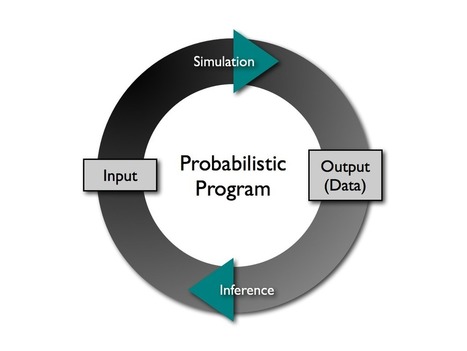
A probabilistic programming language is a high-level language that makes it easy for a developer to define probability models and then “solve” these models automatically. These languages incorporate random events as primitives and their runtime environment handles inference. Now, it is a matter of programming that enables a clean separation between modeling and inference. This can vastly reduce the time and effort associated with implementing new models and understanding data. Just as high-level programming languages transformed developer productivity by abstracting away the details of the processor and memory architecture, probabilistic languages promise to free the developer from the complexities of high-performance probabilistic inference.
|