


This project is the result of Wal-Mart check-out lane impulse purchase of Pocket size Etch A Sketch for $3.99.
Two stepper motors drive Etch A Sketch...

 Your new post is loading...
 Scoop.it! This project is the result of Wal-Mart check-out lane impulse purchase of Pocket size Etch A Sketch for $3.99. 
No comment yet.
Sign up to comment
Scoop.it!
Dan and Paul are with us today to show us the basic setups and workings of several different models of arduino processors.
Scoop.it!

Let your Arduino project deliver realtime notes to your iPhone or Mac with our iSticky/Arduino library!
Scoop.it!

After making so many Arduino prototypes on a breadboard, I decide to make something useful that everyone in the house can use. What is more useful that a digital clock as the year 2010 is coming to an end. I starter doing my research on making a digital clock and gathering the components needed to make one. One of the criteria is that all the components must be easily available locally in Kuala Lumpur, Malaysia. Visually, it looks like those countdown timer bomb found on old movies where the hero needs to cut some wires to deactivate the bomb.
Scoop.it!
Small step by step guide on how to use the PWM (Pulse Width Modulation) of the Arduino board. The video includes the components needed and an easy to follow ...
Scoop.it!

So, I get two or three emails a day, all basically asking the same thing: "Where can I learn about electronics?" In general, most of these people have seen some of my projects and want to be able to build similar things. Unfortunately, I have never been able to point them to a good site that really takes the reader through a solid introduction to microcontrollers and basic electronics.
Scoop.it!

Unless you're lucky enough to have a yard for a garden, you might have to settle for growing alfalfa sprouts, unless you use some high-tech tools for your indoor gardening efforts.
Scoop.it!
We seek to empower students and learners to take an active role in the development of technology which will benefit us all.
Scoop.it!

It’s a solid fact that there are quite a few variations on the typical Arduino Uno-compatible board. You can get them with onboard wireless, GSM, Zigbee and more – however all with their own issues and specific purposes. But what if you wanted a board that was physically and electrically compatible with an Arduino Uno – but with much more SRAM, more EEPROM, more flash, more speed – and then some? Well that (hopefully) will be a possibility with the introduction of the “Goldilocks” board on Pozible by Phillip Stevens.
Scoop.it!

With this post we wanted to compare the latest arrived boards in the world of hobbyists electronics with devices that were already on the market. We highlighted the pros and cons of the most prominent alternatives with the aim of helping our readers to choose the one better fitting with their requirements. Here’s the list of platforms we took in consideration: - Arduino Uno - Arduino Due - MBED - Discovery - Rasperry PI - Android based Mini PCs
Scoop.it!

In this post we present the design of a scale that connects to the Internet and automatically sends weight info on a Google Document.
Scoop.it!

This project is about upgrading a plush toy to give it the ability to sing when baby presses its belly.
|
Scoop.it!

I've currently managed to get my LED to cycle through 8 colors that I've selected. Everything is working correctly, except that I want to go for a more natural feel, and would like to fade / transition from one color to the next, ...
Scoop.it!

The Serial Peripheral Interface a.k.a SPI or four-wire serial interface is a full-duplex serial data protocol used by microcontrollers for communicating with one or more peripheral devices.
Scoop.it!

Open-source hardware project shrinks Arduino, adds wireless, creates awesome.
Scoop.it!
In this tutorial, we will learn to wirelessly control an Arduino with an iPhone/iPod/iPad in less than a few minutes. To make things easy, we will simply control an LED with an iPhone for now. Later, you can extend it to control anything you want...
Scoop.it!

This was the next logical step in my home monitoring project. I've simply added an LM335A temperature sensor to the breadboard and have the output being posted to the LCD every second. Firs...
Scoop.it!

From
arduino

Some days ago Arduino launched a new product, the Arduino Gsm Shield, together with an intro video explaining how to make the first steps into the creation of interaction with it.
Scoop.it!
A basic tutorial on how to connect a hobby servo to an Arduino and then how to use a FlexiForce Pressure Sensor to have the servo move based on pressure appl...

Mohamed Ahmed Abdelalim's comment,
March 22, 2013 8:46 PM
I am a bargainer At Arduino and i am working On Car Robot with 4 Dc Motors :) can you help me with a code or Any video Eng_mohamed.abdelalim@ymail.com

Axel's comment,
March 23, 2013 10:24 AM
Here are a few interesting tutorials:
Simple RC car for beginners: http://sco.lt/9Khm09 Ardusumo: an Open Source Platform for Robots: http://sco.lt/726Hc9 Wireless Robotics Platform with XBee Remote Control: http://sco.lt/8PHGYD Happy coding !
Scoop.it!

LEDs are great. But with any project there comes a point where flashing is simply not enough. For these cases an RGB (Red, Green, BLue) LED is the ans... Via Kalani Kirk Hausman
Scoop.it!

From
arduino
Bleuette project is hexapod robot equipped with 6 legs that can be operated without any external guidance.
Scoop.it!

Time for another instalment in my highly-irregular series of irregular clock projects. In this we have “Clock Four” – a scrolling text clock. After examining some Freetronics Dot Matrix Displays in the stock, it occurred to me that it would be neat to display the time as it was spoken (or close to it) – and thus this the clock was born. It is a quick project – we give you enough to get going with the hardware and sketch, and then you can take it further to suit your needs.
Scoop.it!
Worlds first wireless coin-sized Arduino compatible open-source micro-computer that talks to your iPhone using Bluetooth 4.0 Low Energy
Scoop.it!
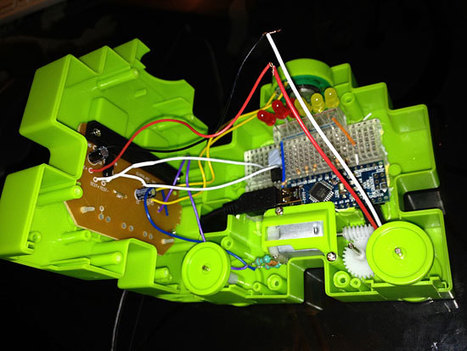
I decided to turn it into an ambient device, connected to the internet and capable of alerting me when things happen. Right now I’ve got it firing up with a new message arrives in my Gmail inbox, but really it could do anything – flag up Twitter replies, indicate the chance of rain or even, paired with one of my previous projects, act as an additional ringer for the doorbell. I’ve added a row of LEDs (three red, three yellow) to give it some more feedback options.
|





