21st Century Learning and Teaching
792.3K views | +97 today
21st Century Learning and Teaching
Related articles to 21st Century Learning and Teaching as also tools...
Curated by Gust MEES
Your new post is loading...

Popular Tags

Current selected tag: 'makered'. Clear
Scooped by Gust MEES
June 23, 2018 7:54 PM
Scoop.it!

Guide for OLED display with Arduino | #Coding #Maker #MakerED #MakerSpaces

Guide for OLED display with Arduino | #Coding #Maker #MakerED #MakerSpaces | 21st Century Learning and Teaching | Scoop.it

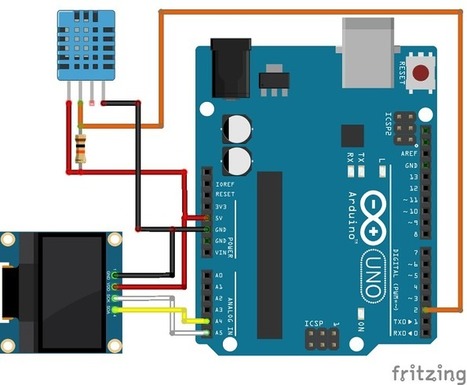
This post is about how to use the 0.96 inch OLED display with the Arduino. It includes schematics and code It is a very small display, the screen has 25mmx14mm...


Learn more / En savoir plus / Mehr erfahren:


https://www.scoop.it/t/21st-century-learning-and-teaching/?&tag=ARDUINO


https://www.scoop.it/t/21st-century-learning-and-teaching/?&tag=OLED


Gust MEES's insight:

This post is about how to use the 0.96 inch OLED display with the Arduino. It includes schematics and code It is a very small display, the screen has 25mmx14mm...


Learn more / En savoir plus / Mehr erfahren:


https://www.scoop.it/t/21st-century-learning-and-teaching/?&tag=ARDUINO


https://www.scoop.it/t/21st-century-learning-and-teaching/?&tag=OLED


No comment yet.
Scooped by Gust MEES
June 18, 2018 1:09 PM
Scoop.it!

Arduino-OLED-Clock/Arduino-OLED-Clock using ADAfruit libraries.ino at master · rydepier/Arduino-OLED-Clock ·

Arduino-OLED-Clock/Arduino-OLED-Clock using ADAfruit libraries.ino at master · rydepier/Arduino-OLED-Clock · | 21st Century Learning and Teaching | Scoop.it

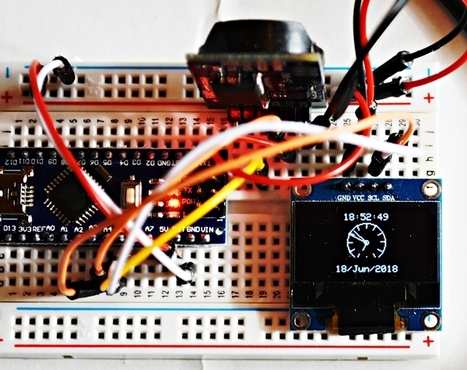
Arduino-OLED-Clock


Learn more / En savoir plus / Mehr erfahren:


https://www.scoop.it/t/21st-century-learning-and-teaching/?&tag=ARDUINO


https://www.scoop.it/t/21st-century-learning-and-teaching/?&tag=OLED


Gust MEES's insight:

Arduino-OLED-Clock


Learn more / En savoir plus / Mehr erfahren:


https://www.scoop.it/t/21st-century-learning-and-teaching/?&tag=ARDUINO


https://www.scoop.it/t/21st-century-learning-and-teaching/?&tag=OLED


No comment yet.
Scooped by Gust MEES
June 13, 2018 3:32 PM
Scoop.it!

First Steps with the #Arduino-UNO R3 | #Maker, #MakerED, #MakerSpaces, #Coding | #Badge with 2.8″ TFT Touch Screen with #SDCard | #LEARNingByDoing with #FUN

First Steps with the #Arduino-UNO R3 | #Maker, #MakerED, #MakerSpaces, #Coding | #Badge with 2.8″ TFT Touch Screen with #SDCard | #LEARNingByDoing with #FUN | 21st Century Learning and Teaching | Scoop.it

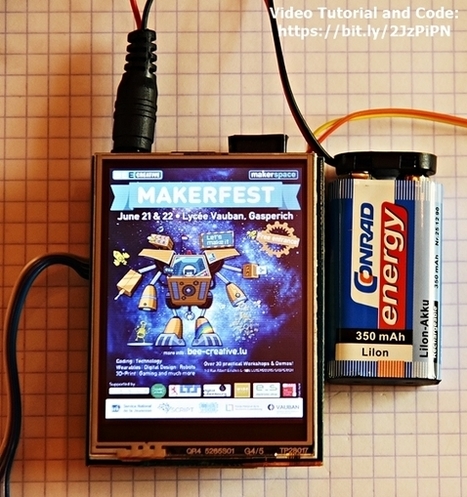
We were already playing around with a 2.8 inch TFT Display and SDCard recently in a previous tutorial <===> First Steps with the Arduino-UNO R3 | Maker, MakerED, Coding | 2.8″ TFT Touch Screen with SDCard <===> and we will create a badge. 


Learn more / En savoir plus / Mehr erfahren:


https://www.scoop.it/t/21st-century-learning-and-teaching/?&tag=ARDUINO


Gust MEES's insight:

We were already playing around with a 2.8 inch TFT Display and SDCard recently in a previous tutorial <===> First Steps with the Arduino-UNO R3 | Maker, MakerED, Coding | 2.8″ TFT Touch Screen with SDCard <===> and we will create a badge. 


Learn more / En savoir plus / Mehr erfahren:


https://www.scoop.it/t/21st-century-learning-and-teaching/?&tag=ARDUINO


No comment yet.
Scooped by Gust MEES
June 10, 2018 12:28 PM
Scoop.it!

IoT Made Simple: Servo Control With NodeMCU and Blynk | #Coding #ESP8266 #Maker #MakerED #MakerSpaces #Apps

IoT Made Simple: Servo Control With NodeMCU and Blynk | #Coding #ESP8266 #Maker #MakerED #MakerSpaces #Apps | 21st Century Learning and Teaching | Scoop.it

In this simple tutorial, we will explore how to control a servo over the internet. For that, we will use a great couple of devices, the NodeMCU ESP12-E and...


Learn more / En savoir plus / Mehr erfahren:


https://www.scoop.it/t/21st-century-learning-and-teaching/?&tag=ESP8266+WiFi+Module


Gust MEES's insight:

In this simple tutorial, we will explore how to control a servo over the internet. For that, we will use a great couple of devices, the NodeMCU ESP12-E and...


Learn more / En savoir plus / Mehr erfahren:


https://www.scoop.it/t/21st-century-learning-and-teaching/?&tag=ESP8266+WiFi+Module


No comment yet.
Scooped by Gust MEES
June 7, 2018 8:21 AM
Scoop.it!

How To Make Custom Characters For Led Matrix - YouTube | #Arduino #Coding #Maker #MakerED #MakerSpaces

Check the video, please, who explains in detail as well there are the links to the code, etc.


Learn more / En savoir plus / Mehr erfahren: 


https://www.scoop.it/t/21st-century-learning-and-teaching/?&tag=ARDUINO


https://www.scoop.it/t/21st-century-learning-and-teaching/?&tag=LEDs


Gust MEES's insight:

Check the video, please, who explains in detail as well there are the links to the code, etc.


Learn more / En savoir plus / Mehr erfahren: 


https://www.scoop.it/t/21st-century-learning-and-teaching/?&tag=ARDUINO


https://www.scoop.it/t/21st-century-learning-and-teaching/?&tag=LEDs


No comment yet.
Scooped by Gust MEES
June 6, 2018 11:15 AM
Scoop.it!

Convert Sound Files in Audacity | Microcontroller Compatible Audio File Conversion | Adafruit Learning System | #Coding #Maker #MakerED #MakerSpaces

Convert Sound Files in Audacity by Mike Barela
Small microcontroller audio projects are designed to play very specific types of audio files. If your music sample is in MP3 format, or 44KHz .wav or if you have grabbed a sample from a source (or the Internet) and do not know how it was encoded, you'll want to convert it to the right format.

This way you will get the best sounding audio, and it'll make using audio with your code painless!

This page will show how to convert your sound file(s) into PCM 16-bit Mono WAV files at 22KHz sample rate, which is usually best for the current crop of microcontrollers which take WAV files and play them on a speaker.

Currently, we are recommending two ways to convert the files: via use of the program Audacity or via iTunes. Other software may do similar conversions, just remember the parameters above when you do the conversion.


Learn more / En savoir plus / Mehr erfahren:


https://www.scoop.it/t/21st-century-learning-and-teaching/?&tag=ARDUINO


https://www.scoop.it/t/21st-century-learning-and-teaching/?&tag=Coding


Gust MEES's insight:

Convert Sound Files in Audacity by Mike Barela
Small microcontroller audio projects are designed to play very specific types of audio files. If your music sample is in MP3 format, or 44KHz .wav or if you have grabbed a sample from a source (or the Internet) and do not know how it was encoded, you'll want to convert it to the right format.

This way you will get the best sounding audio, and it'll make using audio with your code painless!

This page will show how to convert your sound file(s) into PCM 16-bit Mono WAV files at 22KHz sample rate, which is usually best for the current crop of microcontrollers which take WAV files and play them on a speaker.

Currently, we are recommending two ways to convert the files: via use of the program Audacity or via iTunes. Other software may do similar conversions, just remember the parameters above when you do the conversion.


Learn more / En savoir plus / Mehr erfahren:


https://www.scoop.it/t/21st-century-learning-and-teaching/?&tag=ARDUINO


https://www.scoop.it/t/21st-century-learning-and-teaching/?&tag=Coding


No comment yet.
Scooped by Gust MEES
June 2, 2018 9:18 AM
Scoop.it!

Arduino Servo Motor Interfacing Tutorial | #Coding #Maker #MakerED #MakerSpaces

Arduino Servo Motor Interfacing Tutorial | #Coding #Maker #MakerED #MakerSpaces | 21st Century Learning and Teaching | Scoop.it

Servo Motor has an advantage over normal DC motor because it can move shaft very precisely even at a particular angle. It is very useful in embedded and electronics applications for controlling the robotic arm, sensor or moving object connected to its shaft at a certain angle. It has integrated gears and circuit that providing feedback system.

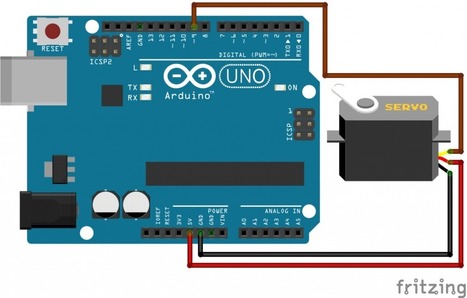
In this tutorial, an RC hobby servo is directly connected to the arduino board. Servo motor current consumption is very high so some time arduino can’t drive it. A standard servo can be positioned at a different angle from 0 to 180 degree. We can move the servo at a particular angle by doing the servo programming.


Learn more / En savoir plus / Mehr erfahren:


https://www.scoop.it/t/21st-century-learning-and-teaching/?&tag=ARDUINO


https://www.scoop.it/t/21st-century-learning-and-teaching/?&tag=Coding


https://www.scoop.it/t/21st-century-learning-and-teaching/?&tag=Servo+motors


Gust MEES's insight:

Servo Motor has an advantage over normal DC motor because it can move shaft very precisely even at a particular angle. It is very useful in embedded and electronics applications for controlling the robotic arm, sensor or moving object connected to its shaft at a certain angle. It has integrated gears and circuit that providing feedback system.

In this tutorial, an RC hobby servo is directly connected to the arduino board. Servo motor current consumption is very high so some time arduino can’t drive it. A standard servo can be positioned at a different angle from 0 to 180 degree. We can move the servo at a particular angle by doing the servo programming.


Learn more / En savoir plus / Mehr erfahren:


https://www.scoop.it/t/21st-century-learning-and-teaching/?&tag=ARDUINO


https://www.scoop.it/t/21st-century-learning-and-teaching/?&tag=Coding


https://www.scoop.it/t/21st-century-learning-and-teaching/?&tag=Servo+motors


No comment yet.
Scooped by Gust MEES
May 29, 2018 6:27 PM
Scoop.it!

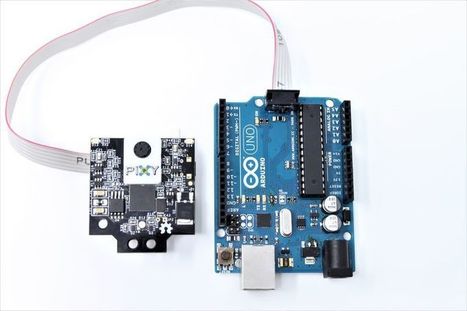
Pixy2 – PixyCam | #Arduino #RaspberryPI #Coding #Maker #MakerED #MakerSpaces 

Pixy2 – PixyCam | #Arduino #RaspberryPI #Coding #Maker #MakerED #MakerSpaces  | 21st Century Learning and Teaching | Scoop.it

Robot vision made easier


Pixy2 is smaller, faster and more capable than the original Pixy.  Like its predecessor, Pixy2 can learn to detect objects that you teach it, just by pressing a button.  Additionally, Pixy2 has new algorithms that detect and track lines for use with line-following robots.  The new algorithms can detect intersections and “road signs” as well. The road signs can tell your robot what to do, such as turn left, turn right, slow down, etc.  And Pixy2 does all of this at 60 frames-per-second, so your robot can be fast, too.

Use Pixy2 for lots of different applications, find a project, or use Pixy2 for something no one has considered!

Connect directly to Arduino or Raspberry Pi

No need to futz around with tiny wires — Pixy2 comes with a special cable to plug directly into an Arduino and a USB cable to plug into a Raspberry Pi, so you can get started quickly.  No Arduino or Raspberry Pi?  No problem!  Pixy2 has several interfaces (SPI, I2C, UART, and USB) and simple communications, so you get your chosen controller talking to Pixy2 in short order.


Learn more / En savoir plus / Mehr erfahren:


https://www.scoop.it/t/21st-century-learning-and-teaching/?&tag=ARDUINO


Gust MEES's insight:

Robot vision made easier


Pixy2 is smaller, faster and more capable than the original Pixy.  Like its predecessor, Pixy2 can learn to detect objects that you teach it, just by pressing a button.  Additionally, Pixy2 has new algorithms that detect and track lines for use with line-following robots.  The new algorithms can detect intersections and “road signs” as well. The road signs can tell your robot what to do, such as turn left, turn right, slow down, etc.  And Pixy2 does all of this at 60 frames-per-second, so your robot can be fast, too.

Use Pixy2 for lots of different applications, find a project, or use Pixy2 for something no one has considered!

Connect directly to Arduino or Raspberry Pi

No need to futz around with tiny wires — Pixy2 comes with a special cable to plug directly into an Arduino and a USB cable to plug into a Raspberry Pi, so you can get started quickly.  No Arduino or Raspberry Pi?  No problem!  Pixy2 has several interfaces (SPI, I2C, UART, and USB) and simple communications, so you get your chosen controller talking to Pixy2 in short order.


Learn more / En savoir plus / Mehr erfahren:


https://www.scoop.it/t/21st-century-learning-and-teaching/?&tag=ARDUINO


No comment yet.
Scooped by Gust MEES
May 28, 2018 5:17 PM
Scoop.it!

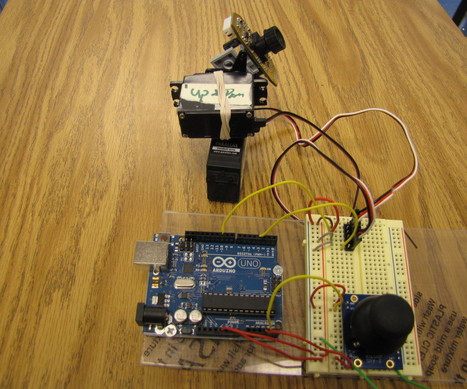
Arduino + 2 Servos + Thumbstick (joystick) | #Coding #Maker #MakerED #MakerSpaces

Arduino + 2 Servos + Thumbstick (joystick) | #Coding #Maker #MakerED #MakerSpaces | 21st Century Learning and Teaching | Scoop.it

This time I will help you move the same 2 servos with a thumbstick. And again I have surf the internet to see If there are tutorials that clear to understand specially for the beginner Arduino user and, I have not found one.


To move 2 servos with the thumbstick is way easier and painless than using the mouse. And the reason for this is that some times the processing software does not work correct or there is a conflict between the arduino software and the processing software.


Learn more / En savoir plus / Mehr erfahren:


https://www.scoop.it/t/21st-century-learning-and-teaching/?&tag=Servo+motors


https://www.scoop.it/t/21st-century-learning-and-teaching/?&tag=ARDUINO


Gust MEES's insight:

This time I will help you move the same 2 servos with a thumbstick. And again I have surf the internet to see If there are tutorials that clear to understand specially for the beginner Arduino user and, I have not found one.


To move 2 servos with the thumbstick is way easier and painless than using the mouse. And the reason for this is that some times the processing software does not work correct or there is a conflict between the arduino software and the processing software.


Learn more / En savoir plus / Mehr erfahren:


https://www.scoop.it/t/21st-century-learning-and-teaching/?&tag=Servo+motors


https://www.scoop.it/t/21st-century-learning-and-teaching/?&tag=ARDUINO


No comment yet.
Scooped by Gust MEES
May 23, 2018 5:34 PM
Scoop.it!

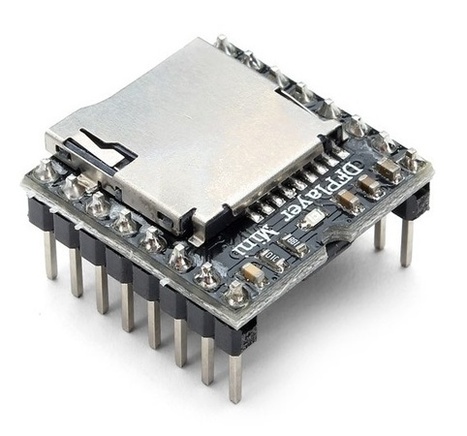
MP3 player using Arduino and DFPlayer mini | #Coding #Maker #MakerED #MakerSpaces

MP3 player using Arduino and DFPlayer mini | #Coding #Maker #MakerED #MakerSpaces | 21st Century Learning and Teaching | Scoop.it

Today, we will build an mp3 player using an Arduino and the DFPlayer mini MP3 module.

The DFplayer mini is a small, low-cost mp3 module with a simplified audio output that can be connected directly to a speaker or an earphone jack. The module can be used as a stand-alone module with attached battery, speaker, and push buttons or used in combination with a microcontroller or development board like the Arduino, enabled for RX/TX (Serial) communication, thus through simple serial commands we can play music and perform other functions like playing the next and previous song, shuffle, pause the song currently being played etc.


The module comes with an SDcard slot and supports both FAT16, FAT32 file system.


Learn more / En savoir plus / Mehr erfahren:


https://www.scoop.it/t/21st-century-learning-and-teaching/?&tag=ARDUINO


https://www.scoop.it/t/21st-century-learning-and-teaching/?&tag=Music


Gust MEES's insight:

Today, we will build an mp3 player using an Arduino and the DFPlayer mini MP3 module.

The DFplayer mini is a small, low-cost mp3 module with a simplified audio output that can be connected directly to a speaker or an earphone jack. The module can be used as a stand-alone module with attached battery, speaker, and push buttons or used in combination with a microcontroller or development board like the Arduino, enabled for RX/TX (Serial) communication, thus through simple serial commands we can play music and perform other functions like playing the next and previous song, shuffle, pause the song currently being played etc.


The module comes with an SDcard slot and supports both FAT16, FAT32 file system.


Learn more / En savoir plus / Mehr erfahren:


https://www.scoop.it/t/21st-century-learning-and-teaching/?&tag=ARDUINO


https://www.scoop.it/t/21st-century-learning-and-teaching/?&tag=Music


No comment yet.
Scooped by Gust MEES
May 18, 2018 4:23 AM
Scoop.it!

Fun Ideas That Keep Kids Learning Even After School's Out | #Coding: #LEARNingByDoing with #FUN

Fun Ideas That Keep Kids Learning Even After School's Out | #Coding: #LEARNingByDoing with #FUN | 21st Century Learning and Teaching | Scoop.it

Learning to Code


So, you like video games? Do you know that actual humans make video games with some type of computer code? It's true. But even better, kids can write programs too. It might seem scary to get started, but it's really not too bad. If you want to get started, I am going to recommend code.org. There are plenty of learning guides that are appropriate for a variety of ages. Oh, and it's free and online.

Even the lowest level activities are very complete—they even include ideas about functions and debugging. It's the best way to get a general idea of computer programming before moving on to a particular language.

If you want to be more creative with your programming, there is also Scratch (scratch.mit.edu). Scratch is a graphical (and free) programming language that focuses on the control of animated sprites. It's pretty easy to pick up and it's built so that you can share programs and modify others.

Finally, there is one more set of coding activities—physical programming. Physical programming takes some type of code but adds onto it some actual object that the code can control. If that sounds awesome, it's only because it is. There are two physical programming platforms that I have worked with before—Raspberry Pi and Arduino. Although these devices are not free, they aren't super expensive either. Both platforms have tons of great projects that kids (or adults) can work on.


Example: https://projects.raspberrypi.org/en/ and https://create.arduino.cc/projecthub


Learn more / En savoir plus / Mehr erfahren:


https://www.scoop.it/t/21st-century-learning-and-teaching/?&tag=ARDUINO


Gust MEES's insight:

Learning to Code


So, you like video games? Do you know that actual humans make video games with some type of computer code? It's true. But even better, kids can write programs too. It might seem scary to get started, but it's really not too bad. If you want to get started, I am going to recommend code.org. There are plenty of learning guides that are appropriate for a variety of ages. Oh, and it's free and online.

Even the lowest level activities are very complete—they even include ideas about functions and debugging. It's the best way to get a general idea of computer programming before moving on to a particular language.

If you want to be more creative with your programming, there is also Scratch (scratch.mit.edu). Scratch is a graphical (and free) programming language that focuses on the control of animated sprites. It's pretty easy to pick up and it's built so that you can share programs and modify others.

Finally, there is one more set of coding activities—physical programming. Physical programming takes some type of code but adds onto it some actual object that the code can control. If that sounds awesome, it's only because it is. There are two physical programming platforms that I have worked with before—Raspberry Pi and Arduino. Although these devices are not free, they aren't super expensive either. Both platforms have tons of great projects that kids (or adults) can work on.


Example: https://projects.raspberrypi.org/en/ and https://create.arduino.cc/projecthub


Learn more / En savoir plus / Mehr erfahren:


https://www.scoop.it/t/21st-century-learning-and-teaching/?&tag=ARDUINO


No comment yet.
Scooped by Gust MEES
May 17, 2018 11:09 AM
Scoop.it!

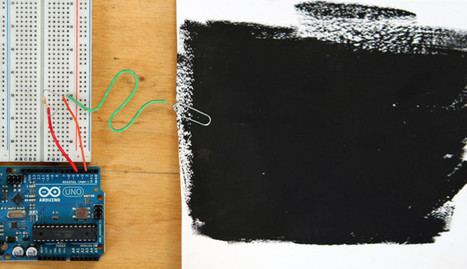
Building a Capacitive Proximity Sensor with Arduino, using Electric Paint | #Coding #Maker #MakerED #MakerSpaces #LEARNingByDoing

Building a Capacitive Proximity Sensor with Arduino, using Electric Paint | #Coding #Maker #MakerED #MakerSpaces #LEARNingByDoing | 21st Century Learning and Teaching | Scoop.it

Make a simple capacitance sensor using a pad of Electric Paint, an Arduino and a resistor. This sensor can detect the presence of a person.


Learn more / En savoir plus / Mehr erfahren:


https://www.scoop.it/t/21st-century-learning-and-teaching/?&tag=ARDUINO


Gust MEES's insight:

Make a simple capacitance sensor using a pad of Electric Paint, an Arduino and a resistor. This sensor can detect the presence of a person.


Learn more / En savoir plus / Mehr erfahren:


https://www.scoop.it/t/21st-century-learning-and-teaching/?&tag=ARDUINO


No comment yet.
Scooped by Gust MEES
May 16, 2018 4:54 PM
Scoop.it!

Design Guides | Polyamide 3D Printing | i.materialise

Design Guides | Polyamide 3D Printing | i.materialise | 21st Century Learning and Teaching | Scoop.it

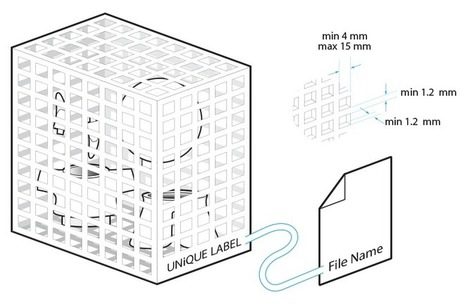
Some basic rules, tips, and tricks to design a printable model in polyamide.


Learn more / En savoir plus / Mehr erfahren:


https://www.scoop.it/t/21st-century-learning-and-teaching/?&tag=3D-Printing


Gust MEES's insight:

Some basic rules, tips, and tricks to design a printable model in polyamide.


Learn more / En savoir plus / Mehr erfahren:


https://www.scoop.it/t/21st-century-learning-and-teaching/?&tag=3D-Printing


No comment yet.
Scooped by Gust MEES
June 20, 2018 12:28 PM
Scoop.it!

How E-Ink Works: The Technology Behind E-Paper Displays - YouTube | #Displays #Maker #MakerED #MakerSpaces 

E-Ink. It powers everything from the YotaPhone 2 to the Amazon Kindle. It's simultaneously one of the most understated and futuristic display technologies around. And it's being put to use in devices and venues you've never even thought of. But what exactly is E-Ink, and how does it work?

That's a question we had for the folks at E-Ink Corporation, the brains behind the world's leading electrophoretic ink technology, and they were more than happy to answer it. They invited us to tour their Innovation Center and Headquarters facility in Massachusetts to get a firsthand look at the technology behind E-Paper Displays, as well as some historical context and a few sneak previews of where E-Ink is headed next. Join us for this quick tour, and then visit E-Ink yourself for more: http://www.eink.com/index.html


Learn more / En savoir plus / Mehr erfahren:


https://www.scoop.it/t/21st-century-learning-and-teaching/?&tag=ARDUINO


Gust MEES's insight:

E-Ink. It powers everything from the YotaPhone 2 to the Amazon Kindle. It's simultaneously one of the most understated and futuristic display technologies around. And it's being put to use in devices and venues you've never even thought of. But what exactly is E-Ink, and how does it work?

That's a question we had for the folks at E-Ink Corporation, the brains behind the world's leading electrophoretic ink technology, and they were more than happy to answer it. They invited us to tour their Innovation Center and Headquarters facility in Massachusetts to get a firsthand look at the technology behind E-Paper Displays, as well as some historical context and a few sneak previews of where E-Ink is headed next. Join us for this quick tour, and then visit E-Ink yourself for more: http://www.eink.com/index.html


Learn more / En savoir plus / Mehr erfahren: 


https://www.scoop.it/t/21st-century-learning-and-teaching/?&tag=ARDUINO


No comment yet.
Scooped by Gust MEES
June 14, 2018 10:35 AM
Scoop.it!

Welcome to Adafruit IO | Want to connect your project to the Internet? Start Here! | Adafruit Learning System | #Coding #Maker #MakerED #MakerSpaces

Welcome to Adafruit IO | Want to connect your project to the Internet? Start Here! | Adafruit Learning System | #Coding #Maker #MakerED #MakerSpaces | 21st Century Learning and Teaching | Scoop.it

Want to make your project talk to the Internet? Connect your existing project to the Internet to log, stream, and interact with the data it produces? What about all this Internet-of-Things (IoT) stuff?

Adafruit IO is a platform designed (by us!) to display, respond, and interact with your project's data. We also keep your data private (data feeds are private by default) and secure (we will never sell or give this data away to another company) for you. It's the internet of things - for everyone!

Why We Built Adafruit IO
Here at Adafruit, we sell all of these amazing components, but we couldn't find a good way to interact with them over the Internet. There are certainly a lot of great services out there for datalogging, or communicating with your microcontroller over the web, but these services are either too complicated to get started, or they aren't particularly fun to use. So, we decided to experiment with our own system, and that's Adafruit IO.


Learn more / En savoir plus / Mehr erfahren:


https://www.scoop.it/t/21st-century-learning-and-teaching/?&tag=Coding


https://www.scoop.it/t/21st-century-learning-and-teaching/?&tag=ARDUINO


https://www.scoop.it/t/21st-century-learning-and-teaching/?&tag=Internet+of+Things


Gust MEES's insight:

Want to make your project talk to the Internet? Connect your existing project to the Internet to log, stream, and interact with the data it produces? What about all this Internet-of-Things (IoT) stuff?

Adafruit IO is a platform designed (by us!) to display, respond, and interact with your project's data. We also keep your data private (data feeds are private by default) and secure (we will never sell or give this data away to another company) for you. It's the internet of things - for everyone!

Why We Built Adafruit IO
Here at Adafruit, we sell all of these amazing components, but we couldn't find a good way to interact with them over the Internet. There are certainly a lot of great services out there for datalogging, or communicating with your microcontroller over the web, but these services are either too complicated to get started, or they aren't particularly fun to use. So, we decided to experiment with our own system, and that's Adafruit IO.


Learn more / En savoir plus / Mehr erfahren:


https://www.scoop.it/t/21st-century-learning-and-teaching/?&tag=Coding


https://www.scoop.it/t/21st-century-learning-and-teaching/?&tag=ARDUINO


https://www.scoop.it/t/21st-century-learning-and-teaching/?&tag=Internet+of+Things


No comment yet.
Scooped by Gust MEES
June 12, 2018 3:30 PM
Scoop.it!

DIY Motorized Camera Slider with Pan and Tilt Head - Arduino Based Project | #Coding #Maker #MakerED #MakerSpaces 

DIY Motorized Camera Slider with Pan and Tilt Head - Arduino Based Project | #Coding #Maker #MakerED #MakerSpaces  | 21st Century Learning and Teaching | Scoop.it

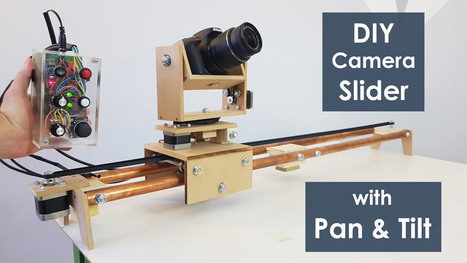
In this tutorial we will learn how make a motorized camera slider with pan and tilt head. This Arduino based project is 100% DIY, built with cheap materials like MDF and plywood and controlled using Arduino, three stepper motors, some buttons and a joystick attached on a custom designed PCB. Despite this, the end result is quite impressive, with super-smooth camera moves enabling us to get professional looking cinematic shots.


Learn more / En savoir plus / Mehr erfahren:


https://www.scoop.it/t/21st-century-learning-and-teaching/?&tag=ARDUINO


https://www.scoop.it/t/21st-century-learning-and-teaching/?&tag=Coding


https://www.scoop.it/t/21st-century-learning-and-teaching/?&tag=Servo+motors


Gust MEES's insight:

In this tutorial we will learn how make a motorized camera slider with pan and tilt head. This Arduino based project is 100% DIY, built with cheap materials like MDF and plywood and controlled using Arduino, three stepper motors, some buttons and a joystick attached on a custom designed PCB. Despite this, the end result is quite impressive, with super-smooth camera moves enabling us to get professional looking cinematic shots.


Learn more / En savoir plus / Mehr erfahren:


https://www.scoop.it/t/21st-century-learning-and-teaching/?&tag=ARDUINO


https://www.scoop.it/t/21st-century-learning-and-teaching/?&tag=Coding


https://www.scoop.it/t/21st-century-learning-and-teaching/?&tag=Servo+motors


No comment yet.
Scooped by Gust MEES
June 8, 2018 11:46 AM
Scoop.it!

[Arduino] - IR remote and Servos - YouTube | IR Remote Control of 4 Servos | #Coding #Maker #MakerED #MakerSpaces 

IR Remote Control of 4 Servos.


It works ALSO with the ELEGOO IR Remote Control!!


Learn more / En savoir plus / Mehr erfahren:


https://www.scoop.it/t/21st-century-learning-and-teaching/?&tag=ARDUINO


https://www.scoop.it/t/21st-century-learning-and-teaching/?&tag=Coding


https://www.scoop.it/t/21st-century-learning-and-teaching/?&tag=Servo+motors


Gust MEES's insight:

IR Remote Control of 4 Servos.


It works ALSO with the ELEGOO IR Remote Control!!


Learn more / En savoir plus / Mehr erfahren:


https://www.scoop.it/t/21st-century-learning-and-teaching/?&tag=ARDUINO


https://www.scoop.it/t/21st-century-learning-and-teaching/?&tag=Coding


https://www.scoop.it/t/21st-century-learning-and-teaching/?&tag=Servo+motors


No comment yet.
Scooped by Gust MEES
June 6, 2018 4:31 PM
Scoop.it!

RGB LED Matrix With an ESP8266 | #Arduino #Coding #Maker #MakerED #MakerSpaces #IoT

RGB LED Matrix With an ESP8266 | #Arduino #Coding #Maker #MakerED #MakerSpaces #IoT | 21st Century Learning and Teaching | Scoop.it

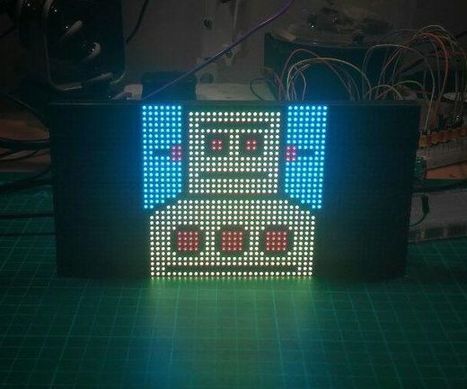
I think these RGB LED Matrix displays are one of best displays you can get for your Arduino projects, they are incredibly bright and vivid and are actually...


Learn more / En savoir plus / Mehr erfahren:


https://www.scoop.it/t/21st-century-learning-and-teaching/?&tag=ARDUINO


https://www.scoop.it/t/21st-century-learning-and-teaching/?&tag=ESP8266+WiFi+Module


https://gustmees.wordpress.com/2018/04/08/first-steps-with-the-arduino-uno-r3-maker-makered-coding-scrolling-text-with-8x8-led-matrix/


Gust MEES's insight:

I think these RGB LED Matrix displays are one of best displays you can get for your Arduino projects, they are incredibly bright and vivid and are actually...


Learn more / En savoir plus / Mehr erfahren:


https://www.scoop.it/t/21st-century-learning-and-teaching/?&tag=ARDUINO


https://www.scoop.it/t/21st-century-learning-and-teaching/?&tag=ESP8266+WiFi+Module


https://gustmees.wordpress.com/2018/04/08/first-steps-with-the-arduino-uno-r3-maker-makered-coding-scrolling-text-with-8x8-led-matrix/


No comment yet.
Scooped by Gust MEES
June 5, 2018 4:35 PM
Scoop.it!

A Flexible Arduino Prototype | #Coding #Maker #MakerED #MakerSpaces #NextFlex

A Flexible Arduino Prototype | #Coding #Maker #MakerED #MakerSpaces #NextFlex | 21st Century Learning and Teaching | Scoop.it

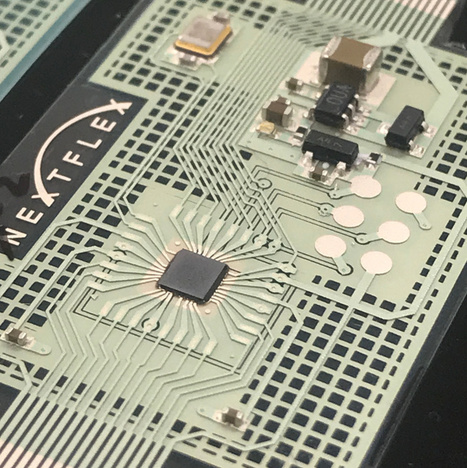
We recently visited NextFlex, the flexible electronics manufacturing institute in Silicon Valley, where they developed a flexible prototype based on the Arduino Mini. Their mission is to make flexible electronics mainstream, opening up all kinds of new applications.

How did you make the flexible Arduino prototype?
Some of the equipment we use is familiar. For example, automated screen printers and industrial inkjet printers. We used them to print the circuit on a 1mm thick flexible plastic ‘board’ (known as the substrate).

We then took the microcontroller silicon die, which is usually inside a chip package, and connected it directly to the substrate. For this, we used our production-level assembly equipment for precision adhesive dispense, die, and component attach.

Using these techniques, we’re able to create flexible wire connections with a resolution of 50um (that’s 0.005 cm, roughly the thickness of a human hair).


Learn more / En savoir plus / Mehr erfahren:


https://www.scoop.it/t/21st-century-learning-and-teaching/?&tag=ARDUINO


Gust MEES's insight:

We recently visited NextFlex, the flexible electronics manufacturing institute in Silicon Valley, where they developed a flexible prototype based on the Arduino Mini. Their mission is to make flexible electronics mainstream, opening up all kinds of new applications.

How did you make the flexible Arduino prototype?
Some of the equipment we use is familiar. For example, automated screen printers and industrial inkjet printers. We used them to print the circuit on a 1mm thick flexible plastic ‘board’ (known as the substrate).

We then took the microcontroller silicon die, which is usually inside a chip package, and connected it directly to the substrate. For this, we used our production-level assembly equipment for precision adhesive dispense, die, and component attach.

Using these techniques, we’re able to create flexible wire connections with a resolution of 50um (that’s 0.005 cm, roughly the thickness of a human hair).


Learn more / En savoir plus / Mehr erfahren:


https://www.scoop.it/t/21st-century-learning-and-teaching/?&tag=ARDUINO


No comment yet.
Scooped by Gust MEES
May 30, 2018 8:26 AM
Scoop.it!

Multiple Blinking LEDs on the Arduino | #Coding #Maker #MakerED #MakerSpaces

Multiple Blinking LEDs on the Arduino | #Coding #Maker #MakerED #MakerSpaces | 21st Century Learning and Teaching | Scoop.it

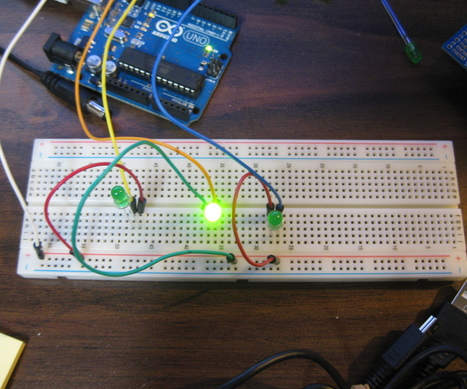
In this tutorial I will show you how to make multiple LEDs blink with Arduino.  You will need three LEDs, jumper wires, breadboard, and Arduino.


Learn more / En savoir plus / Mehr erfahren:


https://www.scoop.it/t/21st-century-learning-and-teaching/?&tag=ARDUINO


Gust MEES's insight:

In this tutorial I will show you how to make multiple LEDs blink with Arduino.  You will need three LEDs, jumper wires, breadboard, and Arduino.


Learn more / En savoir plus / Mehr erfahren:


https://www.scoop.it/t/21st-century-learning-and-teaching/?&tag=ARDUINO


No comment yet.
Scooped by Gust MEES
May 28, 2018 6:14 PM
Scoop.it!

Triggering a servo using an HC-SR04 distance sensor and an Arduino | #Coding #Maker #MakerED #MakerSpaces

Triggering a servo using an HC-SR04 distance sensor and an Arduino | #Coding #Maker #MakerED #MakerSpaces | 21st Century Learning and Teaching | Scoop.it

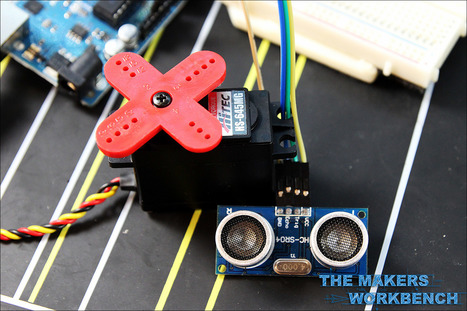
Much like my previous Ultrasonic Sensor tutorial, the Young Makers need to be able to trigger an event when someone walks past a display. In their case, they need to make an element on a poster move when someone walks within three feet of the ultrasonic sensor.


Learn more / En savoir plus / Mehr erfahren:


https://www.scoop.it/t/21st-century-learning-and-teaching/?&tag=ARDUINO


https://www.scoop.it/t/21st-century-learning-and-teaching/?&tag=Coding


https://www.scoop.it/t/21st-century-learning-and-teaching/?&tag=Servo+motors


Gust MEES's insight:

Much like my previous Ultrasonic Sensor tutorial, the Young Makers need to be able to trigger an event when someone walks past a display. In their case, they need to make an element on a poster move when someone walks within three feet of the ultrasonic sensor.


Learn more / En savoir plus / Mehr erfahren:


https://www.scoop.it/t/21st-century-learning-and-teaching/?&tag=ARDUINO


https://www.scoop.it/t/21st-century-learning-and-teaching/?&tag=Coding


https://www.scoop.it/t/21st-century-learning-and-teaching/?&tag=Servo+motors


No comment yet.
Scooped by Gust MEES
May 23, 2018 8:14 PM
Scoop.it!

WTV020-SD sound MODULE with Arduino and example code

WTV020-SD sound MODULE with Arduino and example code | 21st Century Learning and Teaching | Scoop.it

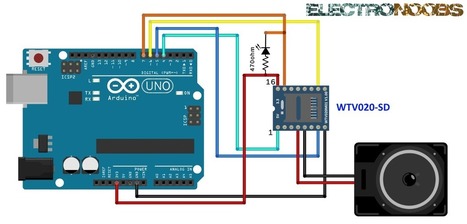
We are going to use a WTV020-SD module to play some ad4 sound files. To control the module we will use an arduino. The steps are: 

- First connect the module to the arduino.
- Prepare the SD card
- Convert wav files to ad4 format and copy example files to the SD
- Inport wtV020 library in Arduino IDE and upload an example code 
- Make a small amplifying circuit


Learn more / En savoir plus / Mehr erfahren:


https://www.scoop.it/t/21st-century-learning-and-teaching/?&tag=ARDUINO


https://www.scoop.it/t/21st-century-learning-and-teaching/?&tag=Music


Gust MEES's insight:

We are going to use a WTV020-SD module to play some ad4 sound files. To control the module we will use an arduino. The steps are: 

- First connect the module to the arduino.
- Prepare the SD card
- Convert wav files to ad4 format and copy example files to the SD
- Inport wtV020 library in Arduino IDE and upload an example code 
- Make a small amplifying circuit


Learn more / En savoir plus / Mehr erfahren:


https://www.scoop.it/t/21st-century-learning-and-teaching/?&tag=ARDUINO


https://www.scoop.it/t/21st-century-learning-and-teaching/?&tag=Music


No comment yet.
Scooped by Gust MEES
May 21, 2018 12:30 PM
Scoop.it!

Archimedes: The AI Robot Owl | #Coding #Maker #MakerED #MakerSpaces #RaspberryPI

Archimedes: The AI Robot Owl | #Coding #Maker #MakerED #MakerSpaces #RaspberryPI | 21st Century Learning and Teaching | Scoop.it

ABOUT THIS PROJECT


This is a robotic owl that looks around for cool people, and can tell whether you're happy or upset. If you're excited enough, he will eventually let you take a sticker (or other small giveaway). He's named Archimedes, after Merlin's familiar in TheOnceandFutureKing. Of course, it's also reminiscent of the cyborg owl in Blade Runner.

First up, if you don't know the Google AIY Vision Kit, check out the details here! This is the basis for the robot's smarts. The code for this project is coming soon.

It started when we were invited to contribute something to the Google booth at Bay Area Maker Faire. I took a really, really long time to figure out what to build—what it would look like, how it would animate, how it would dispense the stickers... in the end, I went with this cute and fairly challenging design.

This robot is versatile enough that I can bring it along to different events, such as the CODAME Artobots Festival and the Arm/Hackster Asia Tour (since the Raspberry Pi runs on an Arm chip, the Broadcom BCM2835). In other words, I can justify spending this much time on one project because I can re-use and iterate upon it. I'm also excited to have a sidekick in the office :)


Learn more / En savoir plus / Mehr erfahren:


https://www.scoop.it/t/21st-century-learning-and-teaching/?&tag=Coding


https://www.scoop.it/t/21st-century-learning-and-teaching/?&tag=Raspberry+Pi


Gust MEES's insight:

ABOUT THIS PROJECT


This is a robotic owl that looks around for cool people, and can tell whether you're happy or upset. If you're excited enough, he will eventually let you take a sticker (or other small giveaway). He's named Archimedes, after Merlin's familiar in TheOnceandFutureKing. Of course, it's also reminiscent of the cyborg owl in Blade Runner.

First up, if you don't know the Google AIY Vision Kit, check out the details here! This is the basis for the robot's smarts. The code for this project is coming soon.

It started when we were invited to contribute something to the Google booth at Bay Area Maker Faire. I took a really, really long time to figure out what to build—what it would look like, how it would animate, how it would dispense the stickers... in the end, I went with this cute and fairly challenging design.

This robot is versatile enough that I can bring it along to different events, such as the CODAME Artobots Festival and the Arm/Hackster Asia Tour (since the Raspberry Pi runs on an Arm chip, the Broadcom BCM2835). In other words, I can justify spending this much time on one project because I can re-use and iterate upon it. I'm also excited to have a sidekick in the office :)


Learn more / En savoir plus / Mehr erfahren:


https://www.scoop.it/t/21st-century-learning-and-teaching/?&tag=Coding


https://www.scoop.it/t/21st-century-learning-and-teaching/?&tag=Raspberry+Pi


No comment yet.
Scooped by Gust MEES
May 17, 2018 3:17 PM
Scoop.it!

OLED_I2C Library for Arduino | #Coding #Maker #MakerED #MakerSpaces #LEARNingByDoing

OLED_I2C Library for Arduino | #Coding #Maker #MakerED #MakerSpaces #LEARNingByDoing | 21st Century Learning and Teaching | Scoop.it

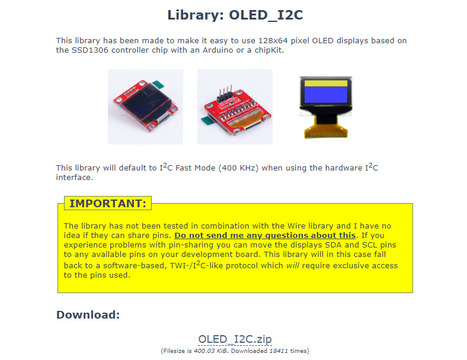
Some Sketches require the OLED_I2C Library, here you can download it as a ZIP-File and include it through the Arduino IDE:


1) Click on "Sketch"

2) Click on "Include Library"

3) Click on "Add ZIP.Library..."


Have FUN and enjoy Coding!


Learn more / En savoir plus / Mehr erfahren:


https://www.scoop.it/t/21st-century-learning-and-teaching/?&tag=ARDUINO


https://www.scoop.it/t/21st-century-learning-and-teaching/?&tag=OLED


Gust MEES's insight:

Some Sketches require the OLED_I2C Library, here you can download it as a ZIP-File and include it through the Arduino IDE:


1) Click on "Sketch"

2) Click on "Include Library"

3) Click on "Add ZIP.Library..."


Have FUN and enjoy Coding!


Learn more / En savoir plus / Mehr erfahren:


https://www.scoop.it/t/21st-century-learning-and-teaching/?&tag=ARDUINO


https://www.scoop.it/t/21st-century-learning-and-teaching/?&tag=OLED


No comment yet.
Scooped by Gust MEES
May 17, 2018 10:49 AM
Scoop.it!

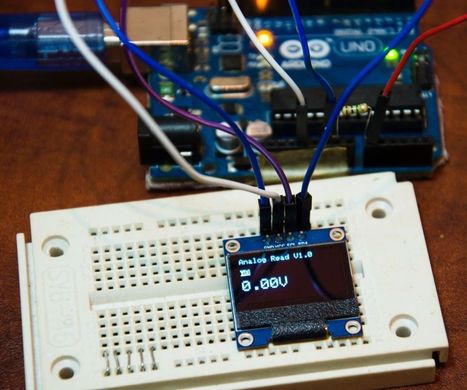
Arduino OLED SSD1306 Voltage Meter | #Coding #Maker #MakerED #MakerSpaces #LEARNingByDoing

Arduino OLED SSD1306 Voltage Meter | #Coding #Maker #MakerED #MakerSpaces #LEARNingByDoing | 21st Century Learning and Teaching | Scoop.it

Arduino OLED Voltage Meter is a simple code that i wrote to read analog input and convert in to voltage and show up on OLED Display this device can be use to check...


Learn more / En savoir plus / Mehr erfahren:


https://www.scoop.it/t/21st-century-learning-and-teaching/?&tag=ARDUINO


https://www.scoop.it/t/21st-century-learning-and-teaching/?&tag=OLED


Gust MEES's insight:

Arduino OLED Voltage Meter is a simple code that i wrote to read analog input and convert in to voltage and show up on OLED Display this device can be use to check...


Learn more / En savoir plus / Mehr erfahren:


https://www.scoop.it/t/21st-century-learning-and-teaching/?&tag=ARDUINO


https://www.scoop.it/t/21st-century-learning-and-teaching/?&tag=OLED


No comment yet.