21st Century Learning and Teaching
791.6K views | +3 today
21st Century Learning and Teaching
Related articles to 21st Century Learning and Teaching as also tools...
Curated by Gust MEES
Your new post is loading...

Popular Tags

Current selected tag: 'Learning by doing'. Clear
Scooped by Gust MEES
April 13, 2018 8:43 AM
Scoop.it!

lcd-image-converter download | #Coding #Maker #MakerED #MakerSpaces #LEARNingByDoing

lcd-image-converter download | #Coding #Maker #MakerED #MakerSpaces #LEARNingByDoing | 21st Century Learning and Teaching | Scoop.it

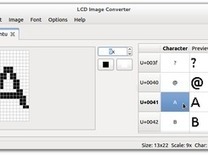
This program allows you to create bitmaps and fonts, and transform them to "C" source format for embedded applications.

The transformation of the images to the source code is made by using templates. Therefore, by modifying the templates, you can change the format of the output within certain limits.


Learn more / En savoir plus / Mehr erfahren:


https://www.scoop.it/t/21st-century-learning-and-teaching/?&tag=ARDUINO


Gust MEES's insight:

This program allows you to create bitmaps and fonts, and transform them to "C" source format for embedded applications.

The transformation of the images to the source code is made by using templates. Therefore, by modifying the templates, you can change the format of the output within certain limits.


Learn more / En savoir plus / Mehr erfahren:


https://www.scoop.it/t/21st-century-learning-and-teaching/?&tag=ARDUINO


No comment yet.
Scooped by Gust MEES
April 10, 2018 5:17 PM
Scoop.it!

First Steps with the Arduino-UNO R3 | Maker, MakerED, Coding | Scrolling Text with 8×8 LED MATRIX  | #MakerSpaces #LEARNingByDoing

First Steps with the Arduino-UNO R3 | Maker, MakerED, Coding | Scrolling Text with 8×8 LED MATRIX  | #MakerSpaces #LEARNingByDoing | 21st Century Learning and Teaching | Scoop.it

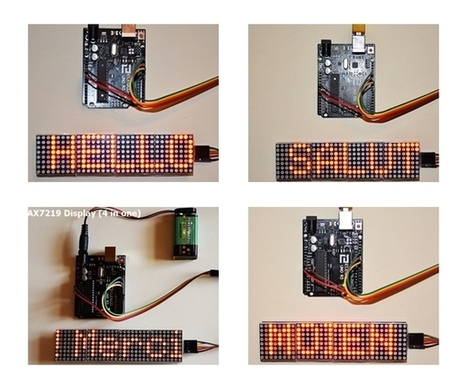
Scrolling Text with 8x8 LED MATRIX (4 Modules in One) . . . As we were playing around already with LED's in previous blog posts let us NOW try out a LED Matrix "4 in one"; its four (4) singular displays soldered on one piece of a single printed circuit board (PCB)...


Learn more / En savoir plus / Mehr erfahren:


https://www.scoop.it/t/21st-century-learning-and-teaching/?&tag=ARDUINO


Gust MEES's insight:

Scrolling Text with 8x8 LED MATRIX (4 Modules in One) . . . As we were playing around already with LED's in previous blog posts let us NOW try out a LED Matrix "4 in one"; its four (4) singular displays soldered on one piece of a single printed circuit board (PCB)...


Learn more / En savoir plus / Mehr erfahren:


https://www.scoop.it/t/21st-century-learning-and-teaching/?&tag=ARDUINO


No comment yet.
Scooped by Gust MEES
April 9, 2018 6:43 PM
Scoop.it!

Lateral thinking - Wikipedia | #QuerDenker #StartUPs OUT of #SchoolCocoon #Mentality | #ModernSociety

Lateral thinking - Wikipedia

Lateral thinking is solving problems through an indirect and creative approach, using reasoning that is not immediately obvious and involving ideas that may not be obtainable by using only traditional step-by-step logic. The term was promulgated in 1967 by Edward de Bono.

Lateral thinking is solving problems through an indirect and creative approach, using reasoning that is not immediately obvious and involving ideas that may not be obtainable by using only traditional step-by-step logic.


The term was promulgated in 1967 by Edward de Bono. He cites as an example the Judgment of Solomon, where King Solomon resolves a dispute over the parentage of a child by calling for the child to be cut in half, and making his judgment according to the reactions that this order receives.[2] Edward de Bono also links lateral thinking with humour, arguing there's a switchover from a familiar pattern to a new, unexpected one. It is in this moment of surprise that generates laughter and new insight which demonstrates an ability to see a different thought pattern that initially was not obvious.[3]

According to de Bono, lateral thinking deliberately distances itself from the standard perception of creativity as "vertical" logic (the classic method for problem solving).

To understand lateral thinking, it is necessary to compare lateral thinking and critical thinking. Critical thinking is primarily concerned with judging the true value of statements and seeking errors. Lateral thinking is more concerned with the "movement value" of statements and ideas.


A person uses lateral thinking to move from one known idea to creating new ideas. Edward de Bono defines four types of thinking tools:

idea-generating tools intended to break current thinking patterns—routine patterns, the status quo


focus tools intended to broaden where to search for new ideas


harvest tools intended to ensure more value is received from idea generating output


treatment tools that promote consideration of real-world constraints, resources, and support


Learn more / En savoir plus / Mehr erfahren:


https://www.scoop.it/t/21st-century-learning-and-teaching/?&tag=Entrepreneurs


Gust MEES's insight:

Lateral thinking is solving problems through an indirect and creative approach, using reasoning that is not immediately obvious and involving ideas that may not be obtainable by using only traditional step-by-step logic.


The term was promulgated in 1967 by Edward de Bono. He cites as an example the Judgment of Solomon, where King Solomon resolves a dispute over the parentage of a child by calling for the child to be cut in half, and making his judgment according to the reactions that this order receives.[2] Edward de Bono also links lateral thinking with humour, arguing there's a switchover from a familiar pattern to a new, unexpected one. It is in this moment of surprise that generates laughter and new insight which demonstrates an ability to see a different thought pattern that initially was not obvious.[3]

According to de Bono, lateral thinking deliberately distances itself from the standard perception of creativity as "vertical" logic (the classic method for problem solving).

To understand lateral thinking, it is necessary to compare lateral thinking and critical thinking. Critical thinking is primarily concerned with judging the true value of statements and seeking errors. Lateral thinking is more concerned with the "movement value" of statements and ideas.


A person uses lateral thinking to move from one known idea to creating new ideas. Edward de Bono defines four types of thinking tools:

idea-generating tools intended to break current thinking patterns—routine patterns, the status quo


focus tools intended to broaden where to search for new ideas


harvest tools intended to ensure more value is received from idea generating output


treatment tools that promote consideration of real-world constraints, resources, and support


Learn more / En savoir plus / Mehr erfahren:


https://www.scoop.it/t/21st-century-learning-and-teaching/?&tag=Entrepreneurs


Spplimited's comment, April 10, 2018 3:31 AM
Very useful
Karen Quintero's curator insight, April 22, 2018 2:41 AM
 From my point of view, lateral thinking must be taken into account in real education and life because different from critical thinking it allows that the brain make deep thinking about questioning, analizing current cultural patterns that society present currently.It not also promotes deep thinkind, it promotes creativity and motivation because its goal is based on the prior knowledge learners or people will come up with new ideas about the same topic.
Scooped by Gust MEES
April 7, 2018 10:01 AM
Scoop.it!

World's Simplest Electric Car: 6 Steps (with Pictures) | #Maker #MakerED #MakerSpaces #Motors

World's Simplest Electric Car: 6 Steps (with Pictures) | #Maker #MakerED #MakerSpaces #Motors | 21st Century Learning and Teaching | Scoop.it

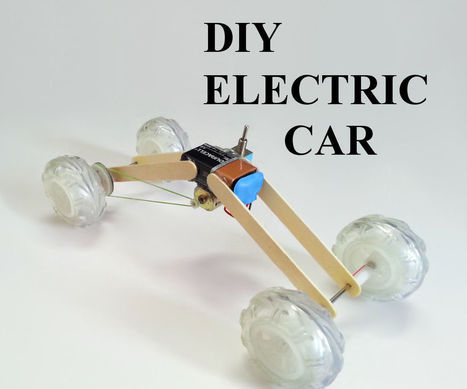
Playing with toy cars is synonymous to almost everyone's childhood. In this instructable, i decided to re-live those memories by making a simplest toy car powered by just a DC motor and a 9v battery. This project is for kids who are entering the world of DIY and need a simple project to start.


This car is a sure shot DIY project that will never fail even in the first attempt.


Learn more / En savoir plus / Mehr erfahren:


https://gustmees.wordpress.com/2017/04/07/maker-easy-to-build-mini-car-with-battery-holder-case-and-motor-as-self-made-propeller/


Gust MEES's insight:

Playing with toy cars is synonymous to almost everyone's childhood. In this instructable, i decided to re-live those memories by making a simplest toy car powered by just a DC motor and a 9v battery. This project is for kids who are entering the world of DIY and need a simple project to start.


This car is a sure shot DIY project that will never fail even in the first attempt.


Learn more / En savoir plus / Mehr erfahren:


https://gustmees.wordpress.com/2017/04/07/maker-easy-to-build-mini-car-with-battery-holder-case-and-motor-as-self-made-propeller/


Emmanuel Gomez's curator insight, April 8, 2018 1:01 PM
Just incredible. This is a great and interesting topic that can be taught  to children with no risks, with fun and easy steps, and with an amazing toy as a result. It can be taught by teachers, parents, and even older brothers to children who are interested in sciences; moreover, the most important part is that this is learning through playing, things that children love. 
Scooped by Gust MEES
March 30, 2018 1:04 PM
Scoop.it!

PID Controller Basics Using XOD and Arduino | #Coding #Maker #MakerED #MakerSpaces #VisualProgramming #LEARNingByDoing

PID Controller Basics Using XOD and Arduino | #Coding #Maker #MakerED #MakerSpaces #VisualProgramming #LEARNingByDoing | 21st Century Learning and Teaching | Scoop.it

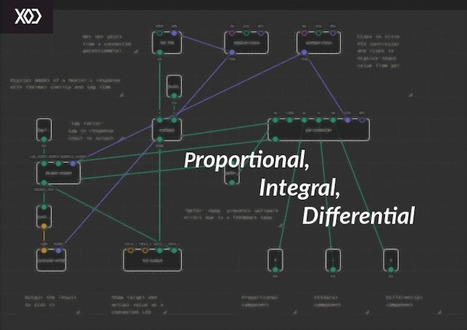
As a beginning student of the Arduino environment and aspiring maker, you’ve probably done some experiments with interfacing the board to some external hardware, such as LEDs, relays, sensors, or…


Learn more/ En svoir plus / Mehr erfahren:


https://www.scoop.it/t/21st-century-learning-and-teaching/?&tag=ARDUINO


https://www.scoop.it/t/21st-century-learning-and-teaching/?&tag=Visual+programming


Gust MEES's insight:

As a beginning student of the Arduino environment and aspiring maker, you’ve probably done some experiments with interfacing the board to some external hardware, such as LEDs, relays, sensors, or…


Learn more/ En svoir plus / Mehr erfahren:


https://www.scoop.it/t/21st-century-learning-and-teaching/?&tag=ARDUINO


https://www.scoop.it/t/21st-century-learning-and-teaching/?&tag=Visual+programming


No comment yet.
Scooped by Gust MEES
March 27, 2018 6:55 PM
Scoop.it!

130+ Arduino Projects with Source Code, Schematics & Complete DIY Explanation

130+ Arduino Projects with Source Code, Schematics & Complete DIY Explanation | 21st Century Learning and Teaching | Scoop.it

Arduino Projects


Arduino is a popular open-source development board for engineers and makers to develop electronics projects in an easy way. It consists of both a physical programmable development board (based on AVR series of microcontrollers) and a piece of software or IDE which runs on your computer and used to write and upload the code to the microcontroller board.

Explore below some interesting arduino projects and tutorials based on different types of arduino baords like Arduino Uno, Arduino Pro Mini, etc. These DIY arduino projects for beginners are explained well and you can find the complete guide to DIY these projects with the help of circuit diagrams, source codes and videos. You can also browse below pages to get new arduino project ideas.


Learn more / En savoir plus / Mehr erfahren:


https://www.scoop.it/t/21st-century-learning-and-teaching/?&tag=ARDUINO


Gust MEES's insight:

Arduino Projects


Arduino is a popular open-source development board for engineers and makers to develop electronics projects in an easy way. It consists of both a physical programmable development board (based on AVR series of microcontrollers) and a piece of software or IDE which runs on your computer and used to write and upload the code to the microcontroller board.

Explore below some interesting arduino projects and tutorials based on different types of arduino baords like Arduino Uno, Arduino Pro Mini, etc. These DIY arduino projects for beginners are explained well and you can find the complete guide to DIY these projects with the help of circuit diagrams, source codes and videos. You can also browse below pages to get new arduino project ideas.


Learn more / En savoir plus / Mehr erfahren:


https://www.scoop.it/t/21st-century-learning-and-teaching/?&tag=ARDUINO


No comment yet.
Scooped by Gust MEES
March 24, 2018 9:20 AM
Scoop.it!

Arduino - TFT | Getting Started with the Arduino TFT Screen | #Coding #Maker #MakerED #MakerSpaces #LEARNingByDoing

Arduino - TFT | Getting Started with the Arduino TFT Screen | #Coding #Maker #MakerED #MakerSpaces #LEARNingByDoing | 21st Century Learning and Teaching | Scoop.it

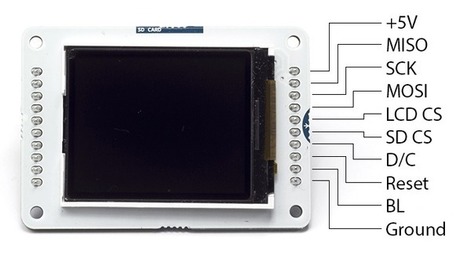
Getting Started with the Arduino TFT Screen

The Arduino TFT screen is a backlit TFT LCD screen with a micro SD card slot in the back. You can draw text, images, and shapes to the screen with the TFT library.


The screen's pin layout is designed to easily fit into the socket of an Arduino Esplora and Arduino Robot, but it can be used with any Arduino board.


Learn more / En savoir plus / Mehr erfahren:


https://www.scoop.it/t/21st-century-learning-and-teaching/?&tag=ARDUINO


Gust MEES's insight:

Getting Started with the Arduino TFT Screen

The Arduino TFT screen is a backlit TFT LCD screen with a micro SD card slot in the back. You can draw text, images, and shapes to the screen with the TFT library.


The screen's pin layout is designed to easily fit into the socket of an Arduino Esplora and Arduino Robot, but it can be used with any Arduino board.


Learn more / En savoir plus / Mehr erfahren:


https://www.scoop.it/t/21st-century-learning-and-teaching/?&tag=ARDUINO


Kami Campbell's curator insight, March 29, 2018 1:45 AM
via KAMI CAMPBELL
Scooped by Gust MEES
March 23, 2018 1:45 PM
Scoop.it!

Arduino Blog » Save the date: Arduino Day 2018 is Saturday, May 12th! | #Coding #Maker #MakerED #MakerSpaces #LEARNingByDoing

Arduino Blog » Save the date: Arduino Day 2018 is Saturday, May 12th! | #Coding #Maker #MakerED #MakerSpaces #LEARNingByDoing | 21st Century Learning and Teaching | Scoop.it

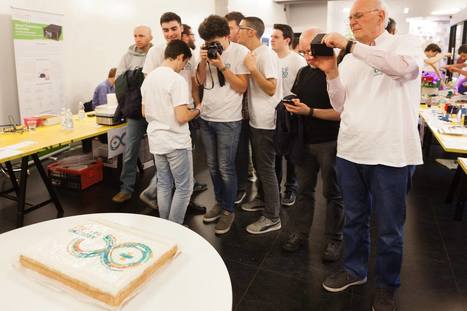
For the fifth year in a row we are inviting the open-source community to join us for Arduino Day 2018 on Saturday, May 12th!

Arduino Day is a worldwide celebration of Arduino’s birthday. It’s a 24 hours-long event–organized by the community and our team–where people interested in Arduino get together, share their experiences, and learn more about the platform.  Participation is open to anyone, either as a local organizer or participant.

In 2017, there were 499 global events consisting of various activities, workshops, talks, and project exhibitions for a wide range of audiences and skill sets. This year, we are hoping to pass the 500 mark! If you want to organize an Arduino Day festivity, please fill out this online form and submit your proposal by April 29th.


Learn more / En savoir plus / Mehr erfahren:


https://www.scoop.it/t/21st-century-learning-and-teaching/?&tag=ARDUINO


Gust MEES's insight:

For the fifth year in a row we are inviting the open-source community to join us for Arduino Day 2018 on Saturday, May 12th!

Arduino Day is a worldwide celebration of Arduino’s birthday. It’s a 24 hours-long event–organized by the community and our team–where people interested in Arduino get together, share their experiences, and learn more about the platform.  Participation is open to anyone, either as a local organizer or participant.

In 2017, there were 499 global events consisting of various activities, workshops, talks, and project exhibitions for a wide range of audiences and skill sets. This year, we are hoping to pass the 500 mark! If you want to organize an Arduino Day festivity, please fill out this online form and submit your proposal by April 29th.


Learn more / En savoir plus / Mehr erfahren:


https://www.scoop.it/t/21st-century-learning-and-teaching/?&tag=ARDUINO


No comment yet.
Scooped by Gust MEES
March 22, 2018 5:45 PM
Scoop.it!

Xevro | Arduino Simulator 1.5 available for Windows and MacOS! | #Freeware #Coding #Maker #MakerED #MakerSpaces

Xevro | Arduino Simulator 1.5 available for Windows and MacOS! | #Freeware #Coding #Maker #MakerED #MakerSpaces | 21st Century Learning and Teaching | Scoop.it

Xevro is run by software developer Louis D'Hont.


I bought an Arduino, What now?


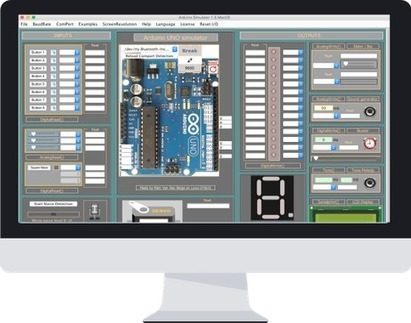
Do you want to simulate a program for Arduino without using real components? Then this Arduino Simulator is definitely for you!


Every time you want to test some project you don't need to add real parts anymore!


The Simulator has all the components needed to test basic projects and even larger projects.


Almost all the I/O is present on the Simulator so we can test your code on the monitor screen.


Learn more / En savoir plus / Mehr erfahren:


https://www.scoop.it/t/21st-century-learning-and-teaching/?&tag=ARDUINO


Gust MEES's insight:

Xevro is run by software developer Louis D'Hont.


I bought an Arduino, What now?


Do you want to simulate a program for Arduino without using real components? Then this Arduino Simulator is definitely for you!


Every time you want to test some project you don't need to add real parts anymore!


The Simulator has all the components needed to test basic projects and even larger projects.


Almost all the I/O is present on the Simulator so we can test your code on the monitor screen.


Learn more / En savoir plus / Mehr erfahren:


https://www.scoop.it/t/21st-century-learning-and-teaching/?&tag=ARDUINO


No comment yet.
Scooped by Gust MEES
March 18, 2018 11:56 AM
Scoop.it!

Plugin Blockly@rduino for Arduino IDE | #Coding #Blockly #Maker #MakerED #MakerSpaces #VisualProgramming #Arduino

Plugin Blockly@rduino for Arduino IDE | #Coding #Blockly #Maker #MakerED #MakerSpaces #VisualProgramming #Arduino | 21st Century Learning and Teaching | Scoop.it

ABOUT THIS PROJECT
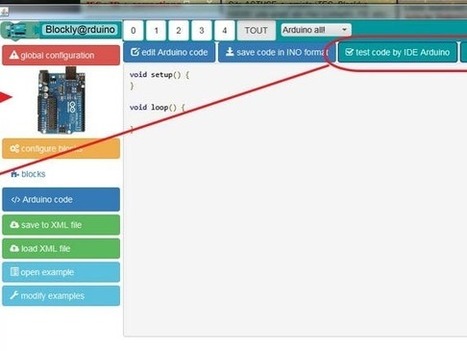
Blockly@rduino is a visual 'Scratch block program' like, based upon Google Blockly (https://developers.google.com/blockly/) and BlocklyDuino (https://github.com/BlocklyDuino/BlocklyDuino).

The aim is to create the more easy way to program Arduino card with this graphical programmation, for newbies or children.

All details: https://github.com/technologiescollege/Blockly-at-rduino

Use normally Blockly@rduino, then inside 'Arduino code' tab you can launch upload :


Learn more / En savoir plus / Mehr erfahren:


https://www.scoop.it/t/21st-century-learning-and-teaching/?&tag=Blockly


https://www.scoop.it/t/21st-century-learning-and-teaching/?&tag=Visual+programming


https://www.scoop.it/t/21st-century-learning-and-teaching/?&tag=ARDUINO


Gust MEES's insight:

ABOUT THIS PROJECT
Blockly@rduino is a visual 'Scratch block program' like, based upon Google Blockly (https://developers.google.com/blockly/) and BlocklyDuino (https://github.com/BlocklyDuino/BlocklyDuino).

The aim is to create the more easy way to program Arduino card with this graphical programmation, for newbies or children.

All details: https://github.com/technologiescollege/Blockly-at-rduino

Use normally Blockly@rduino, then inside 'Arduino code' tab you can launch upload :


Learn more / En savoir plus / Mehr erfahren:


https://www.scoop.it/t/21st-century-learning-and-teaching/?&tag=Blockly


https://www.scoop.it/t/21st-century-learning-and-teaching/?&tag=Visual+programming


https://www.scoop.it/t/21st-century-learning-and-teaching/?&tag=ARDUINO


No comment yet.
Scooped by Gust MEES
March 15, 2018 6:43 PM
Scoop.it!

Repl.it lets you program in your browser | #Programming #Maker #MakerED #MakerSpaces 

Repl.it lets you program in your browser | #Programming #Maker #MakerED #MakerSpaces  | 21st Century Learning and Teaching | Scoop.it

No matter whether you are a seasoned programmer or you simply want to take your first steps in writing code, Repl.it wants to help you get from idea to result as fast as possible — without complicated installs and setup procedures getting in your way.

The Y Combinator-funded project, which released version 1.0 of its service this week, gives you an easy to use programming environment in the browser, which slowly reveals its complexity as you write your code.


The acronym REPL stands for read-eval-print loop and basically provides a programmer with an interactive programming environment. Unsurprisingly, that’s exactly what Repl.it gives you, too, and with 200,000 weekly active developers on the platform already, there is clearly a demand for this service.


Repl.it  already supports virtually every programming language you can think of, no matter whether that’s JavaScript, Python, PHP or QBasic, as well as popular frameworks like Django, Ruby on Rails and Sinatra. And if you want to hurt yourself and write in Brainfuck, you can do that, too.


Learn more / En savoir plus / Mehr erfahren:


https://www.scoop.it/t/21st-century-learning-and-teaching/?&tag=Programming...


Gust MEES's insight:

No matter whether you are a seasoned programmer or you simply want to take your first steps in writing code, Repl.it wants to help you get from idea to result as fast as possible — without complicated installs and setup procedures getting in your way.

The Y Combinator-funded project, which released version 1.0 of its service this week, gives you an easy to use programming environment in the browser, which slowly reveals its complexity as you write your code.


The acronym REPL stands for read-eval-print loop and basically provides a programmer with an interactive programming environment. Unsurprisingly, that’s exactly what Repl.it gives you, too, and with 200,000 weekly active developers on the platform already, there is clearly a demand for this service.


Repl.it  already supports virtually every programming language you can think of, no matter whether that’s JavaScript, Python, PHP or QBasic, as well as popular frameworks like Django, Ruby on Rails and Sinatra. And if you want to hurt yourself and write in Brainfuck, you can do that, too.


Learn more / En savoir plus / Mehr erfahren:


https://www.scoop.it/t/21st-century-learning-and-teaching/?&tag=Programming...


No comment yet.
Scooped by Gust MEES
March 15, 2018 1:04 PM
Scoop.it!

Raspberry Pi powered by Arduino: Now you can program the Pi using Arduino Sketches

Raspberry Pi powered by Arduino: Now you can program the Pi using Arduino Sketches | 21st Century Learning and Teaching | Scoop.it

The new feature will allow Pi owners to write Arduino Sketches to interact with sensors, motors, electronic boards and other hardware attached to the Pi's GPIO pins.

Arduino Sketches can now be used to program the Raspberry Pi, marking a moving together of two of the biggest maker platforms.
The cloud-based Arduino Create platform is designed to simplify the creation of Internet of Things applications.
Want to use the $35 Raspberry Pi computer to build your own hardware but only ever used Arduino boards? Well you're in luck.

If you know how to write programs to control hardware using Arduino boards you can now use the same language to control hardware attached to the Pi, the co-founder of the Arduino Project Massimo Banzi announced yesterday.

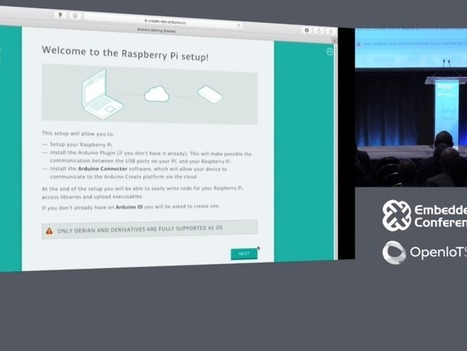
Banzi revealed a new feature in the cloud-based Arduino Create service that will compile Arduino Sketches — programs typically used to interact with Arduino boards and attached hardware — into a form that can be run on a Raspberry Pi.

The feature will allow Pi owners to write Arduino Sketches to interact with sensors, motors, electronic boards and other hardware attached to the Pi's GPIO pins.

"The idea is there's a tonne of people that know how to use Arduino and they can take their knowledge and apply it to this," Banzi told the Embedded Linux Conference 2018 in Portland in the US.


Learn more / En savoir plus / Mehr erfahren:


https://www.scoop.it/t/21st-century-learning-and-teaching/?&tag=Raspberry+Pi


https://www.scoop.it/t/21st-century-learning-and-teaching/?&tag=ARDUINO


Gust MEES's insight:

The new feature will allow Pi owners to write Arduino Sketches to interact with sensors, motors, electronic boards and other hardware attached to the Pi's GPIO pins.

Arduino Sketches can now be used to program the Raspberry Pi, marking a moving together of two of the biggest maker platforms.
The cloud-based Arduino Create platform is designed to simplify the creation of Internet of Things applications.
Want to use the $35 Raspberry Pi computer to build your own hardware but only ever used Arduino boards? Well you're in luck.

If you know how to write programs to control hardware using Arduino boards you can now use the same language to control hardware attached to the Pi, the co-founder of the Arduino Project Massimo Banzi announced yesterday.

Banzi revealed a new feature in the cloud-based Arduino Create service that will compile Arduino Sketches — programs typically used to interact with Arduino boards and attached hardware — into a form that can be run on a Raspberry Pi.

The feature will allow Pi owners to write Arduino Sketches to interact with sensors, motors, electronic boards and other hardware attached to the Pi's GPIO pins.

"The idea is there's a tonne of people that know how to use Arduino and they can take their knowledge and apply it to this," Banzi told the Embedded Linux Conference 2018 in Portland in the US.


Learn more / En savoir plus / Mehr erfahren:


https://www.scoop.it/t/21st-century-learning-and-teaching/?&tag=Raspberry+Pi


https://www.scoop.it/t/21st-century-learning-and-teaching/?&tag=ARDUINO


No comment yet.
Scooped by Gust MEES
March 14, 2018 5:47 PM
Scoop.it!

Raspberry Pi 3B+: Bastelplatine ist flotter und hat GBit-LAN | #Maker #MakerED #MakerSpaces #Coding #RaspBerryPI 

Raspberry Pi 3B+: Bastelplatine ist flotter und hat GBit-LAN | #Maker #MakerED #MakerSpaces #Coding #RaspBerryPI  | 21st Century Learning and Teaching | Scoop.it

Bastelplatine ist flotter und hat GBit-LAN
Der Raspberry Pi 3B+ hat schnellere ARM-Prozessorkerne, es gibt ac-WLAN für das 5-GHz-Frequenzband und Gigabit-Ethernet. Der Preis der Bastelplatine beträgt 40 US-Dollar.

Pünktlich zum Pi-Tag erscheint der Raspberry Pi 3B+ der Rasperry Pi Foundation. Die Bastelplatine folgt auf den Raspberry Pi 3B und hat trotz der vermeintlich kleinen Namensänderung mehr Neuerungen integriert, als die Bezeichnung Raspberry Pi 3B+ impliziert.


Learn more / En savoir plus / Mehr erfahren:


https://www.scoop.it/t/21st-century-learning-and-teaching/?&tag=Raspberry+Pi


Gust MEES's insight:

Bastelplatine ist flotter und hat GBit-LAN
Der Raspberry Pi 3B+ hat schnellere ARM-Prozessorkerne, es gibt ac-WLAN für das 5-GHz-Frequenzband und Gigabit-Ethernet. Der Preis der Bastelplatine beträgt 40 US-Dollar.

Pünktlich zum Pi-Tag erscheint der Raspberry Pi 3B+ der Rasperry Pi Foundation. Die Bastelplatine folgt auf den Raspberry Pi 3B und hat trotz der vermeintlich kleinen Namensänderung mehr Neuerungen integriert, als die Bezeichnung Raspberry Pi 3B+ impliziert.


Learn more / En savoir plus / Mehr erfahren:


https://www.scoop.it/t/21st-century-learning-and-teaching/?&tag=Raspberry+Pi


No comment yet.
Scooped by Gust MEES
April 13, 2018 8:26 AM
Scoop.it!

How to Control MAX7219 LED Matrix with ESP8266 WiFi Module | #Maker #MakerED #MakerSpaces #Coding

How to Control MAX7219 LED Matrix with ESP8266 WiFi Module | #Maker #MakerED #MakerSpaces #Coding | 21st Century Learning and Teaching | Scoop.it

About this Project:


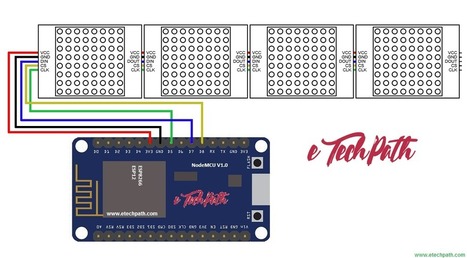
In this project we will learn how to interfacing ESP8266 module with MAX7219 matrix display to scrolling text message from web user interface. We will use Arduino IDE to program ESP module in this project. I am using MajicDesigns MD_MAX72xx library for running this project, also the code is very similar to included example in the library with some improvements in web user interface html code.


Learn more / En savoir plus / Mehr erfahren:


https://www.scoop.it/t/21st-century-learning-and-teaching/?&tag=ARDUINO


Gust MEES's insight:

About this Project:


In this project we will learn how to interfacing ESP8266 module with MAX7219 matrix display to scrolling text message from web user interface. We will use Arduino IDE to program ESP module in this project. I am using MajicDesigns MD_MAX72xx library for running this project, also the code is very similar to included example in the library with some improvements in web user interface html code.


Learn more / En savoir plus / Mehr erfahren:


https://www.scoop.it/t/21st-century-learning-and-teaching/?&tag=ARDUINO


No comment yet.
Scooped by Gust MEES
April 9, 2018 7:01 PM
Scoop.it!

Laterales Denken – Wikipedia | #QuerDenker #Entrepreneurs OUT of #SchoolCocoon #Mentality

Laterales Denken - Wikipedia

Laterales Denken (vom lateinischen latus für „Seite"), umgangssprachlich auch Querdenken genannt, ist eine Denkmethode, die im Rahmen der Anwendung von Kreativitätstechniken zur Lösung von Problemen oder Ideenfindung eingesetzt werden kann.

Laterales Denken


Laterales Denken (vom lateinischen latus für „Seite“), umgangssprachlich auch Querdenken genannt, ist eine Denkmethode, die im Rahmen der Anwendung von Kreativitätstechniken zur Lösung von Problemen oder Ideenfindung eingesetzt werden kann.

Der Begriff wurde 1967 von Edward de Bono eingeführt und seitdem in zahlreichen Veröffentlichungen verwendet. Gelegentlich wird in der Fachsprache auch der Begriff nichtlineares Denken gebraucht. Umgangssprachlich sagt man auch Querdenken oder um die Ecke denken. Das Antonym lautet vertikales oder lineares Denken.

Edward de Bono hat außerdem den Begriff „paralleles Denken“ geprägt, der die Fähigkeit beschreibt, in Bezug auf ein beliebiges Thema systematisch verschiedene Denk- und Wahrnehmungsperspektiven einzunehmen. Das wichtigste Beispiel für das parallele Denken sind die Denkhüte von De Bono. Sie werden inzwischen weltweit in großen Organisationen in den Bereichen Kreativität, aber auch Kommunikation und Teamentwicklung eingesetzt.

Das Konzept de Bonos unterscheidet sich nur in Nuancen von dem Joy Paul Guilfords. Dieser verwendete an Stelle von lateralem Denken den Terminus divergentes Denken bzw. anstelle von vertikalem Denken den Terminus konvergentes Denken. Aufgrund ihrer starken Ähnlichkeit werden die Begriffspaare weitestgehend synonym verwendet.[1]

Im Gegensatz zum vertikalen Denken, das Schritt für Schritt (kontinuierlich) verläuft und auf eingeübten Mustern beruht, ist das laterale Denken durch folgende Grundsätze charakterisiert:

Es wird zugelassen, dass vorliegende Informationen subjektiv bewertet und selektiv verwendet werden. Details werden nicht analytisch, sondern intuitiv erfasst.


Gedankliche Sprünge und Assoziationen werden zugelassen, nicht jedes Zwischenergebnis muss richtig sein.


Ja/Nein-Entscheidungen werden vermieden. Auch nicht durchführbare Lösungen können ein Schritt zum besseren Verständnis des Problems sein.


Konventionelle Denkmuster werden in Frage gestellt, indem z. B. bewusst nach der unwahrscheinlichsten Lösung eines Problems gesucht wird.


Ausgangssituation und Rahmenbedingungen werden nicht als unveränderlich hingenommen.


Learn more / En savoir plus / Mehr erfahren:


https://www.scoop.it/t/21st-century-learning-and-teaching/?&tag=Entrepreneurs


Gust MEES's insight:

Laterales Denken


Laterales Denken (vom lateinischen latus für „Seite“), umgangssprachlich auch Querdenken genannt, ist eine Denkmethode, die im Rahmen der Anwendung von Kreativitätstechniken zur Lösung von Problemen oder Ideenfindung eingesetzt werden kann.

Der Begriff wurde 1967 von Edward de Bono eingeführt und seitdem in zahlreichen Veröffentlichungen verwendet. Gelegentlich wird in der Fachsprache auch der Begriff nichtlineares Denken gebraucht. Umgangssprachlich sagt man auch Querdenken oder um die Ecke denken. Das Antonym lautet vertikales oder lineares Denken.

Edward de Bono hat außerdem den Begriff „paralleles Denken“ geprägt, der die Fähigkeit beschreibt, in Bezug auf ein beliebiges Thema systematisch verschiedene Denk- und Wahrnehmungsperspektiven einzunehmen. Das wichtigste Beispiel für das parallele Denken sind die Denkhüte von De Bono. Sie werden inzwischen weltweit in großen Organisationen in den Bereichen Kreativität, aber auch Kommunikation und Teamentwicklung eingesetzt.

Das Konzept de Bonos unterscheidet sich nur in Nuancen von dem Joy Paul Guilfords. Dieser verwendete an Stelle von lateralem Denken den Terminus divergentes Denken bzw. anstelle von vertikalem Denken den Terminus konvergentes Denken. Aufgrund ihrer starken Ähnlichkeit werden die Begriffspaare weitestgehend synonym verwendet.[1]

Im Gegensatz zum vertikalen Denken, das Schritt für Schritt (kontinuierlich) verläuft und auf eingeübten Mustern beruht, ist das laterale Denken durch folgende Grundsätze charakterisiert:

Es wird zugelassen, dass vorliegende Informationen subjektiv bewertet und selektiv verwendet werden. Details werden nicht analytisch, sondern intuitiv erfasst.


Gedankliche Sprünge und Assoziationen werden zugelassen, nicht jedes Zwischenergebnis muss richtig sein.


Ja/Nein-Entscheidungen werden vermieden. Auch nicht durchführbare Lösungen können ein Schritt zum besseren Verständnis des Problems sein.


Konventionelle Denkmuster werden in Frage gestellt, indem z. B. bewusst nach der unwahrscheinlichsten Lösung eines Problems gesucht wird.


Ausgangssituation und Rahmenbedingungen werden nicht als unveränderlich hingenommen.


Learn more / En savoir plus / Mehr erfahren:


https://www.scoop.it/t/21st-century-learning-and-teaching/?&tag=Entrepreneurs


No comment yet.
Scooped by Gust MEES
April 9, 2018 8:20 AM
Scoop.it!

!!! Arduino Nano mit neuem Bootloader | #Maker #MakerED #MakerSpaces #Coding 

!!! Arduino Nano mit neuem Bootloader | #Maker #MakerED #MakerSpaces #Coding  | 21st Century Learning and Teaching | Scoop.it

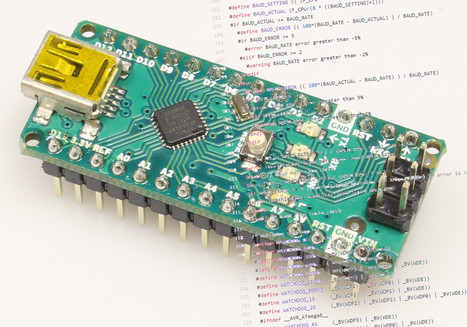
Stillschweigend hat Arduino den Bootloader für die Nano-Boards Anfang 2018 ausgetauscht. Wer sich ein neues Original-Board kauft, kann eine unangenehme Überraschung erleben.

Meistens benutzen wir in der Redaktion die billigen China-Kopien der Arduinos. Als wir jetzt allerdings Mal wieder einen mit FTDI-Chip brauchten, um etwas auszuprobieren, bestellten wir einen originalen Arduino Nano und kamen kurz ins Straucheln.


Learn more / En savoir plus / Mehr erfahren:


https://www.scoop.it/t/21st-century-learning-and-teaching/?&tag=ARDUINO


Gust MEES's insight:

Stillschweigend hat Arduino den Bootloader für die Nano-Boards Anfang 2018 ausgetauscht. Wer sich ein neues Original-Board kauft, kann eine unangenehme Überraschung erleben.

Meistens benutzen wir in der Redaktion die billigen China-Kopien der Arduinos. Als wir jetzt allerdings Mal wieder einen mit FTDI-Chip brauchten, um etwas auszuprobieren, bestellten wir einen originalen Arduino Nano und kamen kurz ins Straucheln.


Learn more / En savoir plus / Mehr erfahren:


https://www.scoop.it/t/21st-century-learning-and-teaching/?&tag=ARDUINO


No comment yet.
Scooped by Gust MEES
April 2, 2018 8:10 AM
Scoop.it!

First Steps with the Arduino-UNO R3 | Maker, MakerED, Coding | 2.8″ TFT Touch Screen with SDCard | #ElectronicsBadge #LEARNingByDoing

First Steps with the Arduino-UNO R3 | Maker, MakerED, Coding | 2.8″ TFT Touch Screen with SDCard | #ElectronicsBadge #LEARNingByDoing | 21st Century Learning and Teaching | Scoop.it

I was very happy when I got delivered that nice looking 2.8 inches TFT with incorporated SDCard. I ordered it on Amazon and it is from ELEGOO. It was delivered with a small CD where a lot of coding examples are integrated and a well done manual. SO, I started as soon…


Learn more / En savoir plus / Mehr erfahren:


https://www.scoop.it/t/21st-century-learning-and-teaching/?&tag=ARDUINO


Gust MEES's insight:

I was very happy when I got delivered that nice looking 2.8 inches TFT with incorporated SDCard. I ordered it on Amazon and it is from ELEGOO. It was delivered with a small CD where a lot of coding examples are integrated and a well done manual. SO, I started as soon…


Learn more / En savoir plus / Mehr erfahren:


https://www.scoop.it/t/21st-century-learning-and-teaching/?&tag=ARDUINO


No comment yet.
Scooped by Gust MEES
March 27, 2018 7:13 PM
Scoop.it!

IoT Analytics - ThingSpeak Internet of Things | #Coding #Maker #MakerSpaces #Analyzing #Visualizing

IoT Analytics - ThingSpeak Internet of Things | #Coding #Maker #MakerSpaces #Analyzing #Visualizing | 21st Century Learning and Teaching | Scoop.it

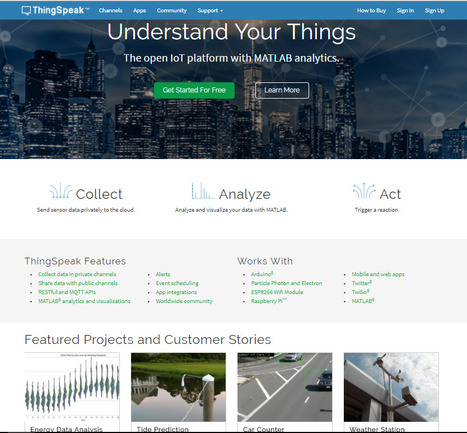
ThingSpeak is the open IoT platform with MATLAB analytics.


Learn more / En savoir plus / Mehr erfahren:


https://www.scoop.it/t/21st-century-learning-and-teaching/?&tag=ARDUINO


Gust MEES's insight:

ThingSpeak is the open IoT platform with MATLAB analytics.


Learn more / En savoir plus / Mehr erfahren:


https://www.scoop.it/t/21st-century-learning-and-teaching/?&tag=ARDUINO


Kami Campbell's curator insight, March 29, 2018 1:20 AM
Share your insight
Scooped by Gust MEES
March 25, 2018 6:43 PM
Scoop.it!

First Steps with the #Arduino-NANO | #DHT22 Temperature/Humidity with Meter | #Maker, #MakerED, #Coding , #MakerSpaces

First Steps with the #Arduino-NANO | #DHT22 Temperature/Humidity with Meter | #Maker, #MakerED, #Coding , #MakerSpaces | 21st Century Learning and Teaching | Scoop.it

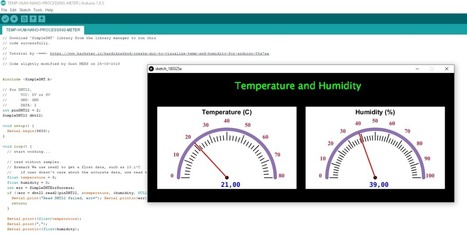
Arduino-NANO | DHT22 Temperature/Humidity with Meter


I was looking to find the most easy way to show people and to GET them interested into "Coding" with a minimum of components and expenses, as well as having directly a "success feeling" to be motivated to continue slowly but surely! Here it is; ONLY three…


Learn more / En savoir plus / Mehr erfahren:


https://www.scoop.it/t/21st-century-learning-and-teaching/?&tag=ARDUINO


Gust MEES's insight:

Arduino-NANO | DHT22 Temperature/Humidity with Meter


I was looking to find the most easy way to show people and to GET them interested into "Coding" with a minimum of components and expenses, as well as having directly a "success feeling" to be motivated to continue slowly but surely! Here it is; ONLY three…


Learn more / En savoir plus / Mehr erfahren:


https://www.scoop.it/t/21st-century-learning-and-teaching/?&tag=ARDUINO


Graphics Designing's curator insight, March 26, 2018 2:15 AM

Custom postcard design services are the best way to promote your business and personal brand.

Scooped by Gust MEES
March 23, 2018 9:23 PM
Scoop.it!

How TinkerCAD Solved My Arduino Problem - YouTube | #Coding #Maker #MakerED #MakerSpaces #LEARNingByDoing #VisualProgramming 

After teaching Arduino in my class for about 3 years now, I have discovered a problem as we were about to begin the unit this year. It needed a solution and TinkerCAD was the answer. Check out how I use it to do more than I thought I could the old way.


Learn more / En savoir plus / Mehr erfahren:


https://www.scoop.it/t/21st-century-learning-and-teaching/?&tag=Visual+programming


Gust MEES's insight:

After teaching Arduino in my class for about 3 years now, I have discovered a problem as we were about to begin the unit this year. It needed a solution and TinkerCAD was the answer. Check out how I use it to do more than I thought I could the old way.


Learn more / En savoir plus / Mehr erfahren:


https://www.scoop.it/t/21st-century-learning-and-teaching/?&tag=Visual+programming


No comment yet.
Scooped by Gust MEES
March 23, 2018 1:23 PM
Scoop.it!

Using TINKERCAD for Arduino projects | #Coding #Simulators #VisualProgramming #Maker #MakerED #MakerSpaces #LEARNingByDoing

Using TINKERCAD for Arduino projects | #Coding #Simulators #VisualProgramming #Maker #MakerED #MakerSpaces #LEARNingByDoing | 21st Century Learning and Teaching | Scoop.it

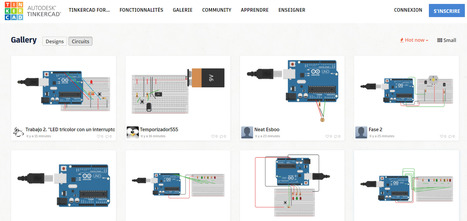
Connect the elements on the breadboard circuit and GET directly the code and also a simulation without having used the hardware.


Learn more / En savoir plus / Mehr erfahren:


https://www.scoop.it/t/21st-century-learning-and-teaching/?&tag=Visual+programming


https://www.scoop.it/t/21st-century-learning-and-teaching/?&tag=ARDUINO


https://www.youtube.com/watch?v=N0-3AqKoAyo


Gust MEES's insight:

Connect the elements on the breadboard circuit and GET directly the code and also a simulation without having used the hardware.


Learn more / En savoir plus / Mehr erfahren:


https://www.scoop.it/t/21st-century-learning-and-teaching/?&tag=Visual+programming


https://www.scoop.it/t/21st-century-learning-and-teaching/?&tag=ARDUINO


https://www.youtube.com/watch?v=N0-3AqKoAyo


No comment yet.
Scooped by Gust MEES
March 22, 2018 8:27 AM
Scoop.it!

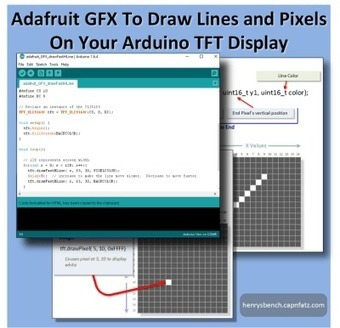
Using Adafruit GFX to Draw Lines and Pixels | #Coding #Arduino #Maker #MakerED #MakerSpaces #PracTICE

Using Adafruit GFX to Draw Lines and Pixels | #Coding #Arduino #Maker #MakerED #MakerSpaces #PracTICE | 21st Century Learning and Teaching | Scoop.it

This well illustrated article has sample sketches and clear explanations of what it will take to draw pixels and lines on your TFT Display.


Learn more / En savoir plus / Mehr erfahren:


https://www.scoop.it/t/21st-century-learning-and-teaching/?&tag=ARDUINO


Gust MEES's insight:

This well illustrated article has sample sketches and clear explanations of what it will take to draw pixels and lines on your TFT Display.


Learn more / En savoir plus / Mehr erfahren:


https://www.scoop.it/t/21st-century-learning-and-teaching/?&tag=ARDUINO


No comment yet.
Scooped by Gust MEES
March 18, 2018 11:40 AM
Scoop.it!

Processing.org | #Coding #Maker #MakerED #MakerSpaces #VisualArts #Software #OpenSource

Processing.org | #Coding #Maker #MakerED #MakerSpaces #VisualArts #Software #OpenSource | 21st Century Learning and Teaching | Scoop.it

Processing is a flexible software sketchbook and a language for learning how to code within the context of the visual arts. Since 2001, Processing has promoted software literacy within the visual arts and visual literacy within technology.


[Gust MEES] It gets used in following projects, to understand what it is about:


https://www.youtube.com/watch?v=P6Obm7sodhg


https://www.youtube.com/watch?v=oZsawlu-U3o


Gust MEES's insight:

Processing is a flexible software sketchbook and a language for learning how to code within the context of the visual arts. Since 2001, Processing has promoted software literacy within the visual arts and visual literacy within technology.


[Gust MEES] It gets used in following projects, to understand what it is about:


https://www.youtube.com/watch?v=P6Obm7sodhg


https://www.youtube.com/watch?v=oZsawlu-U3o


No comment yet.
Scooped by Gust MEES
March 15, 2018 1:19 PM
Scoop.it!

Good to know when using different Arduino boards | Arduino - Wire | #Coding #Maker #MakerED #MakerSpaces #LEARNingByDoing

Wire Library

This library allows you to communicate with I2C / TWI devices. On the Arduino boards with the R3 layout (1.0 pinout), the SDA (data line) and SCL (clock line) are on the pin headers close to the AREF pin. The Arduino Due has two I2C / TWI interfaces SDA1 and SCL1 are near to the AREF pin and the additional one is on pins 20 and 21.

As a reference the table below shows where TWI pins are located on various Arduino boards.


BoardI2C / TWI pinsUno, EthernetA4 (SDA), A5 (SCL)Mega256020 (SDA), 21 (SCL)Leonardo2 (SDA), 3 (SCL)Due20 (SDA), 21 (SCL), SDA1, SCL1


As of Arduino 1.0, the library inherits from the Stream functions, making it consistent with other read/write libraries. Because of this, send() and receive() have been replaced with read() and write().


Gust MEES's insight:

This library allows you to communicate with I2C / TWI devices. On the Arduino boards with the R3 layout (1.0 pinout), the SDA (data line) and SCL (clock line) are on the pin headers close to the AREF pin. The Arduino Due has two I2C / TWI interfaces SDA1 and SCL1 are near to the AREF pin and the additional one is on pins 20 and 21.

As a reference the table below shows where TWI pins are located on various Arduino boards.


BoardI2C / TWI pinsUno, EthernetA4 (SDA), A5 (SCL)Mega256020 (SDA), 21 (SCL)Leonardo2 (SDA), 3 (SCL)Due20 (SDA), 21 (SCL), SDA1, SCL1


As of Arduino 1.0, the library inherits from the Stream functions, making it consistent with other read/write libraries. Because of this, send() and receive() have been replaced with read() and write().


No comment yet.
Scooped by Gust MEES
March 15, 2018 7:04 AM
Scoop.it!

Raspberry Pi 3 Model B+ arrives: Faster CPU, Wi-Fi, 300Mbps Ethernet | #Maker #MakerED #MakerSpaces #Coding #LEARNingByDoing

Raspberry Pi 3 Model B+ arrives: Faster CPU, Wi-Fi, 300Mbps Ethernet | #Maker #MakerED #MakerSpaces #Coding #LEARNingByDoing | 21st Century Learning and Teaching | Scoop.it

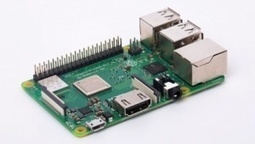
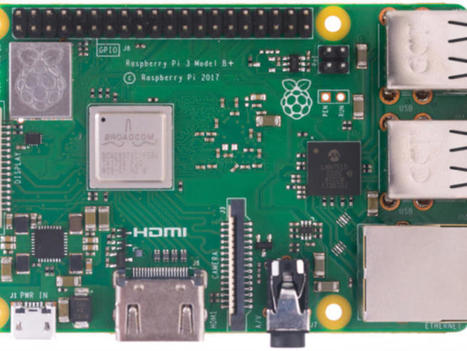
The Raspberry Pi Foundation has launched the Raspberry Pi 3 Model B+, offering a faster CPU and faster wireless throughput than its predecessor, the Raspberry Pi 3 Model B.

Raspberry Pi 3 Model B+ comes exactly two years after the launch of the Raspberry Pi 3 Model B and is in line with Raspberry Pi Foundation's two-year B+ 'evolution' upgrade.

In other words, the changes don't warrant calling it a Raspberry Pi 4, but there are noticeable improvements, including a faster processor, higher Wi-Fi speeds, and faster Ethernet.


Learn more / En savoir plus / Mehr erfahren:


https://www.scoop.it/t/21st-century-learning-and-teaching/?&tag=Raspberry+Pi


Gust MEES's insight:

The Raspberry Pi Foundation has launched the Raspberry Pi 3 Model B+, offering a faster CPU and faster wireless throughput than its predecessor, the Raspberry Pi 3 Model B.

Raspberry Pi 3 Model B+ comes exactly two years after the launch of the Raspberry Pi 3 Model B and is in line with Raspberry Pi Foundation's two-year B+ 'evolution' upgrade.

In other words, the changes don't warrant calling it a Raspberry Pi 4, but there are noticeable improvements, including a faster processor, higher Wi-Fi speeds, and faster Ethernet.


Learn more / En savoir plus / Mehr erfahren:


https://www.scoop.it/t/21st-century-learning-and-teaching/?&tag=Raspberry+Pi


No comment yet.