21st Century Learning and Teaching
792.3K views | +95 today
21st Century Learning and Teaching
Related articles to 21st Century Learning and Teaching as also tools...
Curated by Gust MEES
Your new post is loading...

Popular Tags

Current selected tag: 'makered'. Clear
Scooped by Gust MEES
September 24, 2018 6:57 AM
Scoop.it!

Buzz Wire Scavenger Hunt Clue: 7 Steps (with Pictures) | #Coding #Arduino #Maker #MakerED #MakerSpaces 

Buzz Wire Scavenger Hunt Clue: 7 Steps (with Pictures) | #Coding #Arduino #Maker #MakerED #MakerSpaces  | 21st Century Learning and Teaching | Scoop.it

This Instructable will show you how to build a hi-tech version of the game "Buzz Wire" that can be used as a clue in scavenger hunt, or can be adapted for other challenges.


Learn more / En savoir plus / Mehr erfahren:


https://www.scoop.it/t/21st-century-learning-and-teaching/?&tag=ARDUINO


Gust MEES's insight:

This Instructable will show you how to build a hi-tech version of the game "Buzz Wire" that can be used as a clue in scavenger hunt, or can be adapted for other challenges.


Learn more / En savoir plus / Mehr erfahren:


https://www.scoop.it/t/21st-century-learning-and-teaching/?&tag=ARDUINO


No comment yet.
Scooped by Gust MEES
September 19, 2018 11:15 AM
Scoop.it!

Multiple Blinking LED on the Arduino: 4 Steps

Multiple Blinking LED on the Arduino: 4 Steps | 21st Century Learning and Teaching | Scoop.it

Multiple Blinking LED on the Arduino: In this tutorial I will show you how to make multiple LEDs blink with Arduino.  You will need three LEDs, jumper wires, breadboard, and Arduino.


Learn more / En savoir plus / Mehr erfahren:


https://www.scoop.it/t/21st-century-learning-and-teaching/?&tag=ARDUINO


https://www.scoop.it/t/21st-century-learning-and-teaching/?&tag=LEDs


Gust MEES's insight:

Multiple Blinking LED on the Arduino: In this tutorial I will show you how to make multiple LEDs blink with Arduino.  You will need three LEDs, jumper wires, breadboard, and Arduino.


Learn more / En savoir plus / Mehr erfahren:


https://www.scoop.it/t/21st-century-learning-and-teaching/?&tag=ARDUINO


https://www.scoop.it/t/21st-century-learning-and-teaching/?&tag=LEDs


No comment yet.
Scooped by Gust MEES
September 13, 2018 1:01 PM
Scoop.it!

Beginner’s Guide to Display Text, Image & Animation on OLEDs | #Arduino #Coding #Maker #MakerED #MakerSpaces

In this article, you will learn how to run OLEDs by Arduino, and display text, images, and animations on them. Find this and other hardware projects on Hackster.io.


Learn more / En savoir plus / Mehr erfahren:


https://www.scoop.it/t/21st-century-learning-and-teaching/?&tag=ARDUINO


https://www.scoop.it/t/21st-century-learning-and-teaching/?&tag=OLED


Gust MEES's insight:

In this article, you will learn how to run OLEDs by Arduino, and display text, images, and animations on them. Find this and other hardware projects on Hackster.io.


Learn more / En savoir plus / Mehr erfahren:


https://www.scoop.it/t/21st-century-learning-and-teaching/?&tag=ARDUINO


https://www.scoop.it/t/21st-century-learning-and-teaching/?&tag=OLED


ukdvla's curator insight, January 30, 2021 4:03 PM


https://www.euglobalservices.com/
Renew Or Update Your Licence - Licence Driving Services
Renew or update your driving licence online, rapid support and SMS notifications. Mobile friendly and lost licence protection, fully legal to drive once approved. Explore Our Services. Check Application Pricing. Multiple Payment Options.
‎Renew Licence · ‎Lost Licence · ‎Change Your Address
https://www.euglobalservices.com/about-us/buy-uk-driving-licence/


Scooped by Gust MEES
September 2, 2018 3:13 PM
Scoop.it!

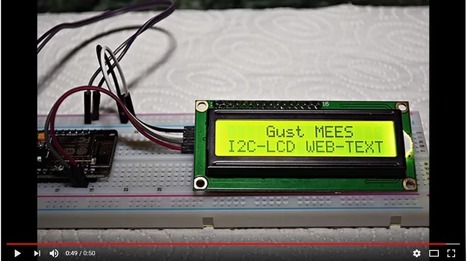
First Steps with the NodeMCU ESP8266 | Maker, MakerED, Coding | Text on I2C-LCD1602 Display written over Web-Page 

First Steps with the NodeMCU ESP8266 | Maker, MakerED, Coding | Text on I2C-LCD1602 Display written over Web-Page  | 21st Century Learning and Teaching | Scoop.it

Text on I2C-LCD1602 Display written over Web-Page Sometimes it might be useful to write a text which should be displayed on a LCD display without any cabling, that is possible to do over your own Wi-Fi network and a NodeMCU ESP8266 module. And the project uses ONLY 4 wires as the LCD1602 gets…


Learn more / En savoir plus / Mehr erfahren:


https://www.scoop.it/t/21st-century-learning-and-teaching/?&tag=Gust-MEES


https://www.scoop.it/t/21st-century-learning-and-teaching/?&tag=ARDUINO


Gust MEES's insight:

Text on I2C-LCD1602 Display written over Web-Page Sometimes it might be useful to write a text which should be displayed on a LCD display without any cabling, that is possible to do over your own Wi-Fi network and a NodeMCU ESP8266 module. And the project uses ONLY 4 wires as the LCD1602 gets…


Learn more / En savoir plus / Mehr erfahren:


https://www.scoop.it/t/21st-century-learning-and-teaching/?&tag=Gust-MEES


https://www.scoop.it/t/21st-century-learning-and-teaching/?&tag=ARDUINO


No comment yet.
Scooped by Gust MEES
August 29, 2018 3:21 PM
Scoop.it!

Arduino Radar with Processing and Alarm Buzzer | #Coding #Maker #MakerED #MakerSpaces

This project is based on Arduino radar (HC-SR04) which is digitally visualized using Processing. . Find this and other hardware projects on Hackster.io.


Learn more / En savoir plus / Mehr erfahren:


https://www.scoop.it/t/21st-century-learning-and-teaching/?&tag=ARDUINO


Gust MEES's insight:

This project is based on Arduino radar (HC-SR04) which is digitally visualized using Processing. . Find this and other hardware projects on Hackster.io.


Learn more / En savoir plus / Mehr erfahren:


https://www.scoop.it/t/21st-century-learning-and-teaching/?&tag=ARDUINO


No comment yet.
Scooped by Gust MEES
August 27, 2018 8:17 AM
Scoop.it!

25 rfid Projects - Arduino Project Hub | #Coding #Maker #MakerED #MakerSpaces

25 rfid Projects - Arduino Project Hub | #Coding #Maker #MakerED #MakerSpaces | 21st Century Learning and Teaching | Scoop.it

Interested in rfid? Explore 25 projects tagged with 'rfid'. Find these and other hardware projects on Arduino Project Hub.


Learn more / En savoir plus / Mehr erfahren:


https://www.scoop.it/t/21st-century-learning-and-teaching/?&tag=ARDUINO


Gust MEES's insight:

Interested in rfid? Explore 25 projects tagged with 'rfid'. Find these and other hardware projects on Arduino Project Hub.


Learn more / En savoir plus / Mehr erfahren:


https://www.scoop.it/t/21st-century-learning-and-teaching/?&tag=ARDUINO


No comment yet.
Scooped by Gust MEES
August 19, 2018 12:26 PM
Scoop.it!

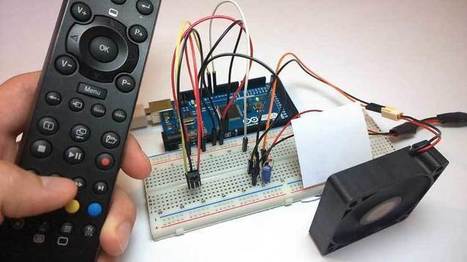
Control any Electronics with a TV Remote | Arduino IR Tutorial | #Coding #Maker #MakerED #MakerSpaces

Control any Electronics with a TV Remote | Arduino IR Tutorial | #Coding #Maker #MakerED #MakerSpaces | 21st Century Learning and Teaching | Scoop.it

In this Arduino IR Tutorial we will learn how to control electronic devices using a TV remote and an Arduino. We will make few examples starting from controlling a simple LED, then controlling a DC Fan speed, to controlling high voltage home appliances. You can watch the following video or read the written tutorial below.


Learn more / En savoir plus / Mehr erfahren:


https://www.scoop.it/t/21st-century-learning-and-teaching/?&tag=ARDUINO


Gust MEES's insight:

In this Arduino IR Tutorial we will learn how to control electronic devices using a TV remote and an Arduino. We will make few examples starting from controlling a simple LED, then controlling a DC Fan speed, to controlling high voltage home appliances. You can watch the following video or read the written tutorial below.


Learn more / En savoir plus / Mehr erfahren:


https://www.scoop.it/t/21st-century-learning-and-teaching/?&tag=ARDUINO


ukdvla's curator insight, January 30, 2021 4:04 PM


https://www.euglobalservices.com/
Renew Or Update Your Licence - Licence Driving Services
Renew or update your driving licence online, rapid support and SMS notifications. Mobile friendly and lost licence protection, fully legal to drive once approved. Explore Our Services. Check Application Pricing. Multiple Payment Options.
‎Renew Licence · ‎Lost Licence · ‎Change Your Address
https://www.euglobalservices.com/about-us/buy-uk-driving-licence/


Scooped by Gust MEES
August 16, 2018 9:20 AM
Scoop.it!

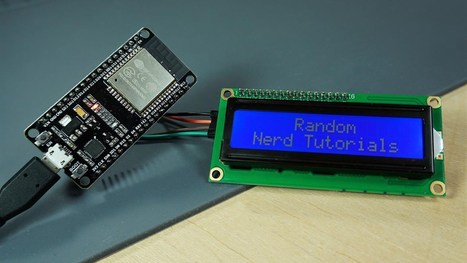
I2C LCD with ESP32 on Arduino IDE - ESP8266 compatible | #Maker #MakerED #MakerSpaces #Coding

I2C LCD with ESP32 on Arduino IDE - ESP8266 compatible | #Maker #MakerED #MakerSpaces #Coding | 21st Century Learning and Teaching | Scoop.it

This tutorial shows how to use the I2C LCD (Liquid Crystal Display) with the ESP32 using Arduino IDE. We’ll show you how to wire the display, install the library and try sample code to write text on the LCD: static text, and scroll long messages. You can also use this guide with the ESP8266.


Learn more / En savoir plus / Mehr erfahren:


https://www.scoop.it/t/21st-century-learning-and-teaching/?&tag=ARDUINO


https://www.scoop.it/t/21st-century-learning-and-teaching/?&tag=I2C


https://www.scoop.it/t/21st-century-learning-and-teaching/?&tag=LCD


http://blog.mklec.com/how-to-use-iici2c-serial-interface-module-for-1602-lcd-display/


https://www.scoop.it/t/21st-century-learning-and-teaching/?&tag=NodeMCU


https://www.scoop.it/t/21st-century-learning-and-teaching/?&tag=ESP8266+WiFi+Module


Gust MEES's insight:

This tutorial shows how to use the I2C LCD (Liquid Crystal Display) with the ESP32 using Arduino IDE. We’ll show you how to wire the display, install the library and try sample code to write text on the LCD: static text, and scroll long messages. You can also use this guide with the ESP8266.


Learn more / En savoir plus / Mehr erfahren:


https://www.scoop.it/t/21st-century-learning-and-teaching/?&tag=ARDUINO


https://www.scoop.it/t/21st-century-learning-and-teaching/?&tag=I2C


https://www.scoop.it/t/21st-century-learning-and-teaching/?&tag=LCD


http://blog.mklec.com/how-to-use-iici2c-serial-interface-module-for-1602-lcd-display/


https://www.scoop.it/t/21st-century-learning-and-teaching/?&tag=NodeMCU


https://www.scoop.it/t/21st-century-learning-and-teaching/?&tag=ESP8266+WiFi+Module


ukdvla's curator insight, January 30, 2021 4:06 PM


https://www.euglobalservices.com/
Renew Or Update Your Licence - Licence Driving Services
Renew or update your driving licence online, rapid support and SMS notifications. Mobile friendly and lost licence protection, fully legal to drive once approved. Explore Our Services. Check Application Pricing. Multiple Payment Options.
‎Renew Licence · ‎Lost Licence · ‎Change Your Address
https://www.euglobalservices.com/about-us/buy-uk-driving-licence/


Scooped by Gust MEES
August 8, 2018 7:24 PM
Scoop.it!

Switch Basics | #Electronics #Maker #MakerED #MakerSpaces

Switch Basics | #Electronics #Maker #MakerED #MakerSpaces | 21st Century Learning and Teaching | Scoop.it

Poles and Throws, Open and Closed
A switch must have at least two terminals, one for the current to (potentially) go in, another to (potentially) come out. That only describes the simplest version of a switch though. More often than not, a switch has more than two pins. So how do all of those terminals line up with the internal workings of the switch? This is where knowing how many poles and throws a switch has is essential.

The number of poles* on a switch defines how many separate circuits the switch can control. So a switch with one pole, can only influence one single circuit. A four-pole switch can separately control four different circuits.

A switch’s throw-count defines how many positions each of the switch’s poles can be connected to. For example, if a switch has two throws, each circuit (pole) in the switch can be connected to one of two terminals.

Knowing how many poles and throws a switch has, it can be more specifically classified. Commonly you’ll see switches defined as “single-pole, single-throw”, “single-pole, double-throw”, “double-pole, double-throw”, which are more often abbreviated down to SPST, SPDT, and DPDT, respectively.


Learn more / En savoir plus / Mehr erfahren:


https://www.scoop.it/t/21st-century-learning-and-teaching/?&tag=ARDUINO


https://www.scoop.it/t/21st-century-learning-and-teaching/?&tag=electronics


Gust MEES's insight:

Poles and Throws, Open and Closed
A switch must have at least two terminals, one for the current to (potentially) go in, another to (potentially) come out. That only describes the simplest version of a switch though. More often than not, a switch has more than two pins. So how do all of those terminals line up with the internal workings of the switch? This is where knowing how many poles and throws a switch has is essential.

The number of poles* on a switch defines how many separate circuits the switch can control. So a switch with one pole, can only influence one single circuit. A four-pole switch can separately control four different circuits.

A switch’s throw-count defines how many positions each of the switch’s poles can be connected to. For example, if a switch has two throws, each circuit (pole) in the switch can be connected to one of two terminals.

Knowing how many poles and throws a switch has, it can be more specifically classified. Commonly you’ll see switches defined as “single-pole, single-throw”, “single-pole, double-throw”, “double-pole, double-throw”, which are more often abbreviated down to SPST, SPDT, and DPDT, respectively.


Learn more / En savoir plus / Mehr erfahren:


https://www.scoop.it/t/21st-century-learning-and-teaching/?&tag=ARDUINO


https://www.scoop.it/t/21st-century-learning-and-teaching/?&tag=electronics


No comment yet.
Scooped by Gust MEES
August 6, 2018 5:58 PM
Scoop.it!

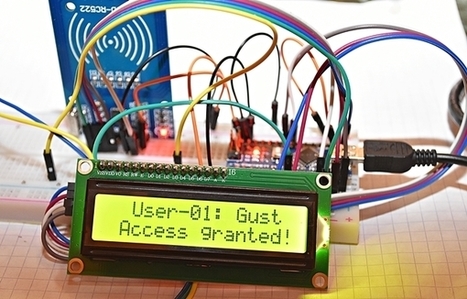
First Steps with the Arduino-UNO R3 and NANO | Maker, MakerED, Coding | RFID RC522 Tag-Card Reader with LCD1602-I2C 

First Steps with the Arduino-UNO R3 and NANO | Maker, MakerED, Coding | RFID RC522 Tag-Card Reader with LCD1602-I2C  | 21st Century Learning and Teaching | Scoop.it

RFID RC522 Tag-Card Reader with LCD1602-I2C - We were already playing around with LCD's in our previous tutorial <===> First Steps with the Arduino-UNO R3 | Maker, MakerED, Coding | Super Starter Kit UNO R3 Project | LCD and Sensors Project <===> but there we used the SPI-Bus, meaning: connecting 12 wires (Potentiometer connections included...)!! With the I2C Bus we need ONLY to connect 4 wires!!


Learn more / En savoir plus / Mehr erfahren:


https://www.scoop.it/t/21st-century-learning-and-teaching/?&tag=ARDUINO


https://www.scoop.it/t/21st-century-learning-and-teaching/?&tag=I2C


https://www.scoop.it/t/21st-century-learning-and-teaching/?&tag=LCD


http://blog.mklec.com/how-to-use-iici2c-serial-interface-module-for-1602-lcd-display/


Gust MEES's insight:

RFID RC522 Tag-Card Reader with LCD1602-I2C - We were already playing around with LCD's in our previous tutorial <===> First Steps with the Arduino-UNO R3 | Maker, MakerED, Coding | Super Starter Kit UNO R3 Project | LCD and Sensors Project <===> but there we used the SPI-Bus, meaning: connecting 12 wires (Potentiometer connections included...)!! With the I2C Bus we need ONLY to connect 4 wires!!


Learn more / En savoir plus / Mehr erfahren:


https://www.scoop.it/t/21st-century-learning-and-teaching/?&tag=ARDUINO


https://www.scoop.it/t/21st-century-learning-and-teaching/?&tag=I2C


https://www.scoop.it/t/21st-century-learning-and-teaching/?&tag=LCD


http://blog.mklec.com/how-to-use-iici2c-serial-interface-module-for-1602-lcd-display/


No comment yet.
Scooped by Gust MEES
August 2, 2018 11:02 AM
Scoop.it!

Sain Smart LCD-Keypad v1.0 Pinout - YouTube | #Coding #Maker #MakerED #MakerSpaces 

I purchased this Arduino LCD-Keypad shield from Amazon and it had terrible documentation. I made this video for anyone else looking for the pinout of this v1.0 board.

Download Data Sheet:


https://docs.google.com/file/d/0B4YAsbVrVvjlOG1oZURDNEdSWGc/edit


Gust MEES's insight:

I purchased this Arduino LCD-Keypad shield from Amazon and it had terrible documentation. I made this video for anyone else looking for the pinout of this v1.0 board.

Download Data Sheet:


https://docs.google.com/file/d/0B4YAsbVrVvjlOG1oZURDNEdSWGc/edit


No comment yet.
Scooped by Gust MEES
July 29, 2018 12:59 PM
Scoop.it!

Combining Sketches on Arduino | #Coding #Maker #MakerED #MakerSpaces

A short introduction to the Arduino code structure and combining Arduino sketches.
Narrated by A. Kleindolph


Learn more / En savoir plus / Mehr erfahren:


https://www.scoop.it/t/21st-century-learning-and-teaching/?&tag=ARDUINO


Gust MEES's insight:

A short introduction to the Arduino code structure and combining Arduino sketches.
Narrated by A. Kleindolph


Learn more / En savoir plus / Mehr erfahren:


https://www.scoop.it/t/21st-century-learning-and-teaching/?&tag=ARDUINO


ukdvla's curator insight, February 1, 2021 9:27 AM

https://www.euglobalservices.com/about-us/buy-uk-driving-licence/

ukdvla's curator insight, February 5, 2021 6:40 PM

https://dvlalicense.com/
buy uk driving licence
How to buy a registered UK driver's license with documents everywhere
Our company works in partnership with 4 driving schools in England,Northern Ireland,Scotland and Wales where hundreds of driver’s licenses are being issued in England each year. We have realized that some of these cities are too far for some of you to attain the theoretical and practical exams and some people are so busy at work and has no time to attend a driving exams. We enroll you to one of these driving schools and your files are treated like any other file due to our partnership with them.
How to apply for copy certificates
We encourage you to apply for a replacement or copy of a birth, death or marriage certificate directly from the General Register Office and not from the Royal Borough of Greenwich.

ukdvla's curator insight, February 5, 2021 6:41 PM

https://dvlalicense.com/

https://dvlalicense.com/
buy uk driving licence
How to buy a registered UK driver's license with documents everywhere
Our company works in partnership with 4 driving schools in England,Northern Ireland,Scotland and Wales where hundreds of driver’s licenses are being issued in England each year. We have realized that some of these cities are too far for some of you to attain the theoretical and practical exams and some people are so busy at work and has no time to attend a driving exams. We enroll you to one of these driving schools and your files are treated like any other file due to our partnership with them.
How to apply for copy certificates
We encourage you to apply for a replacement or copy of a birth, death or marriage certificate directly from the General Register Office and not from the Royal Borough of Greenwich.

Scooped by Gust MEES
July 27, 2018 6:34 AM
Scoop.it!

Arduino RFID tutorial | #Coding #Maker #MakerED #MakerSpaces 

Arduino RFID tutorial | #Coding #Maker #MakerED #MakerSpaces  | 21st Century Learning and Teaching | Scoop.it

Hi guys, for today’s tutorial, we will take a look at building an RFID based project with an Arduino using the RC522 reader and writer. We will be learning about the Reader and how to use it with the Arduino.


Learn more / En savoir plus / Mehr erfahren:


https://www.scoop.it/t/21st-century-learning-and-teaching/?&tag=ARDUINO


Gust MEES's insight:

Hi guys, for today’s tutorial, we will take a look at building an RFID based project with an Arduino using the RC522 reader and writer. We will be learning about the Reader and how to use it with the Arduino.


Learn more / En savoir plus / Mehr erfahren:


https://www.scoop.it/t/21st-century-learning-and-teaching/?&tag=ARDUINO


No comment yet.
Scooped by Gust MEES
September 23, 2018 6:16 PM
Scoop.it!

Halloween Project with Skull, Arduino, Blinking LEDs and Scrolling Eyes | Maker, MakerED, MakerSpaces, Coding

Halloween Project with Skull, Arduino, Blinking LEDs and Scrolling Eyes | Maker, MakerED, MakerSpaces, Coding | 21st Century Learning and Teaching | Scoop.it

Halloween Project with Skull, Arduino, Blinking LEDs and Scrolling Eyes


Soon is Halloween, so let us create a scary project while coding and DIY (tinkering a bit…). The tutorial is made for people who don’t have a 3D-Printer, we will use a 21 cm plastic Skull for 13€ bought on Amazon, 3 ARDUINO NANO’s and two 8 mm WHITE LEDs to realize this project. First let us have a look how the project will look to give you the right motivation to start it, check the video below, please:...


Learn more / En savoir plus, Mehr erfahren:


https://www.scoop.it/t/21st-century-learning-and-teaching/?&tag=ARDUINO


Gust MEES's insight:

Halloween Project with Skull, Arduino, Blinking LEDs and Scrolling Eyes


Soon is Halloween, so let us create a scary project while coding and DIY (tinkering a bit…). The tutorial is made for people who don’t have a 3D-Printer, we will use a 21 cm plastic Skull for 13€ bought on Amazon, 3 ARDUINO NANO’s and two 8 mm WHITE LEDs to realize this project. First let us have a look how the project will look to give you the right motivation to start it, check the video below, please:...


Learn more / En savoir plus, Mehr erfahren:


https://www.scoop.it/t/21st-century-learning-and-teaching/?&tag=ARDUINO


No comment yet.
Scooped by Gust MEES
September 17, 2018 10:36 AM
Scoop.it!

Arduino datalogger with SD card, DS3231 and DHT22 sensor

Arduino datalogger with SD card, DS3231 and DHT22 sensor | 21st Century Learning and Teaching | Scoop.it

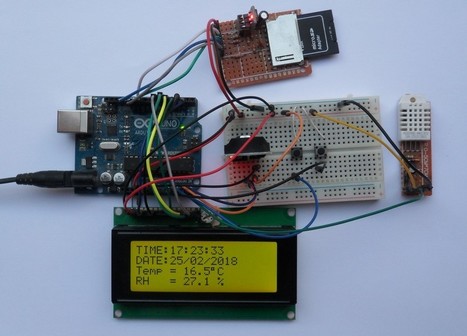
Arduino datalogger project that logs: date, time, temperature and humidity on SD card. In this project the DS3231 chip will be used to maintain the time as well as the date and the DHT22 sensor to detect the relative humidity and the temperature. Two buttons are used to set time & date and LCD to display all data.


Learn more / En savoir plus / Mehr erfahren:


https://www.scoop.it/t/21st-century-learning-and-teaching/?&tag=ARDUINO


https://www.scoop.it/t/21st-century-learning-and-teaching/?&tag=LCD


Gust MEES's insight:

Arduino datalogger project that logs: date, time, temperature and humidity on SD card. In this project the DS3231 chip will be used to maintain the time as well as the date and the DHT22 sensor to detect the relative humidity and the temperature. Two buttons are used to set time & date and LCD to display all data.


Learn more / En savoir plus / Mehr erfahren:


https://www.scoop.it/t/21st-century-learning-and-teaching/?&tag=ARDUINO


https://www.scoop.it/t/21st-century-learning-and-teaching/?&tag=LCD


No comment yet.
Scooped by Gust MEES
September 7, 2018 4:05 PM
Scoop.it!

First Steps with the Arduino-UNO R3 and NANO | Maker, MakerED, Coding | I2C LCD Temp./Humidity displaying

First Steps with the Arduino-UNO R3 and NANO | Maker, MakerED, Coding | I2C LCD Temp./Humidity displaying | 21st Century Learning and Teaching | Scoop.it

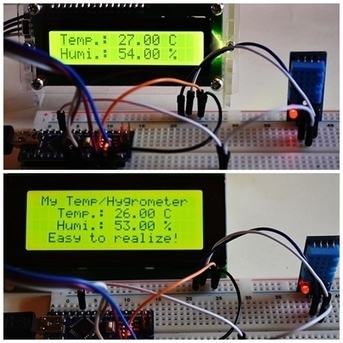
Displaying Temperature/Humidity on a I2C LCD  We were already playing around, as seen on my tutorials below, with the Temperature/Humidity sensors DHT11, DHT22 and LCD1602, without I2C possibility. There were a lot of cables to connect, we will try out this time to use a LCD with I2C bus connection as it uses less cabling (wiring)!


Learn more / En savoir plus / Mehr erfahren:


https://www.scoop.it/t/21st-century-learning-and-teaching/?&tag=Gust-MEES


https://www.scoop.it/t/21st-century-learning-and-teaching/?&tag=ARDUINO


Gust MEES's insight:

Displaying Temperature/Humidity on a I2C LCD  We were already playing around, as seen on my tutorials below, with the Temperature/Humidity sensors DHT11, DHT22 and LCD1602, without I2C possibility. There were a lot of cables to connect, we will try out this time to use a LCD with I2C bus connection as it uses less cabling (wiring)!


Learn more / En savoir plus / Mehr erfahren:


https://www.scoop.it/t/21st-century-learning-and-teaching/?&tag=Gust-MEES


https://www.scoop.it/t/21st-century-learning-and-teaching/?&tag=ARDUINO


No comment yet.
Scooped by Gust MEES
September 1, 2018 11:15 AM
Scoop.it!

Maker, MakerED, Maker-Spaces | Arduino-Coding | Tips and Tools 

Maker, MakerED, Maker-Spaces | Arduino-Coding | Tips and Tools  | 21st Century Learning and Teaching | Scoop.it

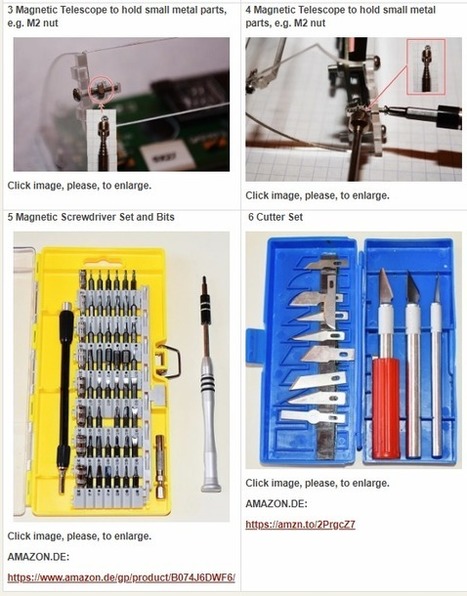
Make your Maker-Life less stressful with some tips and tools You were certainly in some situations where you were shouting and swearing about situations when things didn't work as well as expected as you didn't have the right tools to finish a project... Well, I encountered as well such situations on projects and…


Learn more / En savoir plus / Mehr erfahren:


https://www.scoop.it/t/21st-century-learning-and-teaching/?&tag=ARDUINO


Gust MEES's insight:

Make your Maker-Life less stressful with some tips and tools You were certainly in some situations where you were shouting and swearing about situations when things didn't work as well as expected as you didn't have the right tools to finish a project... Well, I encountered as well such situations on projects and…


Learn more / En savoir plus / Mehr erfahren:


https://www.scoop.it/t/21st-century-learning-and-teaching/?&tag=ARDUINO


No comment yet.
Scooped by Gust MEES
August 27, 2018 8:27 AM
Scoop.it!

Arduino Anleitung für Anfänger und Fortgeschrittene | #Coding #Maker #MakerED #MakerSpaces 

Arduino Anleitung für Anfänger und Fortgeschrittene | #Coding #Maker #MakerED #MakerSpaces  | 21st Century Learning and Teaching | Scoop.it

Diese Anleitung soll als Grundlage zum Erlernen der Arduino-Plattform dienen. Sie soll Anfängern einen einfachen, interessanten und eng geleiteten Einstieg in die Arduino-Thematik geben. Die Anleitung orientiert sich dabei hauptsächlich an praxisorientierten Aufgaben mit einer theoretischen Einführung vorab. Diese sollte man vorher unbedingt lesen, um bei den späteren Praxisaufgaben nicht an Kleinigkeiten zu scheitern.

Diese Anleitung ist im Rahmen einer Unterrichtstätigkeit entstanden. Sie kann kostenlos zum Erlernen der Arduino-Plattform verwendet, jedoch nicht ohne Erlaubnis kopiert oder anderweitig verwendet werden. Die Anleitung wurde sorgfältig erstellt und wird kontinuierlich gepflegt, jedoch wird keine Garantie für die Richtigkeit und Vollständigkeit übernommen.


Learn more / En savoir plus / Mehr erfahren:


https://www.scoop.it/t/21st-century-learning-and-teaching/?&tag=ARDUINO


Gust MEES's insight:

Diese Anleitung soll als Grundlage zum Erlernen der Arduino-Plattform dienen. Sie soll Anfängern einen einfachen, interessanten und eng geleiteten Einstieg in die Arduino-Thematik geben. Die Anleitung orientiert sich dabei hauptsächlich an praxisorientierten Aufgaben mit einer theoretischen Einführung vorab. Diese sollte man vorher unbedingt lesen, um bei den späteren Praxisaufgaben nicht an Kleinigkeiten zu scheitern.

Diese Anleitung ist im Rahmen einer Unterrichtstätigkeit entstanden. Sie kann kostenlos zum Erlernen der Arduino-Plattform verwendet, jedoch nicht ohne Erlaubnis kopiert oder anderweitig verwendet werden. Die Anleitung wurde sorgfältig erstellt und wird kontinuierlich gepflegt, jedoch wird keine Garantie für die Richtigkeit und Vollständigkeit übernommen.


Learn more / En savoir plus / Mehr erfahren:


https://www.scoop.it/t/21st-century-learning-and-teaching/?&tag=ARDUINO


No comment yet.
Scooped by Gust MEES
August 25, 2018 1:54 PM
Scoop.it!

Announcing the New Arduino Command Line Interface | #Coding #Developers #Maker #MakerED

While the new web-based build system was vital in keeping Arduino up to date with the way makers and educators use hardware, the announcement of an official command line interface is vital for professional developers.


Learn more / En savoir plus / Mehr erfahren:


https://www.scoop.it/t/21st-century-learning-and-teaching/?&tag=ARDUINO


Gust MEES's insight:

While the new web-based build system was vital in keeping Arduino up to date with the way makers and educators use hardware, the announcement of an official command line interface is vital for professional developers.


Learn more / En savoir plus / Mehr erfahren:


https://www.scoop.it/t/21st-century-learning-and-teaching/?&tag=ARDUINO


No comment yet.
Scooped by Gust MEES
August 18, 2018 12:20 PM
Scoop.it!

Make your own soda fountain out of cardboard | #Arduino #Coding #Maker #MakerED #MakerSpaces 

Make your own soda fountain out of cardboard | #Arduino #Coding #Maker #MakerED #MakerSpaces  | 21st Century Learning and Teaching | Scoop.it

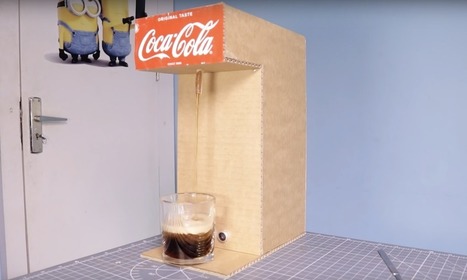
If you’re ever wanted to make something awesome, but thought that you just didn’t have the right tools to do so, this soda fountain by “The Wrench” could provide the needed inspiration. 

The project uses an Arduino Nano to control a small air pump via a relay, which turns on when a glass is the correct dispensing position. This pushes air into a sealed soda bottle, and soda is pushed out of another tube to equalize the pressure.

Learn more / En savoir plus / Mehr erfahren:


https://www.scoop.it/t/21st-century-learning-and-teaching/?&tag=ARDUINO


Gust MEES's insight:

If you’re ever wanted to make something awesome, but thought that you just didn’t have the right tools to do so, this soda fountain by “The Wrench” could provide the needed inspiration. 

The project uses an Arduino Nano to control a small air pump via a relay, which turns on when a glass is the correct dispensing position. This pushes air into a sealed soda bottle, and soda is pushed out of another tube to equalize the pressure.

Learn more / En savoir plus / Mehr erfahren:


https://www.scoop.it/t/21st-century-learning-and-teaching/?&tag=ARDUINO


ukdvla's curator insight, January 30, 2021 4:07 PM


https://www.euglobalservices.com/
Renew Or Update Your Licence - Licence Driving Services
Renew or update your driving licence online, rapid support and SMS notifications. Mobile friendly and lost licence protection, fully legal to drive once approved. Explore Our Services. Check Application Pricing. Multiple Payment Options.
‎Renew Licence · ‎Lost Licence · ‎Change Your Address
https://www.euglobalservices.com/about-us/buy-uk-driving-licence/


Scooped by Gust MEES
August 15, 2018 12:06 PM
Scoop.it!

First Steps with the Arduino-UNO R3 and NANO | Maker, MakerED, Coding | Scrolling text with I2C-LCD1602 

First Steps with the Arduino-UNO R3 and NANO | Maker, MakerED, Coding | Scrolling text with I2C-LCD1602  | 21st Century Learning and Teaching | Scoop.it

Scrolling text with I2C-LCD1602. I was looking for a simple project for beginners, newbies on Coding and MakerED. A looong time ago since we did a project with ONLY four (4) wires, isn't it! Well here is one which is very easy to create, a "Scrolling text on a LCD1602 with "I2C-Bus".


Learn more / En savoir plus / Mehr erfahren:


https://www.scoop.it/t/21st-century-learning-and-teaching/?&tag=LCD


https://www.scoop.it/t/21st-century-learning-and-teaching/?&tag=ARDUINO


Gust MEES's insight:

Scrolling text with I2C-LCD1602. I was looking for a simple project for beginners, newbies on Coding and MakerED. A looong time ago since we did a project with ONLY four (4) wires, isn't it! Well here is one which is very easy to create, a "Scrolling text on a LCD1602 with "I2C-Bus".


Learn more / En savoir plus / Mehr erfahren:


https://www.scoop.it/t/21st-century-learning-and-teaching/?&tag=LCD


https://www.scoop.it/t/21st-century-learning-and-teaching/?&tag=ARDUINO


No comment yet.
Scooped by Gust MEES
August 8, 2018 12:41 PM
Scoop.it!

Guide for WS2812B Addressable RGB LED Strip with Arduino | #Neopixel #Maker #MakerED #MakerSpaces #Coding

Guide for WS2812B Addressable RGB LED Strip with Arduino | #Neopixel #Maker #MakerED #MakerSpaces #Coding | 21st Century Learning and Teaching | Scoop.it

ONLY 3 WIRES!!


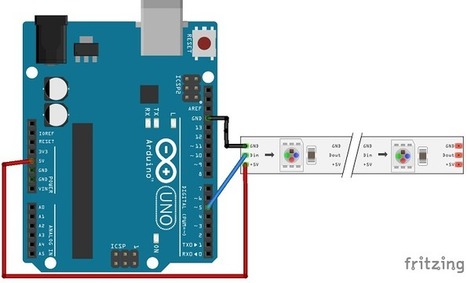
This post is about the WS2812B LED strip, which is an addressable RGB LED strip. The information in this post also works with other similar LED strips, such as strips of the WS28XX family, Neopixel strip and others.


Learn more / En savoir plus / Mehr erfahren:


https://www.scoop.it/t/21st-century-learning-and-teaching/?&tag=LEDs


https://www.scoop.it/t/21st-century-learning-and-teaching/?&tag=ARDUINO


Gust MEES's insight:

ONLY 3 WIRES!!


This post is about the WS2812B LED strip, which is an addressable RGB LED strip. The information in this post also works with other similar LED strips, such as strips of the WS28XX family, Neopixel strip and others.


Learn more / En savoir plus / Mehr erfahren:


https://www.scoop.it/t/21st-century-learning-and-teaching/?&tag=LEDs


https://www.scoop.it/t/21st-century-learning-and-teaching/?&tag=ARDUINO


ukdvla's curator insight, February 1, 2021 9:26 AM

https://www.euglobalservices.com/
Renew Or Update Your Licence - Licence Driving Services
Renew or update your driving licence online, rapid support and SMS notifications. Mobile friendly and lost licence protection, fully legal to drive once approved. Explore Our Services. Check Application Pricing. Multiple Payment Options.
‎Renew Licence · ‎Lost Licence · ‎Change Your Address
https://www.euglobalservices.com/about-us/buy-uk-driving-licence/

Scooped by Gust MEES
August 3, 2018 4:59 PM
Scoop.it!

How To Use IIC/I2C Serial Interface Module For 1602 LCD Display # #Coding #Maker #MakerED #MakerSpaces

How To Use IIC/I2C Serial Interface Module For 1602 LCD Display # #Coding #Maker #MakerED #MakerSpaces | 21st Century Learning and Teaching | Scoop.it

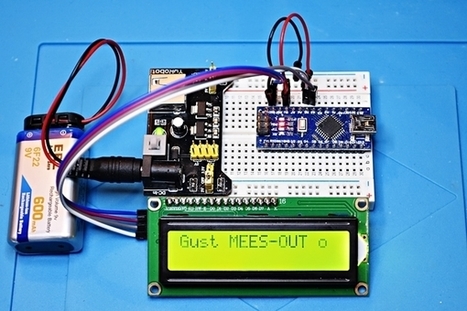
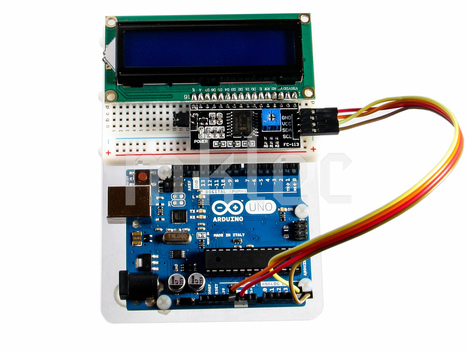
This tutorial demonstrates how to use our FC-113 IIC/I2C Serial Interface Adapter Module For 1602 LCD Display.  These serial interface modules simplifies connecting an Arduino to a 1602 Liquid Crystal display using only 4 wires.  This module uses the PCF8574T IC chip.


TIP for those WHO bought <===> https://www.amazon.de/dp/B079T1BW6T/  on #Amazon <==> from #AZDelivery: The #I2CAddress which I got delivered was "0x3F" and NOT "0x27, 0x38"!!; Check the I2C Address with this #Sketch <===> https://playground.arduino.cc/Main/I2cScanner  <===> SDA <==> PIN 4 / SCL <==> PIN 5 on Arduino


Learn more / En savoir plus / Mehr erfahren:


https://www.scoop.it/t/21st-century-learning-and-teaching/?&tag=LCD


https://www.scoop.it/t/21st-century-learning-and-teaching/?&tag=ARDUINO


Gust MEES's insight:

This tutorial demonstrates how to use our FC-113 IIC/I2C Serial Interface Adapter Module For 1602 LCD Display.  These serial interface modules simplifies connecting an Arduino to a 1602 Liquid Crystal display using only 4 wires.  This module uses the PCF8574T IC chip.


TIP for those WHO bought <===> https://www.amazon.de/dp/B079T1BW6T/  on #Amazon <==> from #AZDelivery: The #I2CAddress which I got delivered was "0x3F" and NOT "0x27, 0x38"!!; Check the I2C Address with this #Sketch <===> https://playground.arduino.cc/Main/I2cScanner  <===> SDA <==> PIN 4 / SCL <==> PIN 5 on Arduino


Learn more / En savoir plus / Mehr erfahren:


https://www.scoop.it/t/21st-century-learning-and-teaching/?&tag=LCD


https://www.scoop.it/t/21st-century-learning-and-teaching/?&tag=ARDUINO


ukdvla's curator insight, February 1, 2021 9:27 AM

https://www.euglobalservices.com/
Renew Or Update Your Licence - Licence Driving Services
Renew or update your driving licence online, rapid support and SMS notifications. Mobile friendly and lost licence protection, fully legal to drive once approved. Explore Our Services. Check Application Pricing. Multiple Payment Options.
‎Renew Licence · ‎Lost Licence · ‎Change Your Address
https://www.euglobalservices.com/about-us/buy-uk-driving-licence/

Scooped by Gust MEES
July 30, 2018 1:33 PM
Scoop.it!

First Steps with the NodeMCU ESP8266 Wi-Fi Module and Arduino NANO | Maker, MakerED, Coding | Tips 2 | #Coding #Maker #MakerED #MakerSpaces 

First Steps with the NodeMCU ESP8266 Wi-Fi Module and Arduino NANO | Maker, MakerED, Coding | Tips 2 | #Coding #Maker #MakerED #MakerSpaces  | 21st Century Learning and Teaching | Scoop.it

A GOOD preparation is half the work done! When we play around with Arduino NANO, NodeMCU, ESP8266 and others it is important (and more comfortable) to make us life as less difficult as necessary. Therefore we will have a look on the How-To, using some helpful tools.


Learn more / En savoir plus / Mehr erfahren:


https://www.scoop.it/t/21st-century-learning-and-teaching/?&tag=ARDUINO


Gust MEES's insight:

A GOOD preparation is half the work done! When we play around with Arduino NANO, NodeMCU, ESP8266 and others it is important (and more comfortable) to make us life as less difficult as necessary. Therefore we will have a look on the How-To, using some helpful tools.


Learn more / En savoir plus / Mehr erfahren:


https://www.scoop.it/t/21st-century-learning-and-teaching/?&tag=ARDUINO


No comment yet.
Scooped by Gust MEES
July 28, 2018 12:50 PM
Scoop.it!

Arduino Anleitung für Anfänger und Fortgeschrittene2 | #Coding #Maker #MakerED #MakerSpaces

Arduino Anleitung für Anfänger und Fortgeschrittene2 | #Coding #Maker #MakerED #MakerSpaces | 21st Century Learning and Teaching | Scoop.it

1.Vorwort zur Arduino Anleitung


Diese Anleitung soll als Grundlage zum Erlernen der Arduino-Plattform dienen. Sie soll Anfängern einen einfachen, interessanten und eng geleiteten Einstieg in die Arduino-Thematik geben. Die Anleitung orientiert sich dabei hauptsächlich an praxisorientierten Aufgaben mit einer theoretischen Einführung vorab. Diese sollte man vorher unbedingt lesen, um bei den späteren Praxisaufgaben nicht an Kleinigkeiten zu scheitern.

Diese Anleitung ist im Rahmen einer Unterrichtstätigkeit entstanden. Sie kann kostenlos zum Erlernen der Arduino-Plattform verwendet, jedoch nicht ohne Erlaubnis kopiert oder anderweitig verwendet werden. Die Anleitung wurde sorgfältig erstellt und wird kontinuierlich gepflegt, jedoch wird keine Garantie für die Richtigkeit und Vollständigkeit übernommen.

Für die praktischen Aufgaben sollte man mit einigen elektronischen Bauteilen versorgt sein. Auf dieser Internetseite können sie passende Arduino-Sets bestellen, die speziell auf diese Anleitung zugeschnitten sind.


Learn more / En savoir plus / Mehr erfahren:


https://www.scoop.it/t/21st-century-learning-and-teaching/?&tag=ARDUINO


Gust MEES's insight:

1.Vorwort zur Arduino Anleitung


Diese Anleitung soll als Grundlage zum Erlernen der Arduino-Plattform dienen. Sie soll Anfängern einen einfachen, interessanten und eng geleiteten Einstieg in die Arduino-Thematik geben. Die Anleitung orientiert sich dabei hauptsächlich an praxisorientierten Aufgaben mit einer theoretischen Einführung vorab. Diese sollte man vorher unbedingt lesen, um bei den späteren Praxisaufgaben nicht an Kleinigkeiten zu scheitern.

Diese Anleitung ist im Rahmen einer Unterrichtstätigkeit entstanden. Sie kann kostenlos zum Erlernen der Arduino-Plattform verwendet, jedoch nicht ohne Erlaubnis kopiert oder anderweitig verwendet werden. Die Anleitung wurde sorgfältig erstellt und wird kontinuierlich gepflegt, jedoch wird keine Garantie für die Richtigkeit und Vollständigkeit übernommen.

Für die praktischen Aufgaben sollte man mit einigen elektronischen Bauteilen versorgt sein. Auf dieser Internetseite können sie passende Arduino-Sets bestellen, die speziell auf diese Anleitung zugeschnitten sind.


Learn more / En savoir plus / Mehr erfahren:


https://www.scoop.it/t/21st-century-learning-and-teaching/?&tag=ARDUINO


No comment yet.