




Parents are getting increasingly worried about the ease with which undesirable content can be accessed online, according to Kaspersky Lab...
Read more:

 Your new post is loading...
 Your new post is loading...
Your new post is loading...
 Scoop.it!
Parents are getting increasingly worried about the ease with which undesirable content can be accessed online, according to Kaspersky Lab...
Read more:

No comment yet.
Sign up to comment
Scoop.it!
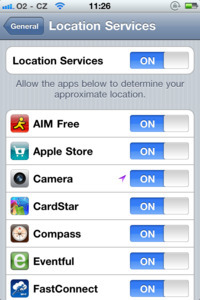
Geotagging: the process of adding geographical identification metadata to various media such as photographs, video, websites, [etc]. That’s the definition from Wikipedia.
If you’re still unclear on what this means, just imagine using your smartphone to take photos of your child at his/her school performance, then uploading them from your smartphone to a site like Facebook or Flickr, or directly to Twitter via a service like TwitPic or yfrog. Now imagine a complete stranger being able to pinpoint the exact location of where those photos were taken. Well, that’s what geotagging does. And it’s the same technology you’ll find in social networking services like Facebook Places or Foursquare.
Here’s a video that my good friend Sue Scheff forwarded to me. It gives you a nice glimpse into how geotagging technology works on your mobile device, and why you might want to consider disabling it on your smartphone, and your child’s.
Read more: http://internet-safety.yoursphere.com/2011/03/location-based-services-and-geotagging-how-they-work/
Gust MEES's insight:
Scoop.it!
![How to Avoid 17 Internet Scams [INFOGRAPHIC] | 21st Century Learning and Teaching | Scoop.it](https://img.scoop.it/rAUu9hiWLA6h_bZS-utdfTl72eJkfbmt4t8yenImKBVvK0kTmF0xjctABnaLJIm9)
All over the world, Internet scams abound. Check out this infographic for tips on how to ensure that you don't fall prey to a scheme.
Read more: http://mashable.com/2012/06/17/internet-scams-infographic/
Scoop.it!

Educate Parents About Internet Safety
Use these guides to help facilitate a conversation with parents about Internet safety. The guides include open-ended questions as well as short vignet...
Read more:
Scoop.it!

Netsafe Netbasics:
Nicely-done videos about internet safety
Check out here:
|
Scoop.it!
![Google Yourself For Safety [Infographic] | 21st Century Learning and Teaching | Scoop.it](https://img.scoop.it/u3SpvP8htpfU1U-6PGqptjl72eJkfbmt4t8yenImKBVvK0kTmF0xjctABnaLJIm9)
Online challenge encourages users to protect their identities by searching for personal mentions of themselves on the web.
Read more: http://www.edtechmagazine.com/k12/article/2012/08/google-yourself-safety-infographic
Scoop.it!

Cybersecurity Summary for Parents
Learn how to help your kids use the Internet safely and responsibly...
Read more:
Scoop.it!

June is National Internet Safety Month. But who is making sure our children are safe online?
Five million social media users are under the age of 10 years old, and 51% have given out personal information online to strangers. Out of all teenagers, 95% have been online and 80% use social media, where peer pressure can prompt them to post personal information and photos to strangers when they update their status online.
===> Only 10% of these teens ever talk with a parent about the internet!!! <===
Read more:
Scoop.it!
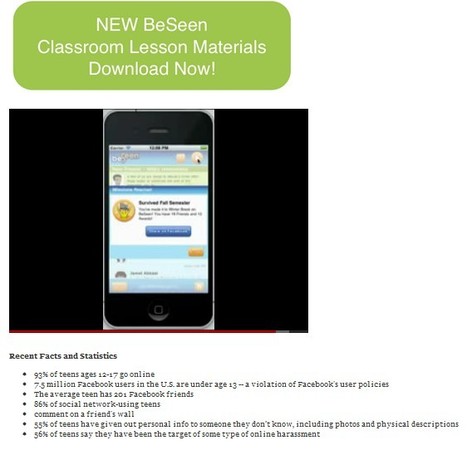
BeSeen is provided by Carnegie Mellon University and Web Wise Kids to teach youth how to be responsible in social networks by securing their private and personal information, protecting their online reputation and defending their peers.
This online safety mobile application is a single-player game that simulates a social networking website. The player creates a profile and starts earning “friend” characters and interacting with them. They learn about others through their posts and help them through challenges in order to win awards and make new friends.
In BeSeen, the ultimate quest is to make friends. At first, that is a matter of getting involved in school activities, but as more friends join a social circle, they bring their problems with them. To keep friends and make more, it’s important not only to be involved but to be a good friend. Who is up for the challenge?
Web Wise Kids' President Judi Westberg Warren discusses how their BeSeen app, like Web Wise Kids' other games, teaches youth ===> how to think critically about the decisions they make online and on social networks. <===
Read more:
View also the videos here:
Scoop.it!

Hi, I start a new series of blogs with educational vocation who will be easy to follow as they take only +/- 5 minutes and by following them and by applying my advice you will become a champion in IT-Security ;)
Part5: Not Only Internet-Safety/ALSO IT-Security!
Read more:
- http://gustmees.wordpress.com/category/get-smart-with-5-minutes-tutorials/
- http://gustmeesen.wordpress.com
|




