Your new post is loading...

|
Scooped by
Gust MEES
August 14, 2012 6:53 AM
|
“BYOD is top of mind for myriad organisations; however, it’s causing some concern among IT. The increase in personal devices accessing the network may complicate the process of ensuring devices are secure and compliant with company policies, making it difficult for IT to justify broad BYOD acceptance,” said Stacy K. Crook, senior analyst, Mobile Enterprise Research, IDC. “Solutions with features like those found in the latest version of Sophos Mobile Control allow organisations to develop BYOD strategies without compromising on security, or complicating the overall management of the network.” In addition, if it a mobile device becomes non-compliant, the new release will alert IT, so the administrator can send messages to the user for minor violations. For more serious incidents, the administrator can configure a set of tasks, which will be applied automatically. Examples include corporate or full wipes as well as policy changes to avert any risk for corporate data. Gust MEES: a MUST read for anyone who uses "Bring Your Own Device" (Hashtag for Twitter =#BYOD): http://www.net-security.org/secworld.php?id=13423
|
|
Scooped by
Gust MEES
August 8, 2012 8:55 AM
|
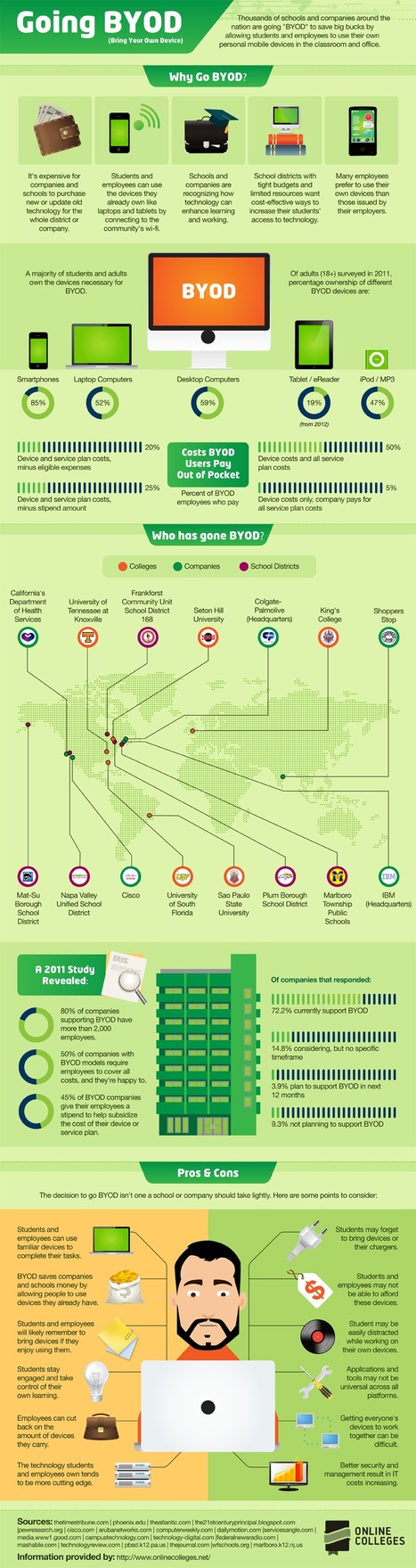
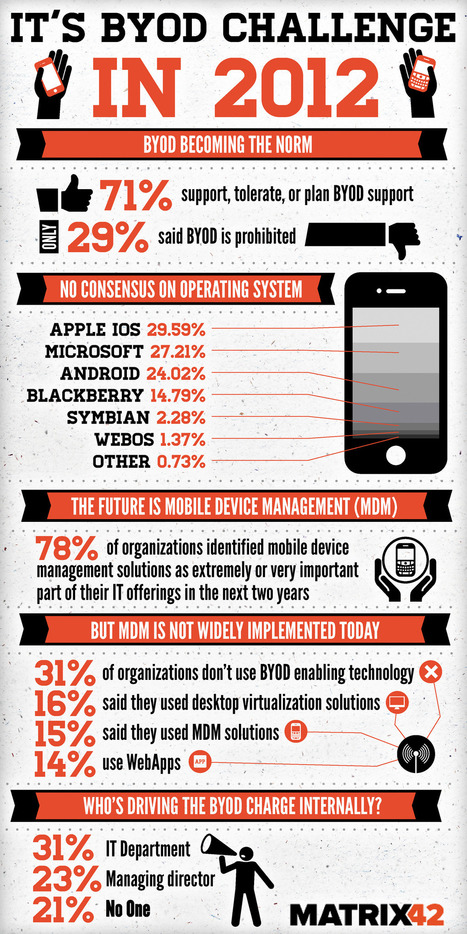
Bring your own device (BYOD) has become increasingly more prevalent in businesses with over 71% of companies planning, tolerating or supporting its infiltration into normal corporate work practices, according to an infograph published by Matrix 42. According to the below infograph the most common devices being utilised by employees via BYOD for work are laptops, PDA’s, mobile devices, and tablet computers. Simon Loughran one of Certification Europe’s leading ISO 27001 – Information Security Management Systems auditors published a paper called ‘Security and Mobile Devices’ on this topic recently. The paper identified one of the largest risk associated with the usage of BYOD devices such as mobile devices is inherent with their portability and that is precisely the intended functionality. Advanced technological changes allow people to work outside the corporate networks on wireless and remote connectivity, which in turn facilitates easily accessible and shareable company information. This creates a new risk area for companies as it has moved outside of the established security perimeter that has been so meticulously developed. The solution is to develop subsequent selected security controls around the mobile devices and BYOD devices which are as stringent as those employed around company devices. The Matrix 42 infograph was developed after the company completed a survey of 600 enterprise IT professionals and was published via Visual.ly. Top Ten tips for mobile security... Read moree, a MUST: http://www.certificationeurope.com/blog/byod-is-becoming-a-prevalent-information-security-and-it-management-focus/
|
|
Scooped by
Gust MEES
July 26, 2012 2:32 PM
|
Online Trends and Risks with BYOD [pdf]
Study from Kaspersky Labs: Digital Consumer’s Online Trends and Risks Modern consumers live a full-scale digital life. Their virtual assets like personal photos and videos, work documents, passwords to access social networking and online banking credentials are of the utmost importance and users are very concerned about safety of such data. We at Kaspersky Lab maintain and expand the leading expertise in IT security risks, malware and vulnerabilities in order to protect consumers in the best possible way. To better understand our customers, their computer and Internet usage patterns and attitudes towards security and the safety of data, we initiated a study into this valuable information. Although users acknowledge the existence of various online threats, a significant share of them are reckless in terms of security. ===> Even now 16% of laptop owners, 50% of Macbook users and 65% (!) of smartphone owners do not use any kind of security software on their devices. <=== Check out also http://gustmees.wordpress.com/2012/07/07/bring-your-own-device-advantages-dangers-and-risks/ to get a maximum of informtion about BYOD! Gust MEES: a MUST READ for people using BYOD! Read more [pdf]: http://www.kaspersky.com/downloads/pdf/kaspersky_lab_consumer_survey_report_eng_final.pdf
|
|
Scooped by
Gust MEES
July 22, 2012 8:24 AM
|
The 21st Century Principal I do not buy into the argument of "no access for anyone until everyone can have it." Instead, I think we must do what Marc Prensky argues which is to find ways to "Bridge and eliminate this digital divide" and provide digital access to our students. As Prensky suggests, we are going to have to accept that there is always going to be some inequality, but there are things we should be doing as educators to mediate the impact of the digital divide, and trying to keep the playing field level by refusing anyone access until all have it is not the ethical thing to do. As educators we must be concerned with our "students wanting or needing access to a minimal level of digital technology and not being able to get it." Read more, very interesting...: http://the21stcenturyprincipal.blogspot.com.au/2012/07/digital-divide-is-not-excuse-to.html
|
|
Scooped by
Gust MEES
July 17, 2012 10:05 AM
|
Most organisations still don’t have a strategy for dealing with the demands of bring your own device - but pressure to have one continues to bui... As a result, he said, companies are increasingly putting a BYOD policy in place. According to IDC’s research, 20 per cent of companies have a BYOD policy in place and 15 per cent are working on it. But that leaves the majority - 65 per cent - nowhere on this issue yet. Simon Gale, CTO at IBM workplace services, said that as a result of BYOD, IT organisations are looking for new ways to secure their infrastructure, as the security perimeter changes from the physical device to the data. “You had a standardised layer that was the device and the operating system. What BYOD is doing is taking away that opportunity for standardisation and so the IT department is trying to work out where that level is”. Read more: http://www.techrepublic.com/blog/european-technology/byod-havent-got-a-policy-maybe-its-time-you-did/850?tag=nl.e101
There are 50,538 smartphones and tablets in use at Cisco, which has 71,825 employees. Not only does that already comprise a ratio of one device per 1.4 employees, said Lance Perry, vice-president of IT customer strategy and success for Cisco, during an excellent presentation at the Consumerization of IT in the Enterprise (CITE) conference in San Francisco on Monday. But the 50,000+ device figure is also an increase of 52% from just 12 months earlier. Read more: the practice... http://www.forbes.com/sites/sap/2012/03/05/cisco-the-biggest-mobile-byod-deployment-around/
|
|
Scooped by
Gust MEES
July 16, 2012 8:45 AM
|
Bring-Your-Own-Device (BYOD) schemes have become increasingly prevalent in most businesses worldwide, as employees look to use their own personal devices in a business context. When asked if employees valued certain devices over others, 89 per cent of those surveyed claimed this was the case. “Rather than fight against the tide, organizations should embrace the use of these devices and work alongside staff to ensure that comprehensive IT policies and best practice guidelines are put in place to assist and inform employees about how their devices should be used. End-point protection for these devices is also crucial if businesses want to safeguard employees against an ever-changing, increasingly sophisticated threat landscape.” Read more: http://www.net-security.org/secworld.php?id=13245
|
|
Scooped by
Gust MEES
July 8, 2012 4:04 PM
|
Bring Your Own Device (BYOD) is more complex than most people know, read further to learn… . . Keywords for this free course: . motivation, engagement, heroes, Security-Scouts, critical thinking, stay out of the box, adapt to new technologies, be aware of the malware, nobody is perfect, knowing the dangers and risks, responsibility, responsibility of School, responsibility of IT-Admin, responsibilities of BYOD users, Apple insecurity, Insecurity of Apps, Principals responsibilities, Mobile Device Management, risks of BYOD, BYOD-Policy, IT-Security Infrastructure, Teacher-Parents Meeting, Cyberwar, Cyberwarfare, Government, Internet-Safety, IT-Security knowledge basics... The weakest link in the Security Chain is the human! If you don’t respect certain advice you will get tricked by the Cyber-Criminals!
=> NOBODY is perfect! A security by 100% doesn’t exist! <=
Read more: http://gustmees.wordpress.com/2012/07/07/bring-your-own-device-advantages-dangers-and-risks/
|
|
Scooped by
Gust MEES
July 7, 2012 6:50 PM
|
|
|
Scooped by
Gust MEES
July 6, 2012 5:55 AM
|
What Teachers + Educators should learn about BYOD Gust MEES: Most of articles, blogs and Tweets witten by educational people are showing the advantages of "Bring Your Own Device" (BYOD) and they embrace very well BYOD, which I do also; but... There are some more things to consider such as: - A BYOD Policy in the campus, school... - Prepare for BYOD in your organization Read my complete curation about it here: http://www.scoop.it/t/21st-century-learning-and-teaching?q=BYOD ===> Read and learn also about IT-Security, YES that is a MUST in 21st Century in Education, especially when using BYOD: <=== - http://gustmees.wordpress.com/category/get-smart-with-5-minutes-tutorials/ Learn also about eCitizen, Digital Citizenship where Teachers should stay there as good example and knowing about their responsability: - http://www.scoop.it/t/21st-century-learning-and-teaching?tag=eCitizen Responsability as eCitizen for the Government, be a good patriot and know how to defend your Government against Cyber-Attacks and Cyberwar, why and how? - http://gustmees.wordpress.com/2012/05/21/visual-it-securitypart2-your-computer-as-a-possible-cyber-weapon/ ===> The above mentioned must be included in Education and especially when using BYOD, read these blogs and curated articles and you will understand that they are a MUST ;) <=== Check out also my new blog "Bring Your Own Device: Advantages, Dangers, Risks and best Policy to stay secure": http://gustmees.wordpress.com/2012/07/07/bring-your-own-device-advantages-dangers-and-risks/
|
|
Scooped by
Gust MEES
June 19, 2012 10:24 AM
|
|
|
Scooped by
Gust MEES
June 11, 2012 5:51 PM
|
VERACODE: Mobile Security for the Rest of Us! Get Our Fun New E-book Join Joe IT and his blissfully unaware mobile device user Joe Worker as they navigate together the perils of BYOD. It’s a whimsical look at a serious subject and readers walk away with Ten Tips to secure their device. Gust MEES: A MUST READ! Read more about VERACODE here: http://www.veracode.com/
|
|
|
Scooped by
Gust MEES
August 9, 2012 2:58 PM
|
|
|
Scooped by
Gust MEES
August 3, 2012 10:10 AM
|
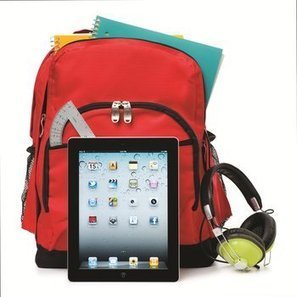
Gone are the days where students sit neatly in rows all prepared with the same back to school supplies ready to consume instruction. As the 2012/13 school year approaches, one thing is clear. One-size-fits-all is out and personalization is in. This doesn’t only apply to the classroom instruction, it also applies to the mobile devices your students choose to use for learning. ===> Today student choice = personalization. The teacher sets the learning goals, but students choose their own tools or learning. <=== Gust MEES: Don't forget about IT-Security and be aware of the malware! "Nobody is Perfect!", so ALL "OS" are vulnerable and especially smartphones and any other device connecting to Internet also! And there are also a lot of Apps around who are malicious... ===> Take care and as teacher and educator take your ===> responsibilities <=== to educate your learners of the dangers of Internet and How-To protect best! <=== In 21st Century while using "Bring Your Own Device" (Hashtag for Twitter = #BYOD) there is a MUST to know about basic IT-Security knowledge! The teachers role is NOT anymore to be the MOST important person, but the LEARNER! So the teacher needs to have that basic knowledge to share it with its learners and to try to keep a safe Learning Workspace... Online and Offline, in the "internal learning network" and also in the "external learning network"! As Teachers, Educators and Instructors we have to deal with Apps, OpenSource software, Freeware, different OS devices, so we need to know about the risks and dangers! We need to know how to get protected these devices also! It's not ONLY the IT-Admin's responsibility, IT-Security is the responsibility of ALL of us!!! Check also: - http://gustmees.wordpress.com/2012/07/07/bring-your-own-device-advantages-dangers-and-risks/ - http://gustmees.wordpress.com/category/get-smart-with-5-minutes-tutorials/ - http://www.scoop.it/t/apple-mac-ios4-ipad-iphone-and-in-security - http://www.scoop.it/t/ict-security-tools - http://www.scoop.it/t/securite-pc-et-internet ===> Be aware of the malware! <===
|
|
Scooped by
Gust MEES
July 27, 2012 10:52 AM
|
In 21st Century we need not ONLY talking about Internet-Safety, Online-Safety and IT-Security, but we need to secure our computers and ANY other related device connecting to Internet, such as also our smartphones! I will present you now a tutorial on How-To create best protection (as on March 2012) for your computer and this with mostly FREE tools and FREE Online Services… Also will I provide you a worksheet which helps you planning your weekly tasks! In 21st Century while using "Bring Your Own Device" (Hashtag for Twitter = #BYOD) there is a MUST to know about basic IT-Security knowledge! The teachers role is NOT anymore to be the MOST important person, but the LEARNER! So the teacher needs to have that basic knowledge to share it with its learners and to try to keep a safe Learning Workspace... Online and Offline, in the "internal learning network" and also in the "external learning network"! As Teachers, Educators and Instructors we have to deal with Apps, OpenSource software, Freeware, different OS devices, so we need to know about the risks and dangers! We need to know how to get protected these devices also! It's not ONLY the IT-Admin's responsibility, IT-Security is the responsibility of ALL of us!!! Check also: - http://gustmees.wordpress.com/2012/07/07/bring-your-own-device-advantages-dangers-and-risks/ ; - http://gustmees.wordpress.com/category/get-smart-with-5-minutes-tutorials/ - http://www.scoop.it/t/apple-mac-ios4-ipad-iphone-and-in-security - http://www.scoop.it/t/ict-security-tools - http://www.scoop.it/t/securite-pc-et-internet ===> Be aware of the malware! <===
|
|
Scooped by
Gust MEES
July 25, 2012 4:05 AM
|
|
|
Scooped by
Gust MEES
July 18, 2012 6:41 AM
|
|
|
Scooped by
Gust MEES
July 17, 2012 9:27 AM
|
Bring Your Own Device (BYOD) has become one of the most influential trends that has or will touch each and every IT organization. The term has come to define a megatrend occurring in IT that requires sweeping changes to the way devices are used in the workplace.
What is BYOD? Does it mean employees pay for their own devices they use for work? Possibly, but the BYOD trend means much more. It is about end users being able to use the compute and communication devices they choose to increase productivity and mobility. These can be devices purchased by the employer, purchased by the employee, or both. BYOD means any device, with any ownership, used anywhere.
This paper discusses the how this trend will affect businesses, explores the challenges it creates for IT, and outlines the Cisco® technologies that are part of the solution. Cisco offers a comprehensive architecture to address these challenges, allowing end users the freedom to bring their choice of device to work while still affording IT the controls to ensure security and prevent data loss.
A MUST read...
|
|
Scooped by
Gust MEES
July 17, 2012 7:44 AM
|
|
|
Scooped by
Gust MEES
July 11, 2012 6:05 PM
|
|
|
Scooped by
Gust MEES
July 8, 2012 12:40 PM
|
|
|
Scooped by
Gust MEES
July 6, 2012 12:36 PM
|
What is "jailbreaking" and "rooting"? iOS: Jailbreaking is the process of modifying iOS system kernels to allow file system read and write access. Most jailbreaking tools (and exploits) remove the limitations and security features built by the manufacturer Apple (the "jail") through the use of custom kernels, which make unauthorized modifications to the operating system. Almost all jailbreaking tools allow users to run code not approved and signed by Apple. This allows users to install additional applications, extensions and patches without the control of Apple’s App Store. Android: Rooting is the process of gaining administrative or privileged access for the Android OS. As the Android OS is based on the Linux Kernel, rooting a device is analogous to gaining access to administrative, root user-equivalent, permissions on Linux. Unlike iOS, rooting is (usually) not required to run applications outside from the Android Market. Some carriers control this through operating system settings or device firmware. Rooting also enables the user to completely remove and replace the device's operating system. Read more: http://www.owasp.org/index.php/Projects/OWASP_Mobile_Security_Project_-_Dangers_of_Jailbreaking_and_Rooting_Mobile_Devices
|
|
Scooped by
Gust MEES
June 12, 2012 12:33 PM
|
|


![Online Trends and Risks with BYOD [pdf] | 21st Century Learning and Teaching | Scoop.it](https://img.scoop.it/k3ecoU08827ttk1VyHl7LTl72eJkfbmt4t8yenImKBVvK0kTmF0xjctABnaLJIm9)

![Cisco: The Biggest Mobile BYOD Deployment Around? [Slides] | 21st Century Learning and Teaching | Scoop.it](https://img.scoop.it/979Kz0MNTSPBQDYgcyqzhzl72eJkfbmt4t8yenImKBVvK0kTmF0xjctABnaLJIm9)