21st Century Learning and Teaching
792.4K views | +4 today
21st Century Learning and Teaching
Related articles to 21st Century Learning and Teaching as also tools...
Curated by Gust MEES
Your new post is loading...

Popular Tags

Current selected tag: 'makerspace'. Clear
Scooped by Gust MEES
February 6, 2018 11:02 AM
Scoop.it!

First Steps with the Arduino-UNO R3 | Maker, MakerED, Coding | SMART V3.0 ROBOT CAR Kit | #MakerSpaces #PracTICE 

First Steps with the Arduino-UNO R3 | Maker, MakerED, Coding | SMART V3.0 ROBOT CAR Kit | #MakerSpaces #PracTICE  | 21st Century Learning and Teaching | Scoop.it

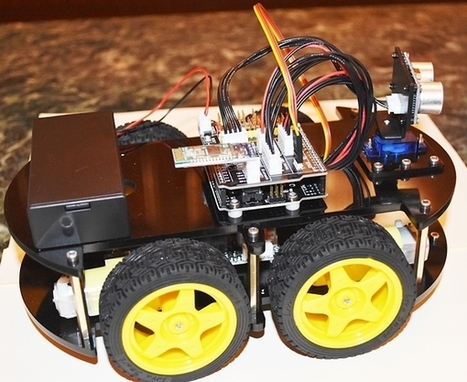
First impressions . . The Kit is delivered in a well organized plastic box with a poster inside of all the parts with description and a CD with the PDF Manual, Code and Libraries. The manual in PDF format is actually very well documented an nobody should have problems to follow the instructions.…


Learn more / En savoir plus / Mehr erfahren:


https://www.scoop.it/t/21st-century-learning-and-teaching/?&tag=ARDUINO


https://gustmees.wordpress.com/?s=arduino


Gust MEES's insight:

First impressions . . The Kit is delivered in a well organized plastic box with a poster inside of all the parts with description and a CD with the PDF Manual, Code and Libraries. The manual in PDF format is actually very well documented an nobody should have problems to follow the instructions.…


Learn more / En savoir plus / Mehr erfahren:


https://www.scoop.it/t/21st-century-learning-and-teaching/?&tag=ARDUINO


https://gustmees.wordpress.com/?s=arduino


No comment yet.
Scooped by Gust MEES
February 5, 2018 11:20 AM
Scoop.it!

25 Makerspace (STEM / STEAM) Projects For Kids | Makerspaces.com | #Maker #MakerED #Creativity #MakerSpaces #LEARNingByDoing 

25 Makerspace (STEM / STEAM) Projects For Kids | Makerspaces.com | #Maker #MakerED #Creativity #MakerSpaces #LEARNingByDoing  | 21st Century Learning and Teaching | Scoop.it
Makerspace or STEM projects for kids don’t have to be complicated or expensive.  In fact, some of the best projects use recycled or repurposed items like cardboard or soda bottles which means nothing to buy.

Below, we’ve compiled some of our favorite projects that are great for makerspaces.

Learn how to make a boat out of a soda bottle, create a car from cardboard and many more.


Learn more / En savoir plus / Mehr erfahren:


https://www.scoop.it/t/21st-century-learning-and-teaching/?&tag=makerspace


https://gustmees.wordpress.com/?s=maker


Gust MEES's insight:
Makerspace or STEM projects for kids don’t have to be complicated or expensive.  In fact, some of the best projects use recycled or repurposed items like cardboard or soda bottles which means nothing to buy.

Below, we’ve compiled some of our favorite projects that are great for makerspaces.

Learn how to make a boat out of a soda bottle, create a car from cardboard and many more.


Learn more / En savoir plus / Mehr erfahren:


https://www.scoop.it/t/21st-century-learning-and-teaching/?&tag=makerspace


https://gustmees.wordpress.com/?s=maker


Scooped by Gust MEES
January 23, 2018 8:23 PM
Scoop.it!

First Steps with the Arduino-UNO R3 | Maker, MakerED, Coding | Super Starter Kit UNO R3 Project | LCD and Sensors Project

First Steps with the Arduino-UNO R3 | Maker, MakerED, Coding | Super Starter Kit UNO R3 Project | LCD and Sensors Project | 21st Century Learning and Teaching | Scoop.it

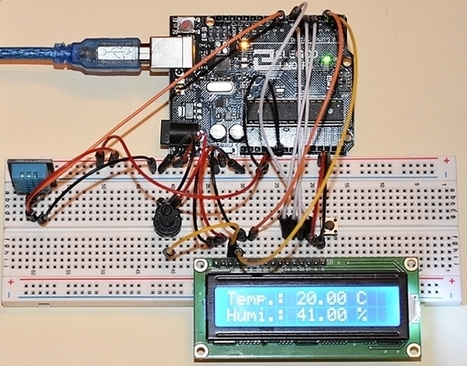
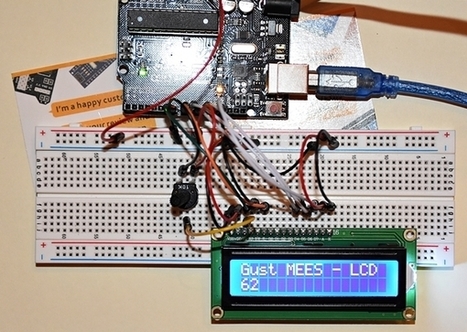
SO, as I got my new Super Starter Kit UNO R3 Project I am playing around a bit with it. In my previous post WE were wiring and testing a LCD-Display and coding to display a bit text on the LCD. That was actually very easy, so lets try out now some “Sensors“, e.g. a Temperature/Humidity Sensor and a Ultrasonic Sensor to measure distances. The measured values of those sensors will get displayed on the LCD-Display.


Learn more / En savoir plus / Mehr erfahren:


https://gustmees.wordpress.com/?s=maker


https://www.scoop.it/t/21st-century-learning-and-teaching/?&tag=ARDUINO


Gust MEES's insight:

SO, as I got my new Super Starter Kit UNO R3 Project I am playing around a bit with it. In my previous post WE were wiring and testing a LCD-Display and coding to display a bit text on the LCD. That was actually very easy, so lets try out now some “Sensors“, e.g. a Temperature/Humidity Sensor and a Ultrasonic Sensor to measure distances. The measured values of those sensors will get displayed on the LCD-Display.


Learn more / En savoir plus / Mehr erfahren:


https://gustmees.wordpress.com/?s=maker


https://www.scoop.it/t/21st-century-learning-and-teaching/?&tag=ARDUINO


Vivalist's curator insight, January 25, 2018 3:13 AM
Temperature and Humidity monitoring
Scooped by Gust MEES
January 21, 2018 8:06 AM
Scoop.it!

Alternative Arduino Interfaces | #Coding #ArduBlock #VisualProgramming #Maker #MakerED #MakerSpaces

Alternative Arduino Interfaces | #Coding #ArduBlock #VisualProgramming #Maker #MakerED #MakerSpaces | 21st Century Learning and Teaching | Scoop.it
Overviewing the Options


Arduino is awesome! It’s our go-to electronics education platform, and it’s our top choice for rapid prototyping, but it isn’t for everyone. Maybe it’s the cryptic language, or the Java-based IDE, or maybe it’s just the teal window border – regardless of your reasoning, if you’re trying to escape the Arduino IDE, here are a few alternatives we’d like to share.

The Arduino alternatives covered in this tutorial range from simple, introductory graphical programming to web-based Arduino interfaces for your web browser. Here’s a quick overview of each interface covered, we’ll go into further detail later on:

ArduBlock – A Visual Programming Arduino Extension


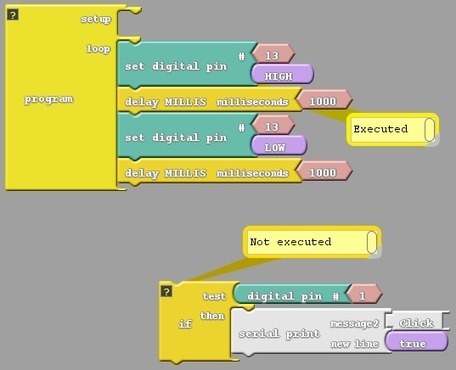
ArduBlock is a graphical programming add-on to the default Arduino IDE. Instead of memorizing cryptic functions, forgetting semicolons, and debugging code, ArduBlock allows you to build your Arduino program by dragging and dropping interlocking blocks.

Learn more / En savoir plus / Mehr erfahren:


https://www.scoop.it/t/21st-century-learning-and-teaching/?&tag=ARDUINO


Gust MEES's insight:
Overviewing the Options


Arduino is awesome! It’s our go-to electronics education platform, and it’s our top choice for rapid prototyping, but it isn’t for everyone. Maybe it’s the cryptic language, or the Java-based IDE, or maybe it’s just the teal window border – regardless of your reasoning, if you’re trying to escape the Arduino IDE, here are a few alternatives we’d like to share.

The Arduino alternatives covered in this tutorial range from simple, introductory graphical programming to web-based Arduino interfaces for your web browser. Here’s a quick overview of each interface covered, we’ll go into further detail later on:

ArduBlock – A Visual Programming Arduino Extension


ArduBlock is a graphical programming add-on to the default Arduino IDE. Instead of memorizing cryptic functions, forgetting semicolons, and debugging code, ArduBlock allows you to build your Arduino program by dragging and dropping interlocking blocks.


Learn more / En savoir plus / Mehr erfahren:


https://www.scoop.it/t/21st-century-learning-and-teaching/?&tag=ARDUINO


Ness Crouch's curator insight, January 23, 2018 3:08 PM

Arduino can be lots of fun! #coding #edtech #visualprogramming #elearning
Scooped by Gust MEES
January 19, 2018 12:34 PM
Scoop.it!

First Steps with the Arduino-UNO R3 | Maker, MakerED, Coding | Super Starter Kit UNO R3 Project | #LEARNingByDoing #Creativity #PracTICE 

First Steps with the Arduino-UNO R3 | Maker, MakerED, Coding | Super Starter Kit UNO R3 Project | #LEARNingByDoing #Creativity #PracTICE  | 21st Century Learning and Teaching | Scoop.it

Super Starter Kit UNO R3 Project From Elegoo. In one of my previous blog posts I used Arduino-UNO Starter Kit, which I ordered at Conrad (English version) and I wasn't really impressed by the manual, it didn't satisfy to my expectations and needs. SO, I was looking around to find some distributors for a BETTER version...…


Learn more / En savoir plus / Mehr erfahren:


https://gustmees.wordpress.com/?s=arduino


Gust MEES's insight:

Super Starter Kit UNO R3 Project From Elegoo. In one of my previous blog posts I used Arduino-UNO Starter Kit, which I ordered at Conrad (English version) and I wasn't really impressed by the manual, it didn't satisfy to my expectations and needs. SO, I was looking around to find some distributors for a BETTER version...…


Learn more / En savoir plus / Mehr erfahren:


https://gustmees.wordpress.com/?s=arduino


No comment yet.
Scooped by Gust MEES
January 14, 2018 6:06 PM
Scoop.it!

Visuino - Visual Development for Arduino | #Maker #MakerED #MakerSpaces #Coding

Visuino - Visual Development for Arduino | #Maker #MakerED #MakerSpaces #Coding | 21st Century Learning and Teaching | Scoop.it

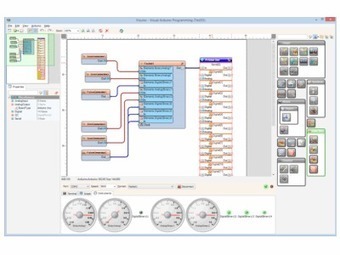
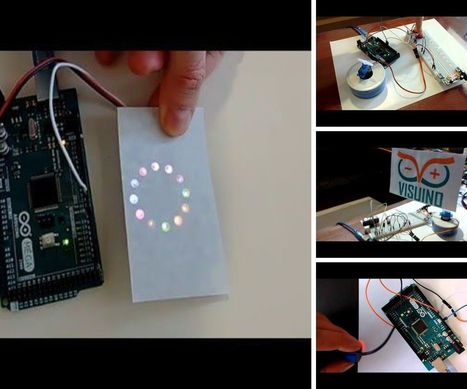
The components found in the Visuino software represent their hardware components and you will easily be able to create and design your programs using drag and drop. No equipment or hardware is needed to run the software in design mode. Once you have completed the design, you can connect Arduino board upload and run it.

For those people who are not strong on writing code then designing, compiling and creating Arduino programs has never been easier! Why waste time on creating code when we have done all the hard work for you already? You have your Arduino board, and great hardware design, see it running in minutes, not hours!

We recommend that you join the Google group to keep up-to-date with all the latest releases.


Learn more / En savoir plus / Mehr erfahren:


https://www.scoop.it/t/21st-century-learning-and-teaching/?&tag=ARDUINO


Gust MEES's insight:

The components found in the Visuino software represent their hardware components and you will easily be able to create and design your programs using drag and drop. No equipment or hardware is needed to run the software in design mode. Once you have completed the design, you can connect Arduino board upload and run it.

For those people who are not strong on writing code then designing, compiling and creating Arduino programs has never been easier! Why waste time on creating code when we have done all the hard work for you already? You have your Arduino board, and great hardware design, see it running in minutes, not hours!

We recommend that you join the Google group to keep up-to-date with all the latest releases.


Learn more / En savoir plus / Mehr erfahren:


https://www.scoop.it/t/21st-century-learning-and-teaching/?&tag=ARDUINO


No comment yet.
Scooped by Gust MEES
January 9, 2018 11:14 AM
Scoop.it!

XOD - A visual programming language for microcontrollers | #Arduino #Coding #Maker #MakerED #MakerSpaces

XOD - A visual programming language for microcontrollers | #Arduino #Coding #Maker #MakerED #MakerSpaces | 21st Century Learning and Teaching | Scoop.it

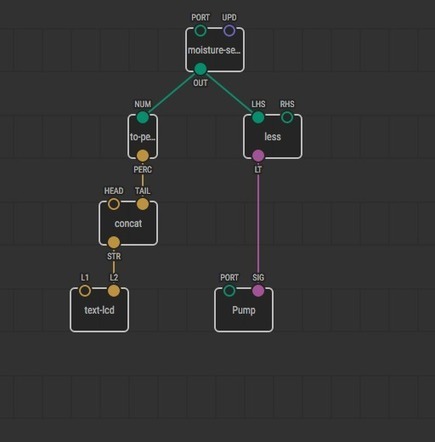
A VISUAL PROGRAMMING LANGUAGE  FOR MICROCONTROLLERS, LIKE CODE, BUT BETTER


Learn more / En savoir plus / Mehr erfahren:


https://www.scoop.it/t/21st-century-learning-and-teaching/?&tag=Coding


Gust MEES's insight:

A VISUAL PROGRAMMING LANGUAGE  FOR MICROCONTROLLERS, LIKE CODE, BUT BETTER


Learn more / En savoir plus / Mehr erfahren:


https://www.scoop.it/t/21st-century-learning-and-teaching/?&tag=Coding


Vivalist's curator insight, January 11, 2018 8:46 AM
Their tagline is "like code, but better" and even though I don't question the importance of learning code in various languages, it is clear that a nodal approach is easing the process of learning and doing some "controls".

Looking forward to using this on a future project in the greenhouse... or building rolbots with the kiddos.

Visuino is another software solution designed to ease the coding of Arduino micro-controllers through a visual interface:
Scooped by Gust MEES
January 1, 2018 1:59 PM
Scoop.it!

LCD Projects Archives - Use Arduino for Projects | #Maker #MakerED #MakerSpaces #PracTICE #Coding #LEARNingByDoing 

LCD Projects Archives - Use Arduino for Projects | #Maker #MakerED #MakerSpaces #PracTICE #Coding #LEARNingByDoing  | 21st Century Learning and Teaching | Scoop.it

A selection of projects and tutorials with an Arduino and LCD displays...


Learn more / En savoir plus / Mehr erfahren:


https://www.scoop.it/t/21st-century-learning-and-teaching/?&tag=makerspace


https://www.scoop.it/t/21st-century-learning-and-teaching/?&tag=ARDUINO


Gust MEES's insight:

A selection of projects and tutorials with an Arduino and LCD displays...


Learn more / En savoir plus / Mehr erfahren:


https://www.scoop.it/t/21st-century-learning-and-teaching/?&tag=makerspace


https://www.scoop.it/t/21st-century-learning-and-teaching/?&tag=ARDUINO


No comment yet.
Scooped by Gust MEES
January 1, 2018 10:12 AM
Scoop.it!

Arduino LCD Tutorial | How To Connect an LCD to Arduino | #Maker #MakerED #MakerSpaces #Coding #PracTICE #LEARNingByDoing

Arduino LCD Tutorial | How To Connect an LCD to Arduino | #Maker #MakerED #MakerSpaces #Coding #PracTICE #LEARNingByDoing | 21st Century Learning and Teaching | Scoop.it
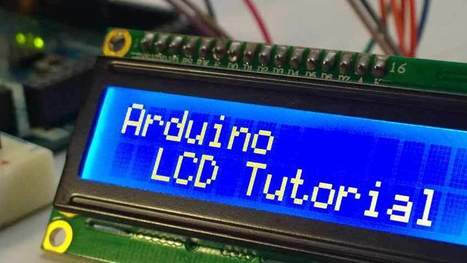
In this Arduino LCD Tutorial we will learn how to connect an LCD (Liquid Crystal Display) to the Arduino board. LCDs like these are very popular and broadly used in electronics projects as they are good for displaying information like sensors data from your project, and also they are very cheap.

You can watch the following video or read the written tutorial below.


Learn more / En savoir plus / Mehr erfahren:


https://www.scoop.it/t/21st-century-learning-and-teaching/?&tag=makerspace


https://www.scoop.it/t/21st-century-learning-and-teaching/?&tag=ARDUINO


Gust MEES's insight:
In this Arduino LCD Tutorial we will learn how to connect an LCD (Liquid Crystal Display) to the Arduino board. LCDs like these are very popular and broadly used in electronics projects as they are good for displaying information like sensors data from your project, and also they are very cheap.

You can watch the following video or read the written tutorial below.


Learn more / En savoir plus / Mehr erfahren:


https://www.scoop.it/t/21st-century-learning-and-teaching/?&tag=makerspace


https://www.scoop.it/t/21st-century-learning-and-teaching/?&tag=ARDUINO


No comment yet.
Scooped by Gust MEES
December 27, 2017 6:21 PM
Scoop.it!

First Steps with the Arduino-UNO | Maker, MakerED, Coding | Playing Music

First Steps with the Arduino-UNO | Maker, MakerED, Coding | Playing Music | 21st Century Learning and Teaching | Scoop.it

Playing Music:  I was looking for a quick project with the Arduino which could get realized in less than half an hour and with the components from my Arduino Starter-Kit. I found this one for Christmas Music playing <===> Christmas songs with an Arduino Uno and a piezo buzzer <===> which I tried out as…


Learn more / En savoir plus / Mehr erfahren:


https://gustmees.wordpress.com/?s=arduino


https://www.scoop.it/t/21st-century-learning-and-teaching/?&tag=ARDUINO


Gust MEES's insight:

Playing Music:  I was looking for a quick project with the Arduino which could get realized in less than half an hour and with the components from my Arduino Starter-Kit. I found this one for Christmas Music playing <===> Christmas songs with an Arduino Uno and a piezo buzzer <===> which I tried out as…


Learn more / En savoir plus / Mehr erfahren:


https://gustmees.wordpress.com/?s=arduino


https://www.scoop.it/t/21st-century-learning-and-teaching/?&tag=ARDUINO


Sáng tạo 88's curator insight, December 28, 2017 3:22 AM
THIẾT BỊ ĐIỆN THÔNG MINH LÀ GÌ ? NGUYÊN TẮC HOẠT ĐỘNG ? 20/12/2017 Thiết bị điện thông minh rất quan trọng trong gia đình và làm việc.Thiết bị điện thông minh này cũng đem rất nhiều giá trị sử dụng và tiện lợi khác.Bạn đang sở hữu nhà thông minh, dùng những thiết bị thông minh và sở hữu nhiều tính năng độc đáo. Nhưng bạn đã biết rõ về nó chưa? Đặc biệt, thiết bị điện thông minh ? Các thiết bị điện thông minh phổ biến nhất trên thị trường nhưĐui đèn cảm biến hồng ngoại SL01, Công tắc cảm biến hồng ngoại, .... Thiết bị thông minh ngày càng được yêu thích và sử dụng nhiều hơn trong cuộc sống con người. Trong các loại thiết bị thông minh thì thiết bị điện thông minh góp phần giúp con người có được sự thoải mái, tiện nghi, tiết kiệm điện và công sức trong việc điều khiển các thiết bị điện trong nhà. Hãy cùng chúng tôi tìm hiểu về các thiết bị điện thông minh trong nhà ngay sau đây. Thiết bị điện thông minh là gì? Các thiết bị điện thông minh trong nhà là các thiết bị điện mà bạn có thể điều khiển chúng thông qua những thao mạng internet hoặc kết nối không dây của các thiết bị bạn đang sử dụng như laptop, smartphone. Thậm chí các loại thiết bị điện thông minh có khả năng cảm ứng nhiệt, ánh sáng bạn không cần thao tác đơn giản qua tác trực tiếp hay các thiết bị nào khác thì các thiết bị điện thông minh trong nhà này cũng giúp bạn có tự đóng ngắt hoặc cảm ứng theo những gì bạn muốn nó thực hiện. Thiết bị điện thông minh là hệ thống cho phép kết nối các thiết bị sử dụng điện trong nhà với nhau. Thiết bị cho nhiều cách để điều khiển, có khả năng tự động xử lý và thông báo cho người sử dụng. Ngoài ra, có khả năng tương tác được với các thông số môi trường, giúp người sử dụng có thể giám sát và điều khiển các thiết bị từ xa, đem lại sự an toàn, tiện nghi, linh hoạt, tiết kiệm và thể hiện đẳng cấp của người sử dụng. Xu thế thiết bị điện thông minh là phát triển công nghệ vi mạch ngày càng nhỏ, công nghệ nano, tốc độ xử lý ngày càng nhanh, với chíp đa nhân, khả năng kết hợp trao đổi dữ liệu với các thiết bị với nhau, các chuẩn giao tiếp dùng dây dẫn và đặc biệt là giao tiếp không dây như hồng ngoại, RF, wifi, zigbee.. Các loại thiết bị điện thông minh Là một trong những loại thiết bị thông minh phát triển cực nhanh trong thời gian trở lại đây thì các loại thiết bị điện thông minh trong nhà ngày càng nhiều và phục vụ lợi ích của con người tạo nên một ngôi nhà thông minh. Mô hình của một ngôi nhà thông mình gồm một hệ thống các thiết bị điện thông minh như ổ cắm thông minh, công tắc thông minh, đèn thông minh, các thiết bị an ninh, cảm biến cảnh báo như rò ga ….và đặc biệt một bộ điều khiển trung tâm đây là bộ não của ngôi nhà nó cho phép các thiết bị điện thông minh nói chuyện với nhau. Lợi ích của các thiết bị điện thông minh Lợi ích tuyệt vời của các thiết bị điện thông minh giúp bạn có được cuộc sống thông minh, tiện ích hơn rất nhiều. Các thiết bị thông minh trong nhà giúp bạn sử dụng điện một cách tiết kiệm, an toàn. Bạn hoàn toàn có thể điều khiển tất cả các thiết bị điện thông minh chỉ bằng một thiết bị và những thao tác đơn giản thông qua một thiết bị. Các thiết bị điện thông minh sẽ là xu thể trong các ngôi nhà hiện đại, Qua bài viết này chúng tôi hi vọng rằng đã cung cấp cho bạn những thông tin cần thiết về thiết bị điện thông minh. Hiện nay Sangtao88 có phân phối rất nhiều sản phẩm điện thông minh chất lượng với mức giá thành hấp dẫn, cạnh tranh.
Scooped by Gust MEES
December 26, 2017 9:24 AM
Scoop.it!

Customizable Piano Music Box | #Maker #MakerED #MakerSpaces #PracTICE #3D #3DPrinting #Electronics 

Customizable Piano Music Box | #Maker #MakerED #MakerSpaces #PracTICE #3D #3DPrinting #Electronics  | 21st Century Learning and Teaching | Scoop.it

A musical gift for someone NOTEable... A friend surprised me with a birthday gift, and I wanted to return the favor by creating something personalized...


Learn more / En savoir plus / Mehr erfahren:


https://www.scoop.it/t/21st-century-learning-and-teaching/?&tag=3D


https://www.scoop.it/t/21st-century-learning-and-teaching/?&tag=makerspace


Gust MEES's insight:

A musical gift for someone NOTEable... A friend surprised me with a birthday gift, and I wanted to return the favor by creating something personalized...


Learn more / En savoir plus / Mehr erfahren:


https://www.scoop.it/t/21st-century-learning-and-teaching/?&tag=3D


https://www.scoop.it/t/21st-century-learning-and-teaching/?&tag=makerspace


Scooped by Gust MEES
December 25, 2017 6:07 PM
Scoop.it!

Thingiverse - Digital Designs for Physical Objects | #3D #3DPrinting #MakerED #MakerSpaces 

Thingiverse - Digital Designs for Physical Objects | #3D #3DPrinting #MakerED #MakerSpaces  | 21st Century Learning and Teaching | Scoop.it
THINGIVERSE EDUCATION


Thingiverse Education provides over a hundred free lessons that make teaching with a 3D printer easier and more effective for a variety of grade levels and subjects. It also provides a community where educators can exchange best practices or remix projects.


Learn more / En savoir plus / Mehr erfahren:


https://www.thingiverse.com/search/page:4?sort=popular&type=things&is_edu_approved=1&subjects=13&dwh=695a4177836b4a9


https://www.scoop.it/t/21st-century-learning-and-teaching/?&tag=makerspace


Gust MEES's insight:
THINGIVERSE EDUCATION


Thingiverse Education provides over a hundred free lessons that make teaching with a 3D printer easier and more effective for a variety of grade levels and subjects. It also provides a community where educators can exchange best practices or remix projects.


Learn more / En savoir plus / Mehr erfahren:


https://www.thingiverse.com/search/page:4?sort=popular&type=things&is_edu_approved=1&subjects=13&dwh=695a4177836b4a9


https://www.scoop.it/t/21st-century-learning-and-teaching/?&tag=makerspace


Scooped by Gust MEES
December 18, 2017 10:38 AM
Scoop.it!

Piezo Christmas Songs with the Arduino | #Maker #MakerED #MakerSpaces #Creativity #PracTICE #LEARNingByDoing

Piezo Christmas Songs with the Arduino | #Maker #MakerED #MakerSpaces #Creativity #PracTICE #LEARNingByDoing | 21st Century Learning and Teaching | Scoop.it
For a digital Christmas: let your Arduino play Christmas songs with the piezo buzzer.


Learn more / En savoir plus / Mehr erfahren:


https://gustmees.wordpress.com/?s=arduino


Gust MEES's insight:
For a digital Christmas: let your Arduino play Christmas songs with the piezo buzzer.


Learn more / En savoir plus / Mehr erfahren:


https://gustmees.wordpress.com/?s=arduino


No comment yet.
Scooped by Gust MEES
February 5, 2018 6:52 PM
Scoop.it!

Arduino - How to build an Interface with a TFT-Display with buttons | #Coding #Maker #MakerED #MakerSpaces 

Arduino - How to build an Interface with a TFT-Display with buttons | #Coding #Maker #MakerED #MakerSpaces  | 21st Century Learning and Teaching | Scoop.it
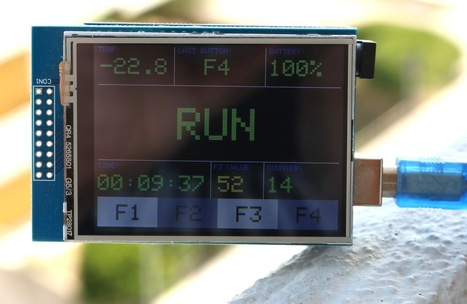
On this page we show you how to create an interface for a TFT display with an Arduino. You can download source code and library here


It works with an 2.8 inches TFT-Display from ELEGOO (available on Amazon) and it shows how buttons get integrated in the sketch.


Learn more / En savoir plus / Mehr erfahren:


https://www.scoop.it/t/21st-century-learning-and-teaching/?&tag=ARDUINO


https://gustmees.wordpress.com/?s=arduino


Gust MEES's insight:
On this page we show you how to create an interface for a TFT display with an Arduino. You can download source code and library here


It works with an 2.8 inches TFT-Display from ELEGOO (available on Amazon) and it shows how buttons get integrated in the sketch.


Learn more / En savoir plus / Mehr erfahren:


https://www.scoop.it/t/21st-century-learning-and-teaching/?&tag=ARDUINO


https://gustmees.wordpress.com/?s=arduino


Kool Design Maker's curator insight, February 6, 2018 4:43 AM

The custom flyer design services producer is sufficiently experienced to deliver excellent and energetic shading flyer plan creator correct to your business and occasion topic. Regardless of in the event that you have officially chosen plans for your flyer simply send us your outline and we will have returned to you within 24 hours.

Scooped by Gust MEES
January 30, 2018 6:24 PM
Scoop.it!

Raspberry Pi's latest competitor RockPro64 brings more power plus AI processor | #Maker #MakerED #MakerSpaces #Coding 

Raspberry Pi's latest competitor RockPro64 brings more power plus AI processor | #Maker #MakerED #MakerSpaces #Coding  | 21st Century Learning and Teaching | Scoop.it
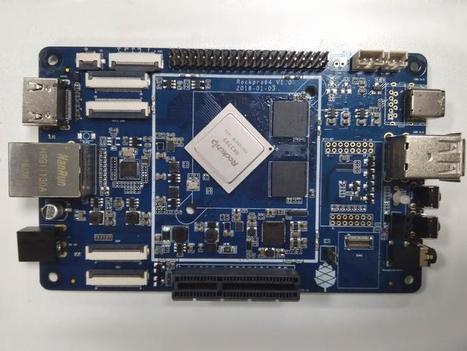
Pine64 has released a budget-friendly single-board computer with the high-powered Rockchip RK3399 system on chip (SoC).

Available from around $60, the RockPro64 board comes in two flavors, either with the hexa-core RK3399 SoC or the RK3399Pro, Rockchip's first "artificial-intelligence processor". Unveiled at CES 2018, it combines a CPU, GPU, and neural-network processing unit (NPU).

As noted by CNX-Software, a number of RK3999-based boards have been released in the past week but, priced at around $200 each, they've been aimed at business customers rather than home developers.

The RockPro64 with 2GB of RAM will cost between $59 and $65 and will be available from March, while the RockPro64-AI will cost $99 but won't be available until August 1, according to Pine64.


Learn more / En savoir plus / Mehr erfahren:


https://www.scoop.it/t/21st-century-learning-and-teaching/?&tag=Raspberry+Pi


Gust MEES's insight:
Pine64 has released a budget-friendly single-board computer with the high-powered Rockchip RK3399 system on chip (SoC).

Available from around $60, the RockPro64 board comes in two flavors, either with the hexa-core RK3399 SoC or the RK3399Pro, Rockchip's first "artificial-intelligence processor". Unveiled at CES 2018, it combines a CPU, GPU, and neural-network processing unit (NPU).

As noted by CNX-Software, a number of RK3999-based boards have been released in the past week but, priced at around $200 each, they've been aimed at business customers rather than home developers.

The RockPro64 with 2GB of RAM will cost between $59 and $65 and will be available from March, while the RockPro64-AI will cost $99 but won't be available until August 1, according to Pine64.


Learn more / En savoir plus / Mehr erfahren:


https://www.scoop.it/t/21st-century-learning-and-teaching/?&tag=Raspberry+Pi


Vivalist's curator insight, January 31, 2018 11:56 AM
Glad to see more affordable solutions for makers willing to push the envelope. This is a lot of tech for a decent price tag.

It's a chance for hobbyist to be able to tinker with neural networks, I could definitely use some additional brain power on weather data autonomously triggering relays for example :)
Scooped by Gust MEES
January 21, 2018 11:18 AM
Scoop.it!

Digital Sandbox Experiment Guide | #Arduino #Coding #VisualProgramming #Maker #MakerED #MakerSpaces 

Digital Sandbox Experiment Guide | #Arduino #Coding #VisualProgramming #Maker #MakerED #MakerSpaces  | 21st Century Learning and Teaching | Scoop.it
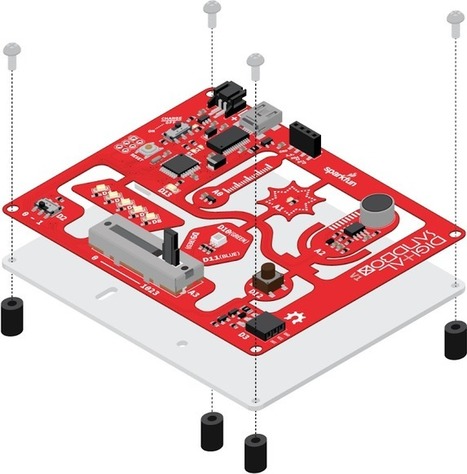
Welcome to the Digital Sandbox!


The Digital Sandbox is a learning platform that engages both the software and hardware worlds. It’s powered by a microcontroller that can interact with real-world inputs – like light or temperature sensors – while at the same time controlling LEDs, motors, and other outputs. The Digital Sandbox is equipped with everything, on board, that you will need to complete 13 experiments including controlling an LED, measuring how loud things are, detecting the temperature is, and more.


Learn more / En savoir plus / Mehr erfahren:


https://www.scoop.it/t/21st-century-learning-and-teaching/?&tag=ARDUINO


Gust MEES's insight:
Welcome to the Digital Sandbox!


The Digital Sandbox is a learning platform that engages both the software and hardware worlds. It’s powered by a microcontroller that can interact with real-world inputs – like light or temperature sensors – while at the same time controlling LEDs, motors, and other outputs. The Digital Sandbox is equipped with everything, on board, that you will need to complete 13 experiments including controlling an LED, measuring how loud things are, detecting the temperature is, and more.


Learn more / En savoir plus / Mehr erfahren:


https://www.scoop.it/t/21st-century-learning-and-teaching/?&tag=ARDUINO


No comment yet.
Scooped by Gust MEES
January 19, 2018 7:43 PM
Scoop.it!

KinderLab Robotics | #KIBO #LEARNingByDoing #LEARNing2LEARN #Kids #STEM

KinderLab Robotics | #KIBO #LEARNingByDoing #LEARNing2LEARN #Kids #STEM | 21st Century Learning and Teaching | Scoop.it
Toys for learning about technology. Playfully!

Play the video above to learn more about KIBO


With KIBO, 4- to 7-year-olds create, design, decorate and bring their own robot to life! KIBO lets kids' imaginations soar - all without requiring screen time on PCs, tablets, or smartphones.


Learn more / En savoir plus / Mehr erfahren:


https://gustmees.wordpress.com/2014/08/24/coding-a-new-trend-in-education-and-a-big-responsibility/


Gust MEES's insight:
Toys for learning about technology. Playfully!

Play the video above to learn more about KIBO


With KIBO, 4- to 7-year-olds create, design, decorate and bring their own robot to life! KIBO lets kids' imaginations soar - all without requiring screen time on PCs, tablets, or smartphones.


Learn more / En savoir plus / Mehr erfahren:


https://gustmees.wordpress.com/2014/08/24/coding-a-new-trend-in-education-and-a-big-responsibility/


No comment yet.
Scooped by Gust MEES
January 14, 2018 6:14 PM
Scoop.it!

Programming Arduino With Visuino | Lots of examples in #Video #Tutorials

Programming Arduino With Visuino | Lots of examples in #Video #Tutorials | 21st Century Learning and Teaching | Scoop.it

Programming Arduino with Visuino. Lots of examples in Video Tutorials.


Learn more / En savoir plus / Mehr erfahren:


https://www.scoop.it/t/21st-century-learning-and-teaching/?&tag=ARDUINO


Gust MEES's insight:

Programming Arduino with Visuino. Lots of examples in Video Tutorials.


Learn more / En savoir plus / Mehr erfahren:


https://www.scoop.it/t/21st-century-learning-and-teaching/?&tag=ARDUINO


No comment yet.
Scooped by Gust MEES
January 9, 2018 11:35 AM
Scoop.it!

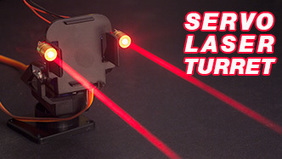
Arduino and Servos: How to Make a Laser Turret with XOD | Fun with electronics! | #Coding #Maker #MakerED #MakerSpaces

Arduino and Servos: How to Make a Laser Turret with XOD | Fun with electronics! | #Coding #Maker #MakerED #MakerSpaces | 21st Century Learning and Teaching | Scoop.it

A tutorial on what servos are, how they work, and how to use them. Then I build a laser turret using a pan-tilt servo kit and an Arduino Uno.


Learn more / En savoir plus / Mehr erfahren:


https://www.scoop.it/t/21st-century-learning-and-teaching/?&tag=Coding


Gust MEES's insight:

A tutorial on what servos are, how they work, and how to use them. Then I build a laser turret using a pan-tilt servo kit and an Arduino Uno.


Learn more / En savoir plus / Mehr erfahren:


https://www.scoop.it/t/21st-century-learning-and-teaching/?&tag=Coding


No comment yet.
Scooped by Gust MEES
January 7, 2018 11:15 AM
Scoop.it!

First use of the #3Dprinter FORM2 | #Maker #MakerED #MakerSpaces #3DPrinting 

First use of the #3Dprinter FORM2 | #Maker #MakerED #MakerSpaces #3DPrinting  | 21st Century Learning and Teaching | Scoop.it

Recently I bought myself the latest model of 3D-printers from Formlabs, the Form2.

The Form 2 delivers high-resolution prints in  Industrial 3D printing quality and it is very, very expensive. (I had been waiting (and saving money) for 3 years until I made the financial plunge to get such a machine)

But it has the huge advantage that dosen’t require a lot of tweaking and experimenting to run, you just take it out of the box, you install it and it runs !! It comes with the right software, the materials you need to use are in sich a packaging (1 Liter resin cartridges !) that you can concentrate on the objet you’re printing and not on the maintenance of the machine. The system recognises the resin type, configures settings, and allows you to keep track of resin supplies.

The Form 2 is a SLA printer where SLA stand for Stereolithography. SLA is an additive manufacturing – commonly referred to as 3D printing – technology that converts liquid materials into solid parts, layer by layer, by selectively curing them using a light source in a process called photopolymerization. SLA is widely used to create models, prototypes, patterns, and production parts for a range of industries from engineering and product design to manufacturing, dentistry, jewelry, model making, and education.


Learn more / En savoir plus / Mehr erfahren:


https://www.scoop.it/t/21st-century-learning-and-teaching/?&tag=3D-Printing


Gust MEES's insight:

Recently I bought myself the latest model of 3D-printers from Formlabs, the Form2.

The Form 2 delivers high-resolution prints in  Industrial 3D printing quality and it is very, very expensive. (I had been waiting (and saving money) for 3 years until I made the financial plunge to get such a machine)

But it has the huge advantage that dosen’t require a lot of tweaking and experimenting to run, you just take it out of the box, you install it and it runs !! It comes with the right software, the materials you need to use are in sich a packaging (1 Liter resin cartridges !) that you can concentrate on the objet you’re printing and not on the maintenance of the machine. The system recognises the resin type, configures settings, and allows you to keep track of resin supplies.

The Form 2 is a SLA printer where SLA stand for Stereolithography. SLA is an additive manufacturing – commonly referred to as 3D printing – technology that converts liquid materials into solid parts, layer by layer, by selectively curing them using a light source in a process called photopolymerization. SLA is widely used to create models, prototypes, patterns, and production parts for a range of industries from engineering and product design to manufacturing, dentistry, jewelry, model making, and education.


Learn more / En savoir plus / Mehr erfahren:


https://www.scoop.it/t/21st-century-learning-and-teaching/?&tag=3D-Printing


No comment yet.
Scooped by Gust MEES
January 1, 2018 12:49 PM
Scoop.it!

Interfacing LCD to Arduino-Tutorial to Display on LCD Screen | #Maker #MakerED #MakerSpaces #Coding #PracTICE #LEARNingByDoing 

Interfacing LCD to Arduino-Tutorial to Display on LCD Screen | #Maker #MakerED #MakerSpaces #Coding #PracTICE #LEARNingByDoing  | 21st Century Learning and Teaching | Scoop.it
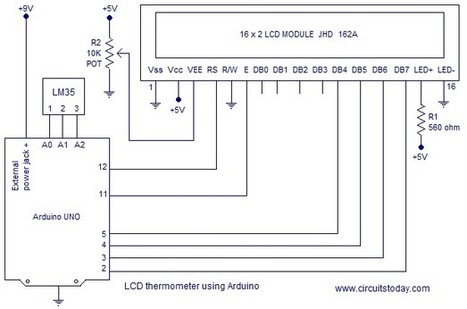
Interfacing LCD to Arduino - Tutorial on how to interface arduino to lcd screen (16x2 lcd, 20x4 lcd) with arduino code/program, lcd pin diagram and circuit.


Learn more / En savoir plus / Mehr erfahren:


https://www.scoop.it/t/21st-century-learning-and-teaching/?&tag=makerspace


https://www.scoop.it/t/21st-century-learning-and-teaching/?&tag=ARDUINO


Gust MEES's insight:
Interfacing LCD to Arduino - Tutorial on how to interface arduino to lcd screen (16x2 lcd, 20x4 lcd) with arduino code/program, lcd pin diagram and circuit.


Learn more / En savoir plus / Mehr erfahren:


https://www.scoop.it/t/21st-century-learning-and-teaching/?&tag=makerspace


https://www.scoop.it/t/21st-century-learning-and-teaching/?&tag=ARDUINO


No comment yet.
Scooped by Gust MEES
January 1, 2018 9:39 AM
Scoop.it!

How to Control Servo Motors with an Arduino and Joystick | #Maker #MakerED #MakerSpaces #Coding #PracTICE #LEARNingByDoing 

How to Control Servo Motors with an Arduino and Joystick | #Maker #MakerED #MakerSpaces #Coding #PracTICE #LEARNingByDoing  | 21st Century Learning and Teaching | Scoop.it
Learn how to use an Arduino and a joystick module to control two servo motors!


Learn more / En savoir plus / Mehr erfahren:


https://www.scoop.it/t/21st-century-learning-and-teaching/?&tag=makerspace


https://www.scoop.it/t/21st-century-learning-and-teaching/?&tag=ARDUINO


Gust MEES's insight:
Learn how to use an Arduino and a joystick module to control two servo motors!


Learn more / En savoir plus / Mehr erfahren:


https://www.scoop.it/t/21st-century-learning-and-teaching/?&tag=makerspace


https://www.scoop.it/t/21st-century-learning-and-teaching/?&tag=ARDUINO


No comment yet.
Scooped by Gust MEES
December 27, 2017 11:56 AM
Scoop.it!

Arduino - ToneMelody | 10 minutes project | #Maker #MakerED #MakerSpaces #Music 

Arduino - ToneMelody | 10 minutes project | #Maker #MakerED #MakerSpaces #Music  | 21st Century Learning and Teaching | Scoop.it

Play a Melody using the tone() function

This example shows how to use the tone() command to generate notes. It plays a little melody you may have heard before.

Hardware Required

  • Arduino or Genuino board
  • piezo buzzer or a speaker
  • hook-up wires


Learn more / En savoir plus / Mehr erfahren


https://gustmees.wordpress.com/?s=arduino


https://www.scoop.it/t/21st-century-learning-and-teaching/?&tag=ARDUINO


Gust MEES's insight:

Play a Melody using the tone() function

This example shows how to use the tone() command to generate notes. It plays a little melody you may have heard before.

Hardware Required

  • Arduino or Genuino board
  • piezo buzzer or a speaker
  • hook-up wires


Learn more / En savoir plus / Mehr erfahren


https://gustmees.wordpress.com/?s=arduino


https://www.scoop.it/t/21st-century-learning-and-teaching/?&tag=ARDUINO


No comment yet.
Scooped by Gust MEES
December 26, 2017 8:42 AM
Scoop.it!

Online CAD/CAM Design Software | Free Trial & Download | Fusion 360 | #3D

Online CAD/CAM Design Software | Free Trial & Download | Fusion 360 | #3D | 21st Century Learning and Teaching | Scoop.it
Download a free trial of Fusion 360, online CAD/CAM design software that connects your entire product design & development process.


Learn more / En savoir plus / Mehr erfahren:


https://www.scoop.it/t/21st-century-learning-and-teaching/?&tag=3D


Gust MEES's insight:
Download a free trial of Fusion 360, online CAD/CAM design software that connects your entire product design & development process.


Learn more / En savoir plus / Mehr erfahren:


https://www.scoop.it/t/21st-century-learning-and-teaching/?&tag=3D


No comment yet.
Scooped by Gust MEES
December 21, 2017 11:56 AM
Scoop.it!

Für #Electronics #Maker #MakerED Einsteiger | Perfekt löten - Jetzt kommt die Praxis | Conrad Academy - YouTube

Und weiter geht es. Nachdem ihr nun wisst, wie der perfekte Lötplatz eingerichtet wird, erfahrt ihr in der zweiten Ausgabe unserer brandneuen Conrad Academy wie Svens Löt-Kompetenzen in der Praxis aussehen.


Ihr seht den perfekten Umgang mit Lötzinn und -Kolben, lernt die Grundlagen für saubere Lötstellen auf der Platine und erfahrt wie starre und flexible Drähte professionell verlötet werden.


Learn more / En savoir plus / Mehr erfahren:


https://gustmees.wordpress.com/?s=electronics


Gust MEES's insight:
Und weiter geht es. Nachdem ihr nun wisst, wie der perfekte Lötplatz eingerichtet wird, erfahrt ihr in der zweiten Ausgabe unserer brandneuen Conrad Academy wie Svens Löt-Kompetenzen in der Praxis aussehen.


Ihr seht den perfekten Umgang mit Lötzinn und -Kolben, lernt die Grundlagen für saubere Lötstellen auf der Platine und erfahrt wie starre und flexible Drähte professionell verlötet werden.


Learn more / En savoir plus / Mehr erfahren:


https://gustmees.wordpress.com/?s=electronics


No comment yet.