


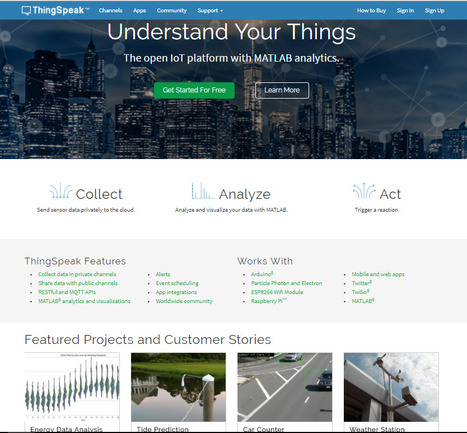
ThingSpeak is the open IoT platform with MATLAB analytics.
Learn more / En savoir plus / Mehr erfahren:
https://www.scoop.it/t/21st-century-learning-and-teaching/?&tag=ARDUINO

 Your new post is loading...
 Scoop.it! ThingSpeak is the open IoT platform with MATLAB analytics.
Learn more / En savoir plus / Mehr erfahren:
https://www.scoop.it/t/21st-century-learning-and-teaching/?&tag=ARDUINO


Kami Campbell's curator insight,
March 29, 2018 1:20 AM
Share your insight
Sign up to comment
Scoop.it!
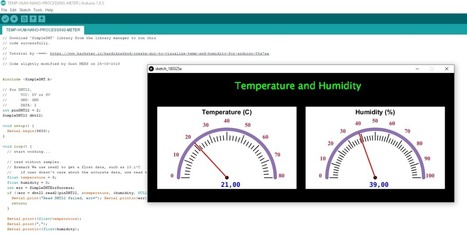
Arduino-NANO | DHT22 Temperature/Humidity with Meter
I was looking to find the most easy way to show people and to GET them interested into "Coding" with a minimum of components and expenses, as well as having directly a "success feeling" to be motivated to continue slowly but surely! Here it is; ONLY three…
Learn more / En savoir plus / Mehr erfahren:
https://www.scoop.it/t/21st-century-learning-and-teaching/?&tag=ARDUINO
Gust MEES's insight:
Arduino-NANO | DHT22 Temperature/Humidity with Meter
I was looking to find the most easy way to show people and to GET them interested into "Coding" with a minimum of components and expenses, as well as having directly a "success feeling" to be motivated to continue slowly but surely! Here it is; ONLY three…
Learn more / En savoir plus / Mehr erfahren:
https://www.scoop.it/t/21st-century-learning-and-teaching/?&tag=ARDUINO

Graphics Designing's curator insight,
March 26, 2018 2:15 AM
Custom postcard design services are the best way to promote your business and personal brand.
Scoop.it!
After teaching Arduino in my class for about 3 years now, I have discovered a problem as we were about to begin the unit this year. It needed a solution and TinkerCAD was the answer. Check out how I use it to do more than I thought I could the old way.
Learn more / En savoir plus / Mehr erfahren:
https://www.scoop.it/t/21st-century-learning-and-teaching/?&tag=Visual+programming
Gust MEES's insight:
After teaching Arduino in my class for about 3 years now, I have discovered a problem as we were about to begin the unit this year. It needed a solution and TinkerCAD was the answer. Check out how I use it to do more than I thought I could the old way.
Learn more / En savoir plus / Mehr erfahren:
https://www.scoop.it/t/21st-century-learning-and-teaching/?&tag=Visual+programming
Scoop.it!
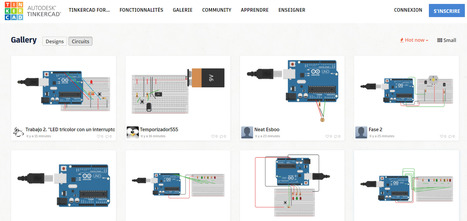
Connect the elements on the breadboard circuit and GET directly the code and also a simulation without having used the hardware.
Learn more / En savoir plus / Mehr erfahren:
https://www.scoop.it/t/21st-century-learning-and-teaching/?&tag=Visual+programming
https://www.scoop.it/t/21st-century-learning-and-teaching/?&tag=ARDUINO
https://www.youtube.com/watch?v=N0-3AqKoAyo
Gust MEES's insight:
Connect the elements on the breadboard circuit and GET directly the code and also a simulation without having used the hardware.
Learn more / En savoir plus / Mehr erfahren:
https://www.scoop.it/t/21st-century-learning-and-teaching/?&tag=Visual+programming
https://www.scoop.it/t/21st-century-learning-and-teaching/?&tag=ARDUINO
https://www.youtube.com/watch?v=N0-3AqKoAyo
Scoop.it!
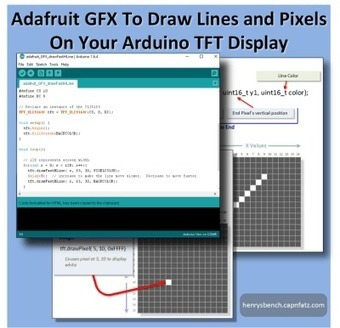
This well illustrated article has sample sketches and clear explanations of what it will take to draw pixels and lines on your TFT Display.
Learn more / En savoir plus / Mehr erfahren:
https://www.scoop.it/t/21st-century-learning-and-teaching/?&tag=ARDUINO
Gust MEES's insight:
This well illustrated article has sample sketches and clear explanations of what it will take to draw pixels and lines on your TFT Display.
Learn more / En savoir plus / Mehr erfahren:
https://www.scoop.it/t/21st-century-learning-and-teaching/?&tag=ARDUINO
Scoop.it!

Processing is a flexible software sketchbook and a language for learning how to code within the context of the visual arts. Since 2001, Processing has promoted software literacy within the visual arts and visual literacy within technology.
[Gust MEES] It gets used in following projects, to understand what it is about:
https://www.youtube.com/watch?v=P6Obm7sodhg
https://www.youtube.com/watch?v=oZsawlu-U3o
Gust MEES's insight:
Processing is a flexible software sketchbook and a language for learning how to code within the context of the visual arts. Since 2001, Processing has promoted software literacy within the visual arts and visual literacy within technology.
[Gust MEES] It gets used in following projects, to understand what it is about:
https://www.youtube.com/watch?v=P6Obm7sodhg
https://www.youtube.com/watch?v=oZsawlu-U3o
Scoop.it!
Wire LibraryThis library allows you to communicate with I2C / TWI devices. On the Arduino boards with the R3 layout (1.0 pinout), the SDA (data line) and SCL (clock line) are on the pin headers close to the AREF pin. The Arduino Due has two I2C / TWI interfaces SDA1 and SCL1 are near to the AREF pin and the additional one is on pins 20 and 21. As a reference the table below shows where TWI pins are located on various Arduino boards. BoardI2C / TWI pinsUno, EthernetA4 (SDA), A5 (SCL)Mega256020 (SDA), 21 (SCL)Leonardo2 (SDA), 3 (SCL)Due20 (SDA), 21 (SCL), SDA1, SCL1
As of Arduino 1.0, the library inherits from the Stream functions, making it consistent with other read/write libraries. Because of this, send() and receive() have been replaced with read() and write().
Gust MEES's insight:
This library allows you to communicate with I2C / TWI devices. On the Arduino boards with the R3 layout (1.0 pinout), the SDA (data line) and SCL (clock line) are on the pin headers close to the AREF pin. The Arduino Due has two I2C / TWI interfaces SDA1 and SCL1 are near to the AREF pin and the additional one is on pins 20 and 21. As a reference the table below shows where TWI pins are located on various Arduino boards. BoardI2C / TWI pinsUno, EthernetA4 (SDA), A5 (SCL)Mega256020 (SDA), 21 (SCL)Leonardo2 (SDA), 3 (SCL)Due20 (SDA), 21 (SCL), SDA1, SCL1
As of Arduino 1.0, the library inherits from the Stream functions, making it consistent with other read/write libraries. Because of this, send() and receive() have been replaced with read() and write().
Scoop.it!
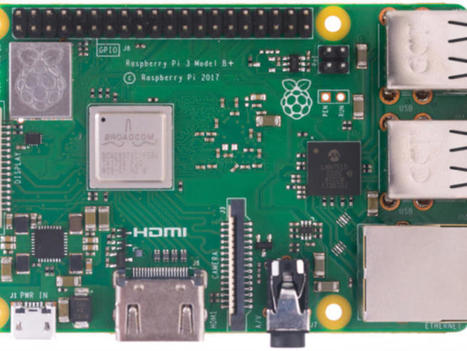
The Raspberry Pi Foundation has launched the Raspberry Pi 3 Model B+, offering a faster CPU and faster wireless throughput than its predecessor, the Raspberry Pi 3 Model B.
Learn more / En savoir plus / Mehr erfahren:
https://www.scoop.it/t/21st-century-learning-and-teaching/?&tag=Raspberry+Pi
Gust MEES's insight:
The Raspberry Pi Foundation has launched the Raspberry Pi 3 Model B+, offering a faster CPU and faster wireless throughput than its predecessor, the Raspberry Pi 3 Model B.
Learn more / En savoir plus / Mehr erfahren:
https://www.scoop.it/t/21st-century-learning-and-teaching/?&tag=Raspberry+Pi
Scoop.it!
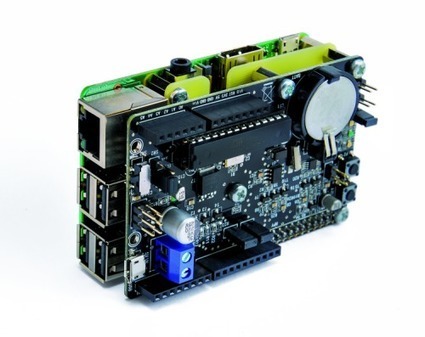
Two years ago, open electronics had produced “RandA“, an Atmega328-based board for Raspberry Pi to deliver the advantages of both, Raspberry Pi and Arduino. Earlier this month, an updated version of RandA has been released to be compatible with Raspberry Pi 3.
Learn more / En savoir plus / Mehr erfahren:
https://www.scoop.it/t/21st-century-learning-and-teaching/?&tag=ARDUINO
https://www.scoop.it/t/21st-century-learning-and-teaching/?&tag=Raspberry+Pi
Gust MEES's insight:
Two years ago, open electronics had produced “RandA“, an Atmega328-based board for Raspberry Pi to deliver the advantages of both, Raspberry Pi and Arduino. Earlier this month, an updated version of RandA has been released to be compatible with Raspberry Pi 3.
Learn more / En savoir plus / Mehr erfahren:
https://www.scoop.it/t/21st-century-learning-and-teaching/?&tag=ARDUINO
https://www.scoop.it/t/21st-century-learning-and-teaching/?&tag=Raspberry+Pi
Scoop.it!
Lego train level crossing automated by Arduino. Another lego train crash at the lego train level crossing! It turns out that the guy working there just wants to relax all day long. Only one solution: automating the thing!
Learn more / En savoir plus / Mehr erfahren:
https://www.scoop.it/t/21st-century-learning-and-teaching/?&tag=ARDUINO
Gust MEES's insight:
Lego train level crossing automated by Arduino. Another lego train crash at the lego train level crossing! It turns out that the guy working there just wants to relax all day long. Only one solution: automating the thing!
Learn more / En savoir plus / Mehr erfahren:
https://www.scoop.it/t/21st-century-learning-and-teaching/?&tag=ARDUINO
Scoop.it!
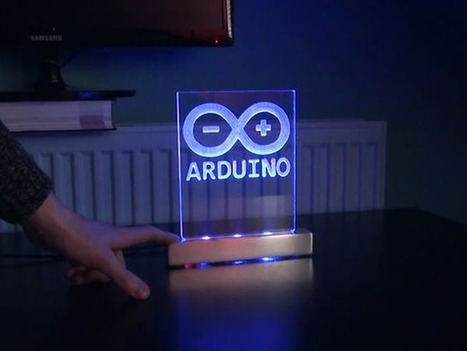
An Arduino logo engraved in acrylic with a touch sensitive aluminum LED stand.
Learn more / En savoir plus / Mehr erfahren:
https://www.scoop.it/t/21st-century-learning-and-teaching/?&tag=ARDUINO
Gust MEES's insight:
An Arduino logo engraved in acrylic with a touch sensitive aluminum LED stand.
Learn more / En savoir plus / Mehr erfahren:
https://www.scoop.it/t/21st-century-learning-and-teaching/?&tag=ARDUINO
Scoop.it!
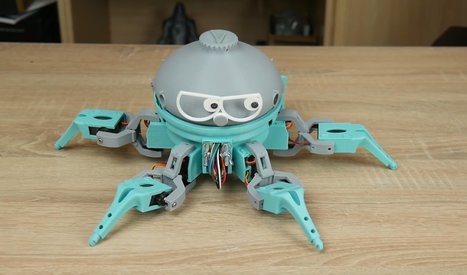
I have often mentioned the wisdom of robot maker and Make: contributor I-Wei Huang who says that you can get away with a lot in a robot creation if you make it cute, characterful, and funny. This comes across in spades with Vorpal, a 3D-printable hexapod with real character and presence. You’ll laugh, you’ll cry, you’ll fall in love.
Learn more / En savoir plus / Mehr erfahren:
https://www.scoop.it/t/21st-century-learning-and-teaching/?&tag=makerspace
https://www.scoop.it/t/21st-century-learning-and-teaching/?&tag=ARDUINO
Gust MEES's insight:
I have often mentioned the wisdom of robot maker and Make: contributor I-Wei Huang who says that you can get away with a lot in a robot creation if you make it cute, characterful, and funny. This comes across in spades with Vorpal, a 3D-printable hexapod with real character and presence. You’ll laugh, you’ll cry, you’ll fall in love.
Learn more / En savoir plus / Mehr erfahren:
https://www.scoop.it/t/21st-century-learning-and-teaching/?&tag=makerspace
https://www.scoop.it/t/21st-century-learning-and-teaching/?&tag=ARDUINO
Scoop.it!
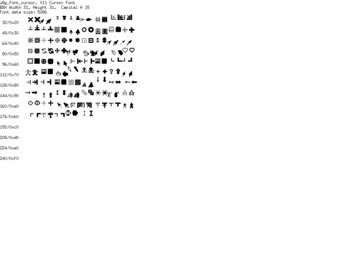
From
github

u8glib - Arduino Monochrom Graphics Library for LCDs and OLEDs
Learn more / En savoir plus / Mehr erfahren:
https://www.scoop.it/t/21st-century-learning-and-teaching/?&tag=ARDUINO
Gust MEES's insight:
u8glib - Arduino Monochrom Graphics Library for LCDs and OLEDs
Learn more / En savoir plus / Mehr erfahren:
https://www.scoop.it/t/21st-century-learning-and-teaching/?&tag=ARDUINO
|
Scoop.it!
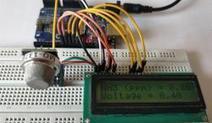
Arduino Projects
Learn more / En savoir plus / Mehr erfahren:
https://www.scoop.it/t/21st-century-learning-and-teaching/?&tag=ARDUINO
Gust MEES's insight:
Arduino Projects
Learn more / En savoir plus / Mehr erfahren:
https://www.scoop.it/t/21st-century-learning-and-teaching/?&tag=ARDUINO
Scoop.it!
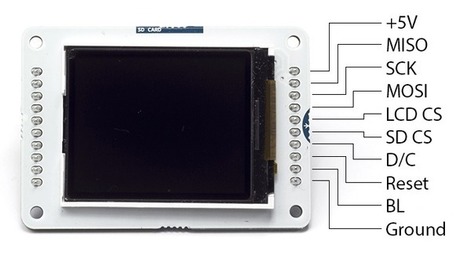
Getting Started with the Arduino TFT ScreenThe Arduino TFT screen is a backlit TFT LCD screen with a micro SD card slot in the back. You can draw text, images, and shapes to the screen with the TFT library. The screen's pin layout is designed to easily fit into the socket of an Arduino Esplora and Arduino Robot, but it can be used with any Arduino board.
Learn more / En savoir plus / Mehr erfahren:
https://www.scoop.it/t/21st-century-learning-and-teaching/?&tag=ARDUINO
Gust MEES's insight:
Getting Started with the Arduino TFT ScreenThe Arduino TFT screen is a backlit TFT LCD screen with a micro SD card slot in the back. You can draw text, images, and shapes to the screen with the TFT library. The screen's pin layout is designed to easily fit into the socket of an Arduino Esplora and Arduino Robot, but it can be used with any Arduino board.
Learn more / En savoir plus / Mehr erfahren:
https://www.scoop.it/t/21st-century-learning-and-teaching/?&tag=ARDUINO
Scoop.it!
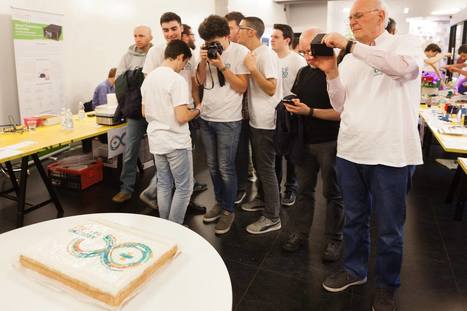
For the fifth year in a row we are inviting the open-source community to join us for Arduino Day 2018 on Saturday, May 12th!
Learn more / En savoir plus / Mehr erfahren:
https://www.scoop.it/t/21st-century-learning-and-teaching/?&tag=ARDUINO
Gust MEES's insight:
For the fifth year in a row we are inviting the open-source community to join us for Arduino Day 2018 on Saturday, May 12th!
Learn more / En savoir plus / Mehr erfahren:
https://www.scoop.it/t/21st-century-learning-and-teaching/?&tag=ARDUINO
Scoop.it!
From
xevro
Xevro is run by software developer Louis D'Hont.
I bought an Arduino, What now?
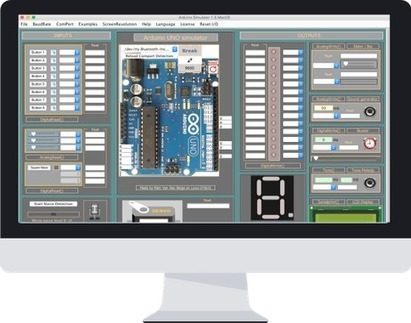
Do you want to simulate a program for Arduino without using real components? Then this Arduino Simulator is definitely for you!
Every time you want to test some project you don't need to add real parts anymore!
The Simulator has all the components needed to test basic projects and even larger projects.
Almost all the I/O is present on the Simulator so we can test your code on the monitor screen.
Learn more / En savoir plus / Mehr erfahren:
https://www.scoop.it/t/21st-century-learning-and-teaching/?&tag=ARDUINO
Gust MEES's insight:
Xevro is run by software developer Louis D'Hont.
I bought an Arduino, What now?
Do you want to simulate a program for Arduino without using real components? Then this Arduino Simulator is definitely for you!
Every time you want to test some project you don't need to add real parts anymore!
The Simulator has all the components needed to test basic projects and even larger projects.
Almost all the I/O is present on the Simulator so we can test your code on the monitor screen.
Learn more / En savoir plus / Mehr erfahren:
https://www.scoop.it/t/21st-century-learning-and-teaching/?&tag=ARDUINO
Scoop.it!
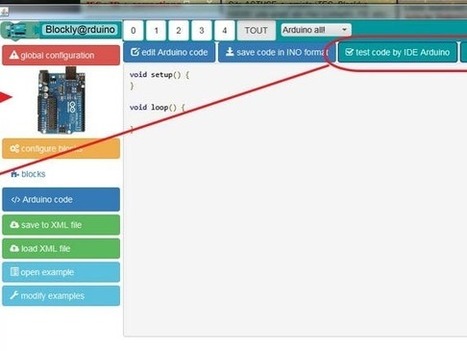
ABOUT THIS PROJECT
Learn more / En savoir plus / Mehr erfahren:
https://www.scoop.it/t/21st-century-learning-and-teaching/?&tag=Blockly
https://www.scoop.it/t/21st-century-learning-and-teaching/?&tag=Visual+programming
https://www.scoop.it/t/21st-century-learning-and-teaching/?&tag=ARDUINO
Gust MEES's insight:
ABOUT THIS PROJECT
Learn more / En savoir plus / Mehr erfahren:
https://www.scoop.it/t/21st-century-learning-and-teaching/?&tag=Blockly
https://www.scoop.it/t/21st-century-learning-and-teaching/?&tag=Visual+programming
https://www.scoop.it/t/21st-century-learning-and-teaching/?&tag=ARDUINO
Scoop.it!

No matter whether you are a seasoned programmer or you simply want to take your first steps in writing code, Repl.it wants to help you get from idea to result as fast as possible — without complicated installs and setup procedures getting in your way. The Y Combinator-funded project, which released version 1.0 of its service this week, gives you an easy to use programming environment in the browser, which slowly reveals its complexity as you write your code.
The acronym REPL stands for read-eval-print loop and basically provides a programmer with an interactive programming environment. Unsurprisingly, that’s exactly what Repl.it gives you, too, and with 200,000 weekly active developers on the platform already, there is clearly a demand for this service.
Repl.it already supports virtually every programming language you can think of, no matter whether that’s JavaScript, Python, PHP or QBasic, as well as popular frameworks like Django, Ruby on Rails and Sinatra. And if you want to hurt yourself and write in Brainfuck, you can do that, too.
Learn more / En savoir plus / Mehr erfahren:
https://www.scoop.it/t/21st-century-learning-and-teaching/?&tag=Programming...
Gust MEES's insight:
No matter whether you are a seasoned programmer or you simply want to take your first steps in writing code, Repl.it wants to help you get from idea to result as fast as possible — without complicated installs and setup procedures getting in your way. The Y Combinator-funded project, which released version 1.0 of its service this week, gives you an easy to use programming environment in the browser, which slowly reveals its complexity as you write your code.
The acronym REPL stands for read-eval-print loop and basically provides a programmer with an interactive programming environment. Unsurprisingly, that’s exactly what Repl.it gives you, too, and with 200,000 weekly active developers on the platform already, there is clearly a demand for this service.
Repl.it already supports virtually every programming language you can think of, no matter whether that’s JavaScript, Python, PHP or QBasic, as well as popular frameworks like Django, Ruby on Rails and Sinatra. And if you want to hurt yourself and write in Brainfuck, you can do that, too.
Learn more / En savoir plus / Mehr erfahren:
https://www.scoop.it/t/21st-century-learning-and-teaching/?&tag=Programming...
Scoop.it!
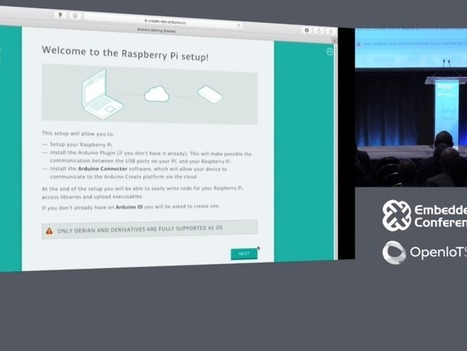
The new feature will allow Pi owners to write Arduino Sketches to interact with sensors, motors, electronic boards and other hardware attached to the Pi's GPIO pins.
Learn more / En savoir plus / Mehr erfahren:
https://www.scoop.it/t/21st-century-learning-and-teaching/?&tag=Raspberry+Pi
https://www.scoop.it/t/21st-century-learning-and-teaching/?&tag=ARDUINO
Gust MEES's insight:
The new feature will allow Pi owners to write Arduino Sketches to interact with sensors, motors, electronic boards and other hardware attached to the Pi's GPIO pins.
Learn more / En savoir plus / Mehr erfahren:
https://www.scoop.it/t/21st-century-learning-and-teaching/?&tag=Raspberry+Pi
https://www.scoop.it/t/21st-century-learning-and-teaching/?&tag=ARDUINO
Scoop.it!
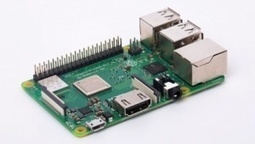
Bastelplatine ist flotter und hat GBit-LAN
Learn more / En savoir plus / Mehr erfahren:
https://www.scoop.it/t/21st-century-learning-and-teaching/?&tag=Raspberry+Pi
Gust MEES's insight:
Bastelplatine ist flotter und hat GBit-LAN
Learn more / En savoir plus / Mehr erfahren:
https://www.scoop.it/t/21st-century-learning-and-teaching/?&tag=Raspberry+Pi
Scoop.it!
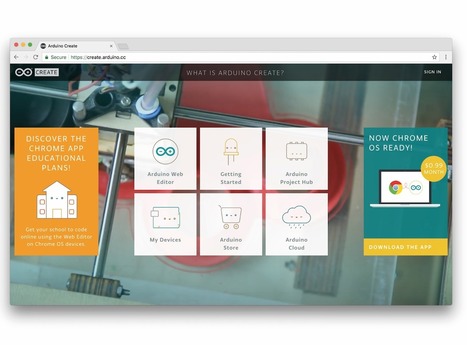
Today, at Embedded Linux Conference 2018, Arduino announced the expansion of the number of architectures supported by its Arduino Create platform for the development of IoT applications. With this new release, Arduino Create users can manage and program a wide range of popular Linux® single-board computers like the AAEON® UP² board, Raspberry Pi® and BeagleBone® as if they were regular Arduino boards. Multiple Arduino programs can run simultaneously on a Linux-based board and interact and communicate with each other, leveraging the capabilities provided by the new Arduino Connector. Moreover, IoT devices can be managed and updated remotely, independently from where they are located.
Learn more / En savoir plus / Mehr erfahren:
https://www.scoop.it/t/21st-century-learning-and-teaching/?&tag=ARDUINO
Gust MEES's insight:
Today, at Embedded Linux Conference 2018, Arduino announced the expansion of the number of architectures supported by its Arduino Create platform for the development of IoT applications. With this new release, Arduino Create users can manage and program a wide range of popular Linux® single-board computers like the AAEON® UP² board, Raspberry Pi® and BeagleBone® as if they were regular Arduino boards. Multiple Arduino programs can run simultaneously on a Linux-based board and interact and communicate with each other, leveraging the capabilities provided by the new Arduino Connector. Moreover, IoT devices can be managed and updated remotely, independently from where they are located.
Learn more / En savoir plus / Mehr erfahren:
https://www.scoop.it/t/21st-century-learning-and-teaching/?&tag=ARDUINO
Scoop.it!
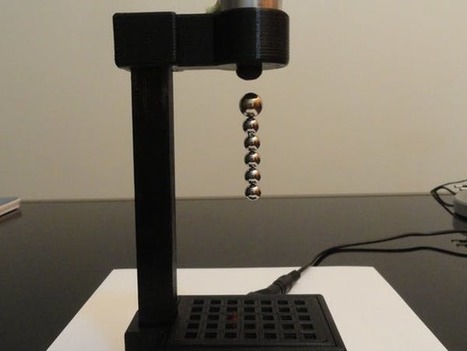
Magnet levitation toy using Arduino. Cheap and easy to make!.
Learn more / En savoir plus / Mehr erfahren:
https://www.scoop.it/t/21st-century-learning-and-teaching/?&tag=ARDUINO
Gust MEES's insight:
Magnet levitation toy using Arduino. Cheap and easy to make!.
Learn more / En savoir plus / Mehr erfahren:
https://www.scoop.it/t/21st-century-learning-and-teaching/?&tag=ARDUINO
Scoop.it!
Each of the following DIY Arduino projects is covered with detailed step by step tutorial on how to do it yourself and includes circuit schematics, source codes and videos.
Learn more / En savoir plus / Mehr erfahren:
https://www.scoop.it/t/21st-century-learning-and-teaching/?&tag=makerspace
https://www.scoop.it/t/21st-century-learning-and-teaching/?&tag=ARDUINO
Gust MEES's insight:
Each of the following DIY Arduino projects is covered with detailed step by step tutorial on how to do it yourself and includes circuit schematics, source codes and videos.
Learn more / En savoir plus / Mehr erfahren:
https://www.scoop.it/t/21st-century-learning-and-teaching/?&tag=makerspace
https://www.scoop.it/t/21st-century-learning-and-teaching/?&tag=ARDUINO
Scoop.it!
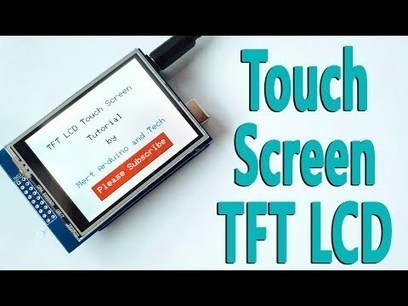
In this tutorial we will learn how to programming the TFT LCD Touch Screen. I used 2.8" TFT Touch Display ILI9325 Module and Arduino Uno for this tutorial.
The topics we will view in this tutorial, Required Libraries, Add Text, Text Color, Font Size, Print Text, Create Button, Button Click, Add Frame, Draw Rectangle and Background Color.
Learn more / En savoir plus / Mehr erfahren:
https://www.scoop.it/t/21st-century-learning-and-teaching/?&tag=ARDUINO
https://www.scoop.it/t/21st-century-learning-and-teaching/?&tag=TFT+Display+with+buttons
Gust MEES's insight:
In this tutorial we will learn how to programming the TFT LCD Touch Screen. I used 2.8" TFT Touch Display ILI9325 Module and Arduino Uno for this tutorial.
The topics we will view in this tutorial, Required Libraries, Add Text, Text Color, Font Size, Print Text, Create Button, Button Click, Add Frame, Draw Rectangle and Background Color.
Learn more / En savoir plus / Mehr erfahren:
https://www.scoop.it/t/21st-century-learning-and-teaching/?&tag=ARDUINO
https://www.scoop.it/t/21st-century-learning-and-teaching/?&tag=TFT+Display+with+buttons
|





ThingSpeak is the open IoT platform with MATLAB analytics.
Learn more / En savoir plus / Mehr erfahren:
https://www.scoop.it/t/21st-century-learning-and-teaching/?&tag=ARDUINO