
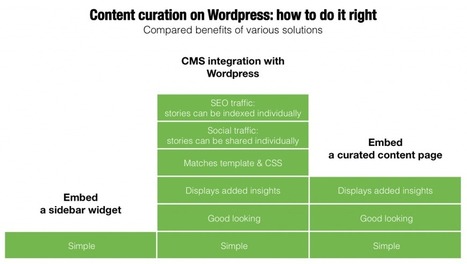

One of the main ways to to leverage content curation for business is to add curated content to your website or blog. Here's how to do it right on Wordpress.




|
Scooped by
Guillaume Decugis
onto Content curation trends November 17, 2014 11:58 AM
|
 Scoop.it!
One of the main ways to to leverage content curation for business is to add curated content to your website or blog. Here's how to do it right on Wordpress.
A comparative analysis of the various ways you can integrate curated content to a Wordpress site or blog.




 Your new post is loading...
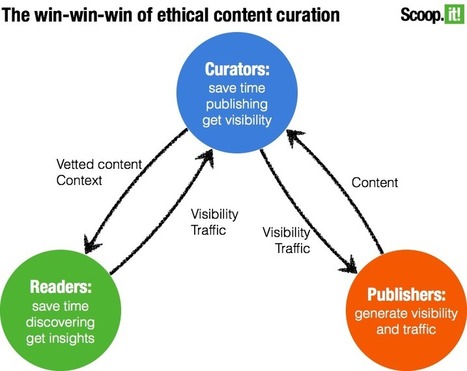




























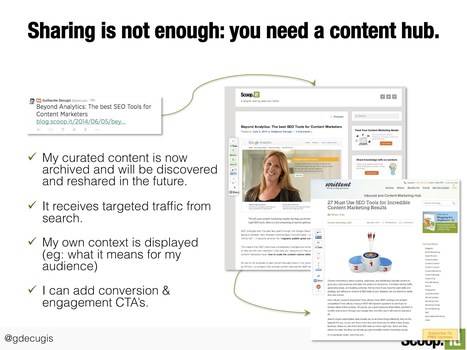





















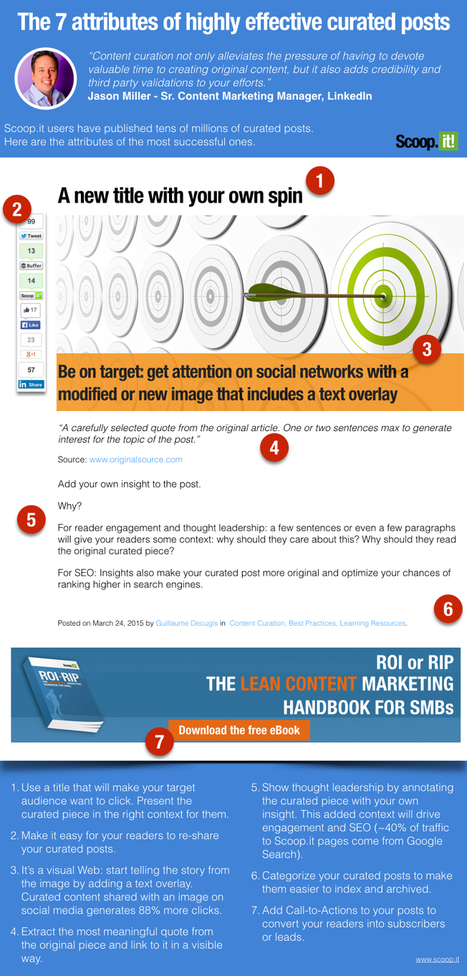




This article simply describes the benefits of content curation, the key integration options for curating, and gives insightful tips on how to optimize your curated content.
The key benefits of content curation for businesses are:
- Audience engagement - popular and engaging content catches the readers (potential clients) interest and encourages and creates conversation
- SEO - simply put, helps stretch out the spider legs and spread the webpage/blogs URL
- Social Traffic - increase of readers, followers, commenters, etc. as the curated content can redirect the readers to your homepage
- Conversions - readers who look at the curated content on your webpage can lead to sales. The curation pages can include call-to-action buttons, Newsletter requests, Free demo options.
*These four benefits are all inter-related it seems. Audience engagement and social traffic go hand in hand, as the more traffic you get the more likely you are to also see an increase in comments, likes, retweets, etc. Additionally, The curated content brings viewers to the main webpage, where there conversions can now be seen. When audience engagement increases social traffic also increase to the homepage, leading to more conversions. All of these factors, the audience engagement, and increases in social traffic and conversions all leads to SEO improvements.
Key Integration Options:
- Embed a sidebar widget - RSS feed of your curated content or ScoopIt widget
* This option does not contain a description or content
* RSS feed is not visually appealing
- Embed curated content pages - embed a ScoopIt it page but cutting and pasting the embed code
* When a reader clicks on the curated page they will be redirected to the original source. This is not optimal. We want the reader to be redirected back to our homepage or blog where a call-to-action button is present.
- Embed a CSM integration with WordPress to turn your curated content into WordPress posts - The issue here is differentiating between the curated and created content. You want to make sure it is clear that it is curated. This can be done by putting all curated content into its own category. If tree are several topics, divide by tops (ex: industry news, Marketing Trends, etc.)
* I think this is a good way to add curated content to your webpage without looking like you are stealing the credit for anybody's work or from the original.
I am currently working as an intern at Local Trades Search for Nigel Kay, the first guest speaker this semester. I hope to try to add curated content to the WordPress account i am currently working on.
Adding curated content can drive SEO, increase engagement, and help position yourself as a leader with expertise
A comparison of three ways to integrate one's curated content on a WordPress website and benefit from them. Worth for other CMS like Joomla.
Scoopit author gives its insight on how does curated content differ from duplicate content (in comments).