tecno4
2.5M views | +43 today
tecno4
Información asignatura tecnología
Your new post is loading...

Popular Tags

Current selected tag: 'Arduino'. Clear
Scooped by Gumersindo Fernández
August 25, 2018 6:13 AM
Scoop.it!

Arduino Projects & Tutorials

Arduino Projects & Tutorials | tecno4 | Scoop.it
One of the most popular microcontrollers to date, the Arduino is an easy to use, open-source platform for prototyping and developing interactive electronic projects. Arduino boards utilize inputs in order to take advantage of sensors, buttons, and more. It can take this input, and output actions like turning on a motor, or an LED, or even posting something to your favorite social media site. This is done by sending the Arduino instructions via its Arduino programming language (based on Wiring), and the Arduino Software (IDE), based on Processing.
No comment yet.
Scooped by Gumersindo Fernández
August 25, 2018 6:11 AM
Scoop.it!

How to Use an LDR Sensor With Arduino 

How to Use an LDR Sensor With Arduino  | tecno4 | Scoop.it
A simple project using an Arduino that automatically turn lights on when an LDR sensor detects darkness.
No comment yet.
Scooped by Gumersindo Fernández
August 25, 2018 6:05 AM
Scoop.it!

DRIVING A RELAY WITH AN ARDUINO 

DRIVING A RELAY WITH AN ARDUINO  | tecno4 | Scoop.it
This is my 4th tutorial on how to drive a RELAY (not a relay module) with an Arduino.
No comment yet.
Scooped by Gumersindo Fernández
August 25, 2018 6:01 AM
Scoop.it!

How to Make an Arduino SD Card Data Logger for Temperature Sensor Data 

How to Make an Arduino SD Card Data Logger for Temperature Sensor Data  | tecno4 | Scoop.it

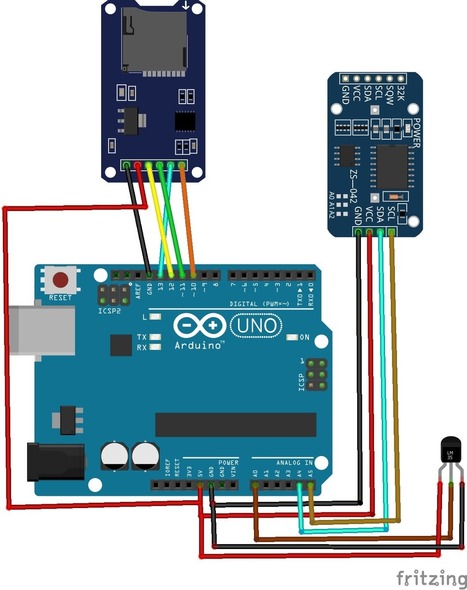
In this article, you are going to learn about Arduino SD card data logging. We will use the LM35 temperature sensor to get the temperature value, and the DS3231 module to get the time and date. Then we will use the SD card module to open the SD card, and we will enter the date, time, and temperature in the SD card file.

No comment yet.
Scooped by Gumersindo Fernández
August 25, 2018 5:56 AM
Scoop.it!

How to Control a Servo Motor From a Webpage 

How to Control a Servo Motor From a Webpage  | tecno4 | Scoop.it
Learn how to create a webpage that can be used to control a servo motor with JQUERY and an Arduino UNO.
No comment yet.
Scooped by Gumersindo Fernández
August 25, 2018 5:50 AM
Scoop.it!

How to Program an Arduino with the Scratch Programming Language Using mBlock 

How to Program an Arduino with the Scratch Programming Language Using mBlock  | tecno4 | Scoop.it

In this article, we'll take a brief look at how to program an Arduino using Scratch.

No comment yet.
Scooped by Gumersindo Fernández
August 25, 2018 5:10 AM
Scoop.it!

Push Button Integration with Arduino (I/O)

Push Button Integration with Arduino (I/O) | tecno4 | Scoop.it

In this experiment, you will learn how to turn on/off an LED by using an I/O port and a button. The “I/O port” refers to the INPUT and OUTPUT port. Here the INPUT port of the Arduino Uno board is used to read the output of an external device. Since the board itself has an LED (connected to Pin 13), so you can use this LED to do this experiment for convenience.

No comment yet.
Scooped by Gumersindo Fernández
August 25, 2018 5:05 AM
Scoop.it!

Controlling RGB Led using Arduino

Controlling RGB Led using Arduino | tecno4 | Scoop.it
In this lesson, you will use PWM to control an RGB LED and cause it to display all kinds of colors.
No comment yet.
Scooped by Gumersindo Fernández
August 25, 2018 5:03 AM
Scoop.it!

Controlling LED by PWM – Arduino

Controlling LED by PWM – Arduino | tecno4 | Scoop.it
In this lesson, let’s try something a little easier – gradually changing the luminance of an LED through programming. Since the pulsing light looks like breathing, we give it a magical name – breathing LED. We’ll accomplish this effect with pulse width modulation (PWM).
No comment yet.
Scooped by Gumersindo Fernández
August 25, 2018 4:34 AM
Scoop.it!

2 Control de temperatura con Wifi y Arduino SIN CÓDIGO por bloques Servidor y App móvil

Puedes importar el programa en: http://www.arduinoblocks.com/web/proj... En este videotutorial se repasan los conceptos aprendidos en el vídeo anterior, se amplía la toma de datos a entradas analógicas y finalmente se aplica lo aprendido a un ejemplo práctico de control de temperatura con un sensor de temperatura y un relé. Se da un paso más en cuanto a la seguridad de la conexión, ya que aprendemos a configurar una cuenta en un servidor en internet, y configurar en él el flujo de datos mediante usuario y contraseña. 1. Repaso de conexión y comunicación con el módulo ESP8266 asociado a Arduino. 2. Medición de temperatura con sensor Lm35 y entradas analógicas. 3. Activación de relé salida digital para manejo de receptores de corriente alterna. 4. Programa de control WIFI con Arduino en servidor gratuito con usuario y contraseña mediante la app móvil gratuita MQTT Dashboard, en el servidor Cloudmqtt. Vídeo anterior sobre wifi de conceptos básicos: https://youtu.be/p9Fn7AEJJjo

No comment yet.
Scooped by Gumersindo Fernández
August 24, 2018 1:28 PM
Scoop.it!

TMP36 Temperature Sensor With Arduino in Tinkercad: 7 Steps (with Pictures)

TMP36 Temperature Sensor With Arduino in Tinkercad: 7 Steps (with Pictures) | tecno4 | Scoop.it

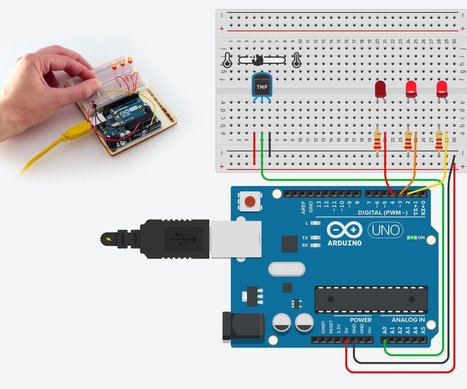
In this project, you will turn the Arduino into a thermometer! Use a temperature sensor to measure your skin temperature, and register the output with three LEDs. Even though the Arduino is a digital tool, it can interpret signals from an analog input, like the TMP36 temperature sensor, using the built in Analog-to-Digital (ADC) converter, accessed through the analog pins A0-A5, which you may have learned about in a previous lesson about analog input.

No comment yet.
Scooped by Gumersindo Fernández
August 23, 2018 4:25 PM
Scoop.it!

Entradas Salidas digitales de Arduino 

Video donde se hace una explicación sencilla pero detallada de lo que son las entradas y salidas digitales de la tarjeta Arduino UNO.
Es la explicación a nivel de hardware antes de empezar con la programación.
No comment yet.
Scooped by Gumersindo Fernández
August 23, 2018 4:14 PM
Scoop.it!

Interrupciones en todos los pines de Arduino con las PCINT

Interrupciones en todos los pines de Arduino con las PCINT | tecno4 | Scoop.it
En esta entrada vamos a ver cómo usar las interrupciones Pin Change en Arduino. Esto, por ejemplo, nos va a permitir tener interrupciones en todos los pines en placas basadas en el Atmega328P.
No comment yet.
Scooped by Gumersindo Fernández
August 25, 2018 6:12 AM
Scoop.it!

How to Make Arduino and Processing IDE Communicate  

How to Make Arduino and Processing IDE Communicate   | tecno4 | Scoop.it
Learn how to connect the Arduino to the Processing IDE so they can communicate with one another.
No comment yet.
Scooped by Gumersindo Fernández
August 25, 2018 6:08 AM
Scoop.it!

How to Control Servo Motors With an Arduino and Joystick  

How to Control Servo Motors With an Arduino and Joystick   | tecno4 | Scoop.it
Control servo motors with a joystick module connected to an Arduino.
No comment yet.
Scooped by Gumersindo Fernández
August 25, 2018 6:02 AM
Scoop.it!

Using Common Cathode and Common Anode RGB LED with Arduino

Using Common Cathode and Common Anode RGB LED with Arduino | tecno4 | Scoop.it

RGB LEDs are widely used in many of the projects with Arduino platform. They work on the basic concept of combination of the basic colors of any shade, that is, red, green and blue. All the colors have these elementary color components in them. Thus, we can make any color we want using a RGB LED.

In the market, there are two types of RGB LEDs - common cathode and common anode LEDs. People (especially beginners) often get confused as common cathode ones are easy to use, but the common anode one behaves differently, even if they are from the same brand and look the same externally on same Arduino sketch.

No comment yet.
Scooped by Gumersindo Fernández
August 25, 2018 5:58 AM
Scoop.it!

How to Control Servo Motors from a Mobile Device with an Arduino UNO and an Android App 

How to Control Servo Motors from a Mobile Device with an Arduino UNO and an Android App  | tecno4 | Scoop.it
Learn how to control servo motors using an Android app on a mobile device, an Arduino UNO, and an HC-06 Bluetooth module
No comment yet.
Scooped by Gumersindo Fernández
August 25, 2018 5:53 AM
Scoop.it!

How to Control LEDs With an Arduino, IR Sensor, and Remote 

How to Control LEDs With an Arduino, IR Sensor, and Remote  | tecno4 | Scoop.it
Use an Arduino, infrared sensor, and remote to control LEDs.
No comment yet.
Scooped by Gumersindo Fernández
August 25, 2018 5:20 AM
Scoop.it!

Getting Familiar With Arduino and Running a Sample Program

Getting Familiar With Arduino and Running a Sample Program | tecno4 | Scoop.it
Learn the important parts of an Arduino, how to download the Arduino IDE, and how to complete a simple test project!
No comment yet.
Scooped by Gumersindo Fernández
August 25, 2018 5:08 AM
Scoop.it!

I2C LCD16x02

I2C LCD16x02 | tecno4 | Scoop.it

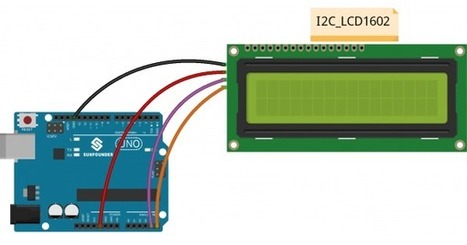
As we all know, though LCD and some other displays greatly enrich the man-machine interaction, they share a common weakness. When they are connected to a controller, multiple IOs will be occupied of the controller which has no so many outer ports. Also it restricts other functions of the controller. Therefore, LCD1602 with an I2C bus is developed to solve the problem.

I2C bus is a type of serial bus invented by PHLIPS. It is a high performance serial bus which has bus ruling and high or low speed device synchronization function required by multiple-host system. The blue potentiometer on the I2C LCD1602 (see the figure below) is used to adjust the backlight  for better display. I²C uses only two bidirectional open-drain lines, Serial Data Line (SDA) and Serial Clock Line (SCL), pulled up with resistors. Typical voltages used are +5 V or +3.3 V although systems with other voltages are permitted.

No comment yet.
Scooped by Gumersindo Fernández
August 25, 2018 5:04 AM
Scoop.it!

Control Relay using Arduino

Control Relay using Arduino | tecno4 | Scoop.it
Relay is a device which is used to provide a connection between two or more points or device in response to the input signal applied. In another word, relay provide isolation between the controller and the device as we know devices may work on AC as well as on DC. However, they receive signals from 
No comment yet.
Scooped by Gumersindo Fernández
August 25, 2018 4:56 AM
Scoop.it!

Humiture Sensor

Humiture Sensor | tecno4 | Scoop.it

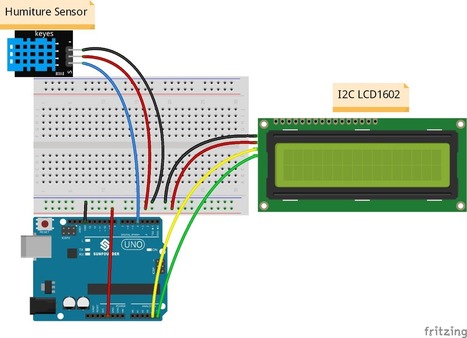
The digital temperature and humidity sensor DHT11 is a composite sensor that contains a calibrated digital signal output of temperature and humidity. The technology of a dedicated digital modules collection and the temperature and humidity sensing technology are applied to ensure that the product has high reliability and excellent long-term stability.

The sensor includes a resistive sense of wet component and an NTC temperature measurement device, and is connected with a high-performance 8-bit microcontroller.

No comment yet.
Scooped by Gumersindo Fernández
August 25, 2018 4:30 AM
Scoop.it!

1_Wifi y Arduino SIN CÓDIGO! con bloques. Explicación proceso completo con app móvil. Nueva versión

Puedes importar el programa en: http://www.arduinoblocks.com/web/proj... Por fin!!! Ya podemos conectar por Wifi nuestro Arduino programándolo de forma sencilla y rápida. En este vídeo se muestra todo el proceso completo de conexión, configuración y programación por bloques para dar conexión Wifi a Arduino, conectando para ello la placa al módulo ESP8266.

No comment yet.
Scooped by Gumersindo Fernández
August 23, 2018 4:30 PM
Scoop.it!

Aprende a superar el juego del T-Rex de Google con Arduino 

Aprende a superar el juego del T-Rex de Google con Arduino  | tecno4 | Scoop.it

Hola a todos y bienvenidos a un nuevo tutorial de El Taller De TD, el dia de hoy vamos a ganar el juego del T-Rex de Google con un simple robot hecho con Arduino.
A grandes rasgos nuestro robot detectara los obstáculos en la pantalla y hará que el pequeño dinosaurio salte en el momento indicado para que este no muera.

No comment yet.
Scooped by Gumersindo Fernández
August 23, 2018 4:20 PM
Scoop.it!

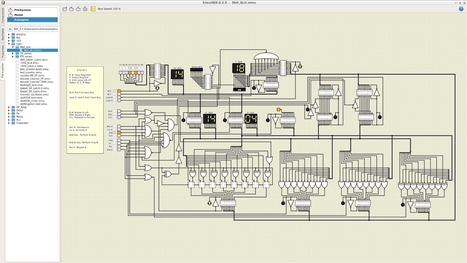
SimulIDE: Simulador de diseños de PIC y Arduino

SimulIDE: Simulador de diseños de PIC y Arduino | tecno4 | Scoop.it

A fines del año pasado Edgardo compartió con nosotros una lista que incluye a los mejores simuladores de circuitos en línea. Un par de meses atrás hice mi parte al sugerir el simulador lógico LogicEmu, que también funciona en el navegador sin dependencias externas. Y hoy es el turno de SimulIDE, un programa compatible con Windows y Linux, pensado para la simulación de circuitos generales y microcontroladores populares como PIC, AVR, y los siempre presentes módulos Arduino.

No comment yet.