So how can we connect sensors and devices to Arduino ? In this video we will look at the basic of sensor connections and their coding. We will also learn how to use a breadboard with Arduino.
Your new post is loading...
Current selected tag: 'Arduino'. Clear
So how can we connect sensors and devices to Arduino ? In this video we will look at the basic of sensor connections and their coding. We will also learn how to use a breadboard with Arduino. No comment yet.
Sign up to comment
In this video we will learn how to control arduino from MIT app inventor via Bluetooth. We will show you how to build your own Bluetooth app and turn on/off the led connected to arduino. The process is six step as follows: 1. Write Arduino Code to control LED using Mobile App 2. Setup Circuit HC-06 Bluetooth Module and Arduino Uno (VCC,Tx,Rx,GND) 3. Create Mobile App using MIT App Inventor 4. Generate APK and send it to Phone using MIT AI2 Companion App 5. Pair HC-06 Bluetooth Module with Mobile Phone 6. Finally Test mobile App and Control LED connected to Arduino Uno Code: https://drive.google.com/file/d/1MzA7...
En este tutorial te mostramos una forma en la que puedes visualizar de forma gráfica en la computadora los valores de interés de tu programa. Esto puede ser útil para graficar el valor de un sensor o cualquier otra variable y evaluar su evolución en el tiempo. Un ejemplo de aplicación de este tutorial es conectar un sensor DHT11 o DHT11 y visualizar en tiempo real de forma gráfica los valores de temperatura y humedad. También podría servirnos para visualizar voltajes o corrientes y crear una especie de osciloscopio bastante sencillo. Este tutorial se basa en la herramienta Serial Plotter que viene incluida en el Arduino IDE. Aunque no es una herramienta sofisticada de visualización, puede ser útil cuando estemos probando sensores, depurando programas y evaluando nuevo hardware.
hoy te voy a indicar una manera fácil y sencilla de vender tus códigos de arduino sin entregar el código fuente
RFID, short for Radio-Frequency Identification, are used in many industries. For example, an RFID tag can be used to attached or implanted in almost everything where it is then used for identification and tracking purposes.
Ever heard of the term “Arduino” but not knowing what is it or what it means?
Usually, temperature sensors are designed based on thermistors or thermocouples. They are used for collecting data from a specified area such as open-air, water, soil, etc.
In this Arduino Collection, we have articles on the latest news regarding Arduinos, massive amounts of guides, tutorials, projects and hardware recommendations, and many more. Use this collection as a pit-stop to find your inspiration for your next major Arduino project! If you’re a beginner just getting started with the Arduino, we have a section of articles below to give you a headstart in your journey too! This collection will be helpful for beginners and experts alike.
Before we introduce our soil sensor and show you how it can be used with an Arduino, let us first take a look at what a soil moisture sensor is, how it works, its applications, and more!
Arduino Desde Cero - Primer Módulo - Tutorial
En esta entrada vamos a ver cómo hacer un control de iluminación constante por PID con una simple Led y una resistencia LDR. Llevamos mucho hablado sobre PID en el blog en la sección de teoría de control. Así hemos visto el controlador PID, cómo ajustar un controlador PID y cómo implementar un control PID en Arduino Ahora toca pasar a un ejemplo práctico de PID. Uno de los más apropiados para empezar es un control de iluminación, porque el montaje es muy sencillo y además podemos visualizar fácilmente el resultado.
Te traemos una lista con los 17 mejores simuladores de Arduino para tu ordenador, de forma que no necesites tenerlo físicamente frente a ti para poder experimentar con él. Arduino es una plataforma de creación de electrónica de código abierto basada en hardware y software libre, con la que puedes hacer una gran cantidad de proyectos.
In this tutorial I'll show you how to make a 4x4x4 LED cube. |
An introduction to Arduino Microcontroller Board. Understanding the Core principal of arduino .
In this video, we will see how to create a security system with an arduino UNO and a PIR (Motion) sensor.
El sensor táctil capacitivo TTP223B permite detectar la presencia de un dedo a través de superficies intermedidas como ser papel, plástico, acrílico y vidrio, útil para ocultar al propio sensor muy utilizado en las industrias automotriz y médica. Veremos su principio de funcionamiento y experimentos prácticos de detección a través de distintos materiales y espesores de los mismos, dos programas para el control de un LED mediante PWM. También el análisis de modelo con puentes A y B para cambio de lógica e interruptor momentáneo o encendido/apagado para usos sin microcontrolador. Código fuente de programas vistos en: https://github.com/bitwiseAr/Curso-Ar...
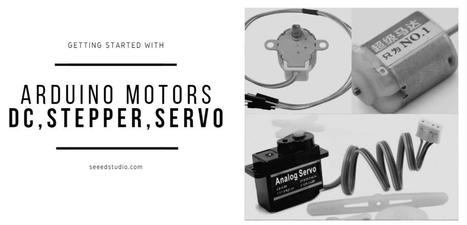
When using the Arduino, there are many projects and things that you can do with it and one of them includes driving a motor! Today, through this tutorial, we will be focusing on the 3 basic motors that you can drive with the Arduino which are the DC motor, Servo motor, and Stepper motor.
Do not know what is an Arduino? Check out this guide which covers everything you need to know about the Arduino from what is it, what can it do to the various types of Arduino.
Arduino microcontrollers are a beginner friendly and low cost platform for electronics and programming. They’re great for simple control tasks like blinking an LED, but how much can we stretch the potential of a single Arduino? In other words, is multitasking with Arduino possible? If you’ve learnt some basic Arduino Programming and want to take it to the next level, this article is definitely for you!
Want to control high voltage devices like your fans, lights, heaters, or other household appliances with the Arduino?
Arduino IDE no se encuentra en los repositorios oficiales de Ubuntu, al menos en su última versión, por lo que tenemos que utilizar la web oficial del Proyecto para conseguir este IDE.
Templates are here for the Oplà IoT Kit. This is a new feature that takes you from unboxing your kit to uploading a sketch and getting a project up and running in record time. And you can do the whole thing without needing any coding.
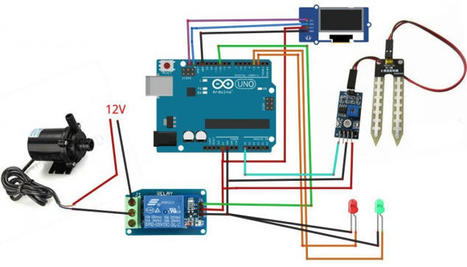
In this tutorial we will learn how to make a Plant Watering System Using a moisture sensor, water pump and flash a green LED |
Your new post is loading...