


Get 100 Creative Presentation Ideas on the App Store. See screenshots and ratings, and read customer reviews.
Via Baiba Svenca


 Your new post is loading...
 Your new post is loading...
Your new post is loading...
 Scoop.it!
Get 100 Creative Presentation Ideas on the App Store. See screenshots and ratings, and read customer reviews. Via Baiba Svenca 
Scoop.it!
PechaKucha is a specific style of presentation that originated in Japan that entails presentations of 20 slides, displayed for 20 seconds each... Via Baiba Svenca

LucaVanin's curator insight,
December 19, 2014 4:42 AM
Non sai cos'è il Pechakucha?!? Come hai fatto a vivere senza fino ad oggi? Leggi un po' qui e... impara!!! 
Claudia M. Reder's curator insight,
December 19, 2014 12:51 PM
This is a creative way to present. The visuals have to enhance the presentation. 
Gianfranco Marini's curator insight,
December 21, 2014 4:11 AM
Una guida pubblicata su Slideshare per realizzare presentazioni PechaKucha, uno stile originario del Giappone per realizzare presentazioni, che utilizza alcune semplici regole illustrate nelle 36 slides della presentazione che ho trovato nel canale di Paul Gordon Brown.
Si tratta di un interessante stile comunicativo cui ispirarsi per cercare di uscire dalla monotonia della maggior parte delle presentazioni. Riassumo qui alcune delle regole: # 20 slides mostrate per 20 secondi ciascuna per un totale di 6 minuti e 40 secondi; # le immagini avanzano automaticament; # le PKN o PechaKucha Nights sono incontri creativi in cui si condividono idee, lavori, pensieri utilizzando presentazioni in stile PechaKucha
LINK UTILI 1. Per saperne di più sul PechaKucha rimando al link di Wikipedia English http://en.wikipedia.org/wiki/PechaKucha 2. Faq su PechaKucha http://www.pechakucha.org/faq
Scoop.it!
This simple technique is an easy way to turn those PowerPoint Slides into flipped course content. The presentation tool in Microsoft Office is one of the Via Baiba Svenca

rodrick rajive lal's curator insight,
December 21, 2014 10:45 PM
This is important advice for those who are into flipped class room teaching. Time and again, it has been reiterated that stand alone powerpoint presentations are not good enough unless they are backed by a voice over, or a verbal presentation, or a description short though it may be on each slide. The tips given in the article will help in preparing PPTs. with Voice Over.
Scoop.it!

Baiba Svenca's curator insight,
January 5, 2015 4:59 AM
These effective characters from westerns will help your students get the message the slideshow is carrying. 
Heraclio Pinedo Hernández's curator insight,
January 5, 2015 1:14 PM
Para poder salirnos de los esquemas y vicios en las presentaciones que lanzamos contra nuestros alumnos.
LucaVanin's curator insight,
January 8, 2015 10:32 AM
Esempio di Storytelling Visivo da paura!!! Questa presentazione non solo è utile come contenuti (60 slide da studiare a memoria e applicare SEMPRE!), ma ha un tratto, una personalità e un efficacia comunicativa fantastiche! Ps. attenzione che alcune indicazioni non sono adatte alle presentazioni online
Scoop.it!
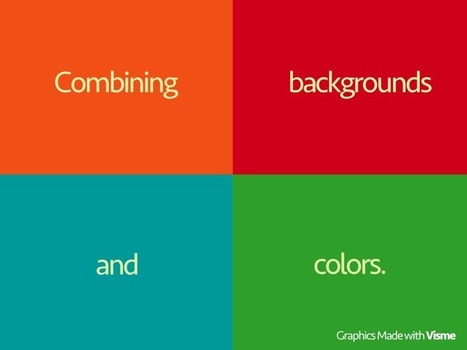
When we start designing something new, it’s always hard to find the correct combination of background and text colors that correspond to each other: This Via Baiba Svenca
Baiba Svenca's curator insight,
January 13, 2015 11:09 AM
Some valuable tips regarding the use of fonts and colours in your presentations. Thanks for the suggestion to Payman Taei. 
Thomas Allan's curator insight,
January 14, 2015 9:55 PM
Some nice quick guidelines for designing presentations and graphics. Nicely written blog post, with some good examples.
Scoop.it!

Vidra is a great free new app from the creators of the also brilliant Grafio - TenTouch Apps. I was using Grafio on my iPad today and saw that they were promoting this new app - the end result look... Via Baiba Svenca
Baiba Svenca's curator insight,
January 13, 2015 11:12 AM
iPad users now have a new app Vidra for creating videos. Reviewed by @ICTevangelist
Scoop.it!

Creating picture transparency is one of those zany things in PowerPoint that is technically impossible…you cannot directly add a transparency to a picture…but there just happens to be a workaround.... Via Baiba Svenca
Baiba Svenca's curator insight,
January 16, 2015 2:04 AM
A useful tutorial on working with images in your presentations.
Scoop.it!

As I prepare for my presentation this week at the Florida Educational Technology Conference (FETC) on “Presenting with Pecha Kucha,” my colleagues have repeatedly asked me, “What is Pecha Kucha?” The short answer is it’s a great presentation style that gets students thinking and learning, not reading slides. Via Baiba Svenca
Baiba Svenca's curator insight,
January 23, 2015 12:01 PM
An interesting post about how Pecha Kucha type of presentations is used in education.
Scoop.it!

Speakers are the backbone of any conference. They have the power to make or break your event. More often than not, your line-up is the main reason why your del Via Baiba Svenca
Scoop.it!
Looking for some ways to make the arduous act of presentation-making faster and easier? Look no further than BrightCarbon's top five shortcuts! Via Baiba Svenca
Scoop.it!
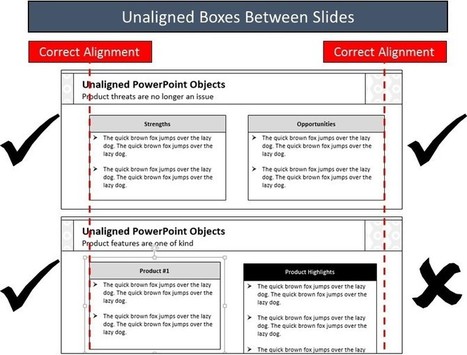
One of the most annoying and tedious PowerPoint tasks is aligning objects BETWEEN your slides so that stuff isn’t just floating around in your presentation…yes, everyone notices! So the question is... Via Baiba Svenca
Baiba Svenca's curator insight,
February 4, 2015 2:00 PM
An excellent tutorial by Nuts & Bolts Speed Training on aligning objects in your presentations. 
Bob Connelly's curator insight,
February 19, 2015 9:46 AM
I often obsess about alignment in my slides, even though they are usually minimalist, with little text or few objects. So something to make alignment between slides easier catches my attention!
I generally use Keynote over Powerpoint, so this won't be much help to me but might for those who do.
Scoop.it!

Scoop.it!

No need to transfer data from Evernote to PowerPoint. Save time and spare your coworkers at your next meeting with this trick. Via Baiba Svenca
Baiba Svenca's curator insight,
February 12, 2015 2:27 PM
Did you know that you can make presentations in Evernote? |
Scoop.it!
Baiba Svenca's curator insight,
December 15, 2014 10:12 AM
Learn how to add a narrative to your Google presentation.
Scoop.it!
Flowboard, maker of the interactive presentation and storytelling software, has changed its company name to FlowVella, effective immediately. The product name will likewise change, but not its form or function. Alongside… Via Baiba Svenca
Baiba Svenca's curator insight,
December 20, 2014 4:20 AM
Flowboard, a presentation app for iPad and Mac, is now FlowVella.
Scoop.it!
Swivl is talked about this week on ETYSK. Jeff talks with the CEO of Swivl about how this great EdTech tool is being used in the classroom. Via Baiba Svenca
Baiba Svenca's curator insight,
December 29, 2014 5:11 AM
Great tutorial how you can use Swivl for creating presentations and lessons.
Scoop.it!

Vimodi has a unique nonlinear viewer and was designed so that content conforms to the discussion - and not the other way around. Its distinctive feature is that it lets you discuss content non-linearly rather than the linear format of PowerPoint or KeyNote. Perfect for business meetings, sales meetings or teaching where you want to keep the discussion open yet know in advance what the key areas for discussion should be. Via Baiba Svenca

Miguel Paul Trijaud Calderón's curator insight,
January 4, 2015 7:26 AM
Design interactive content with Vimodi 
Ann Luzeckyj's curator insight,
January 6, 2015 5:36 PM
If this does what it says it could be good... sounds more free form...
Scoop.it!
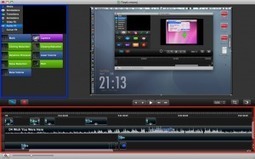
At CustomShow, we decided to list some powerpoint alternatives that could help solve your overall presentation software problems. These programs serve many purposes. Via Baiba Svenca
Baiba Svenca's curator insight,
January 9, 2015 11:03 AM
Thanks for the suggestion to Justin Croxton. 
Becky Roehrs's curator insight,
January 9, 2015 1:56 PM
Awesome list, provides product links, descriptions, pros/cons and who the product is "perfect" for. 
Selina Foong's curator insight,
January 13, 2015 1:32 AM
help solve your overall presentation software problems. These programs serve many purposes.
Scoop.it!
http://preshero.co/ In this Slideshare I've collected the definitive list of presentation worst practices, of PowerPoint no-nos, of public speaking donts. I'v… Via Baiba Svenca

MagneticSpeaking's curator insight,
January 27, 2015 8:26 AM
This is very informative for anyone who speaks in public. The moral of this Slideshare is to keep quiet about your internal dialogue. When you speak, everything you say should benefit your audience. When you ask the audience to sympathize with you, you take away from their experience. Sharing stories and taking questions is great, apologizing for being unprepared and talking about yourself is not. Great article.
LucaVanin's curator insight,
April 22, 2015 3:58 AM
15 cose da NON DIRE durante una presentazione in pubblico! Quali dici o hai detto tu?
Scoop.it!

Creating a mesmerizing presentation is more than stitching slides together, sure, but a good presentation tool certainly helps keep your audience's attention. Some of the best are on the web and easy to use, too, and don't require you download a pricey app to use. This week, we want to know which ones you think are the best. Via Baiba Svenca
Scoop.it!

For Stop Motion and Timelapse lovers. An Android app that combines your pictures into movies. Everyone can make a Lego Movie! Via Baiba Svenca
Baiba Svenca's curator insight,
January 23, 2015 12:06 PM
PicPac is an Android app for creating stop motion or timelapse videos. 
Dupree Wesley's curator insight,
May 27, 2015 9:55 PM
An android app that can make pics into stop motion.
Scoop.it!
My newest tutorial video about ways to make a cartoon of yourself in PowerPoint, including using CrazyTalk Animator, which is a separate software you can get... Via Baiba Svenca

David Swaddle's curator insight,
January 28, 2015 11:01 PM
CrazyTalk is so much fun! Here's a quick demo of what it can do.
Scoop.it!
To get slides to the front animation sequence, visit my blog here: http://bit.ly/1ykmNUt . This video shows a super cool animation add-in that I wish I knew ... Via Baiba Svenca
Baiba Svenca's curator insight,
January 30, 2015 12:33 PM
See how you can easily add animations to your PowerPoint presentations.
Scoop.it!
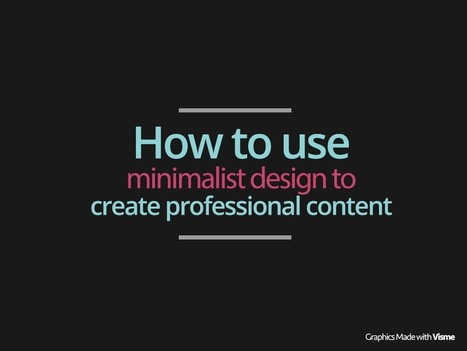
Sometimes less is more. Learn these simple tricks to take advantage the minimalist design trends in graphic design to create more professional presentations and Via Baiba Svenca
Bob Connelly's curator insight,
February 19, 2015 9:39 AM
I really prefer minimalist design. This short post gives some simple tips on how to achieve this. 
Gabriel Arturo Viera's curator insight,
February 23, 2015 1:29 PM
This type of work is currently widely used.

Susan Gingras Fitzell's curator insight,
March 15, 2015 3:41 PM
Poses a refreshing contrast to what is very *busy* in most digital media. The tips presented are consistent with brain research on how we take in information visually.
Scoop.it!

Visit www.thematic.co to create your own free scrolling album to share with your friends. Via Baiba Svenca

Jeff Domansky's curator insight,
February 15, 2015 1:07 AM
Thematic is a cool tool for storytelling and other presentations. Worth looking at. |







If you run out of ideas for your presentations...