Your new post is loading...

|
Scooped by
evangelina chavez
July 5, 2011 3:20 PM
|
Because of my job, I look at quite a few elearning courses. One thing common to many of them is that they lack graphic design structure. This makes sense on a few fronts.
First, most of the people I talk to don’t have a graphic design background. So they tend to do very basic design work, if any at all. In addition, even if they wanted to do more, most don’t have a budget to hire a graphic designer or buy the appropriate graphics. On top of all of that, applications like PowerPoint provide a lot of free graphics and templates and it’s easy to rely on those for the design part of the course.
While these limitations are legitimate and present some obvious challenges, there’s no reason why you can’t learn some basic graphic design concepts.
|
|
Scooped by
evangelina chavez
July 5, 2011 2:10 PM
|
In part 1, we looked at the various forms that learning videos can take and the ways they can be used, either as a stand-alone solution or as an element in a blend. In part 2, we moved on to look at pre-production – all those tasks that need to be completed before you press record on the camera. In this instalment, we get to the shoot itself, with some hints and tips for the set ups you’re most likely to encounter when producing learning videos.
The ‘piece to camera’ or PTC
The piece to camera We’re all familiar with the piece to camera as a technique used in news broadcasts, but in the context of low-budget learning videos, we’re more likely to use this approach to record a response to a question. The following tips will help you to do an effective job:
Explain to the subject what you are going to do and what question you would like them to answer.
Make a note of the subject’s name and check the spelling with them before you leave.
Find an interesting setting, ideally one which will reflect the context of the topic.
Position the camera at the subject’s eye level, ideally on a tripod. Whatever you do, do not look down on the subject.
Frame the shot so you don’t leave lots of space above the subject’s head as this will make them look short.
Ask the subject to look directly into the lens.
Don’t rehearse if you want the subject’s response to sound really natural.
If you’re feeling adventurous, add some movement by using an occasional slow zoom in and out.
The interview
The interview is one of the principle video formats and one that has real value for learning. In the ideal world you would shoot an interview with two cameras – one for the interviewer and one for the interviewee – and then choose the shots you would like to go with during the edit. However, this series is about what you can do with very little equipment and very little experience, so let’s see what you can do with a single camera.
|
|
Scooped by
evangelina chavez
July 5, 2011 2:05 PM
|
Video is very much the medium of the moment. Not only do we spend many hours each day watching it on our TVs, it has become an integral part of the online experience. An ever-increasing proportion of the population does not only consume video, it creates and shares it with a world-wide internet audience. Whereas once video cameras cost many hundreds, if not tens of thousands of pounds, they are now integrated for no additional cost in computers, stills cameras and mobile phones. And where once video editing could only be carried out by skilled engineers in elaborate editing suites, it can now be accomplished, often with equivalent production values, with free or low cost software on PCs and even mobile devices.
In a learning context, video provides a compelling means for conveying content, particularly real-life action and interactions with people. Amazingly, it can also be quicker and easier to produce than slide shows or textual content. Sometimes you just have to point the camera, press record, shoot what you see and then upload to a website. Obviously it won’t always be that easy, but you should start with the attitude that `”I’ll assume I can do it myself, until proven otherwise.”
Media elements
In its purest form, a video is a recording, in moving pictures and sound, of real-life action as captured by a video camera. In actual practice video goes way beyond live action, and is capable of integrating just about every other media element, including still images, text, 2D and 3D animation. At the heart of video, however, will always be moving images of some form and an audio accompaniment, whether ambient sound, voice, music or some combination.
Interactive capability
As a general rule, video is not interactive, other than in an exploratory or navigational sense. And for the purposes of this Practical Guide we will be assuming no interactivity. Having said that, it is possible to build interactivity into video, whether that’s on a DVD, a digital TV system or online; it’s also possible to incorporate video material into what are essentially interactive media, such as scenarios and tutorials.
|
|
Scooped by
evangelina chavez
July 3, 2011 2:03 PM
|
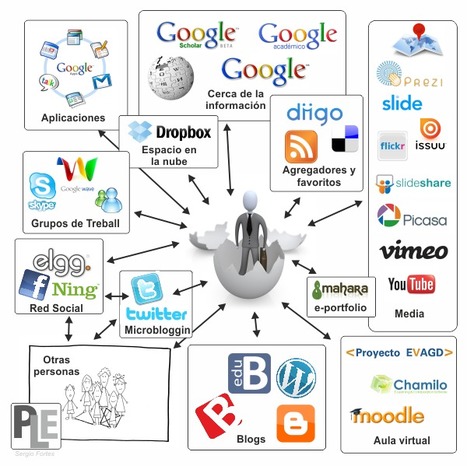
RT @lgaretio: El diseño de Entornos Personales de Aprendizaje y la formación de profesores en TIC http://t.co/o6ZqYhU... (RT @srivero: Hablemos de e-learning: El diseño de Entornos Personales de Aprendizaje y la formaci...)...
|
|
Scooped by
evangelina chavez
July 3, 2011 1:57 PM
|
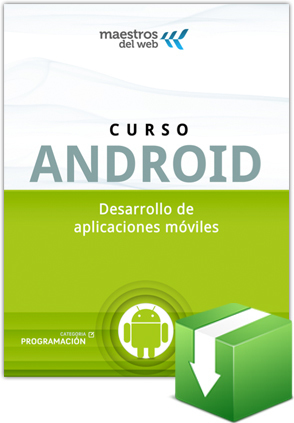
¿Quieres aprender todo sobre Android y no sabes por dónde iniciar? Hoy empezamos un Curso sobre Android donde te llevaremos paso a paso por elementos básicos, ejemplos prácticos y descargas de código sobre esta popular plataforma móvil de Google.
En nuestra sección de Guías de Maestros del Web, presentamos el Curso Android dividido en 10 capítulos.
Guía Android, desarrollo de aplicaciones móviles
Construir un lector de feeds simple
UI en Android y aumentar la funcionalidad de un lector de feeds
Trabajar con imágenes (cámara y galería)
Grabación y reproducción de vídeo
Geolocalización y utilización de mapas de Google
Utilización de sensores
Trabajando con servicios
Envío de emails
Trabajando con APIs (Twitter y Facebook)
Conectándonos con Apis de Google
|
|
Scooped by
evangelina chavez
July 1, 2011 10:25 AM
|
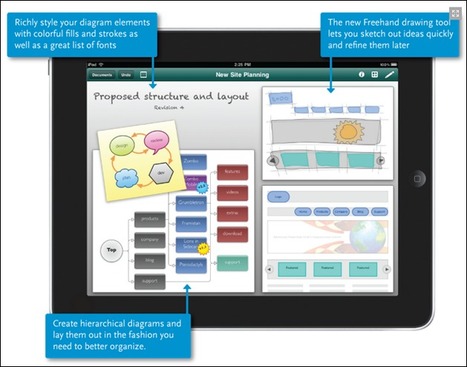
Best iPad Apps.This is a great collection of design and web design apps for ipad...
Apple’s coolest new toy has finally arrived and for those who haven’t had a chance to put their fingers on it, it’s pretty awesome. As with the iPhone, it will no doubt change the way we interact with the web, even when we’re not on the go. Looking past the cool factor of the iPad, you’ll probably want to know what apps are available that will actually be useful in the realm of the design world.
To a certain extent, an iPad changes the tide of web designer’s routine. iPad enables the potential for designers to accomplish their task and project on time because it is a portable workstation that allows designers to work on the dot. With a touch of a your finger, the tons of awesome apps springs into life and the pictures are vivid and it satisfy the sophisticated taste for every designer. In this article i have gathered some creative and useful iPad Applications that will prove useful to both most designers including web designers.
|
|
Scooped by
evangelina chavez
June 30, 2011 9:01 AM
|
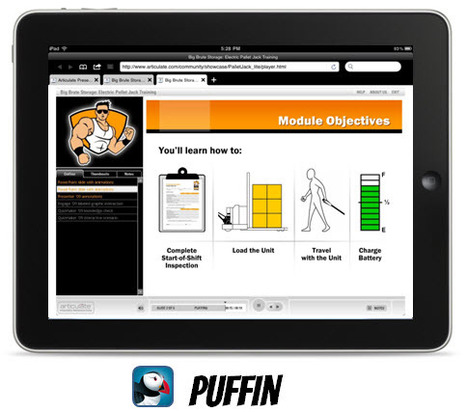
Last week I spent a couple of days in San Jose at mLearnCon. Lots of interesting stuff. One thing that stood out was that most people haven’t jumped into the pool yet. Lots of interest, but not a lot of implementation.
The challenge for many people is figuring out what mobile learning is and what they can do to get started. And they don’t want to spend a lot of money doing so. The cool thing is that while you’re still figuring things out, it’s easy enough to stick your toes into the m-learning pool. In today’s post, I’ll share some simple tips to help you get started with mobile learning.
You Already Have a Great Mobile Learning Tool
Sometimes we make things complicated. This is especially true for new technology or whenever we slap a letter in front of the word learning. Because of this, it can be hard to take a step forward. No one wants to make the wrong decision or a big investment that doesn’t pan out.
The good thing is that you can stick your toes into the mobile learning waters with little investment and actually produce a viable product. And you already have the tool to do so.
|
|
Scooped by
evangelina chavez
June 23, 2011 2:36 PM
|
Using portable computing devices (such as laptops, tablet PCs, PDAs, and smart phones) with wireless networks enables mobility and mobile learning, allowing teaching and learning to extend to spaces beyond the traditional classroom. Within the classroom, mobile learning gives instructors and learners increased flexibility and new opportunities for interaction. Mobile technologies support learning experiences that are collaborative, accessible, and integrated with the world beyond the classroom.
|
|
Scooped by
evangelina chavez
June 21, 2011 7:33 AM
|
Easily create interactive Flash-based courses with Rapid Intake’s elearning software tools for online computer based training (CBT). Start a free trial now.
|
|
Scooped by
evangelina chavez
June 21, 2011 7:22 AM
|
RT @juandoming: Comparación de 10 plataformas de blogging | @scoopit http://bit.ly/maqTK0#web20 #educacion #educachat #formaTIC...
|
|
Scooped by
evangelina chavez
June 21, 2011 7:20 AM
|
Mobile Learning has been on our minds and for all the right reasons. Today, mLearnCon 2011 opens it doors to hundreds of visitors from in and around the US.
|
|
|
Scooped by
evangelina chavez
July 5, 2011 2:15 PM
|
RT @lorievela: Posibilidades educativas de #Google+ http://ht.ly/5wFsC #educacion #eLearning #TIC #edutech cc @jaumefv1... Parece inevitable que los entornos educativos virtuales utilizados en e-learning, las denominadas plataformas, pasen a mejor vida en los próximos años o al menos, es previsible que la estructura cerrada y rígida presente en la mayor parte de las soluciones existentes en el mercado, evolucione hacia otros formatos más abiertos, democráticos y personalizables por parte del usuario (dicho sea de paso, estos atributos son precisamente los rasgos esenciales de los PLE). Mucho se habla también de la importancia de hibridar el aprendizaje formal con el informal, de extender nuestro aprendizaje más allá del camino preestablecido que impone cualquier institución educativa, del potencial creativo que inunda la Red y de la fuerza imparable que representa la inteligencia colectiva mediante la producción entre iguales. Pues bien, desde hace solo unos días, con la aparición de Google+ (aun en versión beta) en el panorama de las redes sociales, se abre ante los usuarios una alternativa al gigante Facebook, pero ¿qué puede hacer Google para lograr una migración masiva de usuarios desde las entrañas de su rival? Mejorar lo que Facebook ya ofrece en estos momentos e incorporar nuevas funcionalidades que atraigan a los usuarios. La respuesta no por simple es fácil, ya que precisamente Google ha fracasado estrepitosamente en ocasiones anteriores (véase Google Wave, Google Buzz,…). Ahora bien, aunque el reto es enorme por competir con una red social que ya posee más de 700 millones de usuarios, quisiera centrarme en analizar las posibilidades educativas de Google+ ya que me parecen particularmente interesantes. ¿Qué características tiene esta red social para convertirse en un entorno formativo de consideración? Como no podía ser de otra forma al hablar de formación, educación, aprendizaje, etc. lo importante es que los usuarios se encuentren un entorno cómodo en el que puedan gestionar fácilmente sus contenidos e interacciones. Deben sentir este espacio como propio, y por tanto, seguro. En este sentido, el control de la privacidad constituye un requisito indispensable si pretendemos que una red social sirva de soporte para más escenarios que los ya habituales de conversación entre pares. En este sentido, Google+ permite organizar a nuestros contactos mediante la creación de “Círculos”. Estos círculos representan grupos que podemos definir según nuestros propios criterios. El resultado es una especie de “sociograma” que servirá para establecer los límites de nuestra privacidad o la audiencia con la que deseamos compartir nuestros mensajes en el momento de enviarlos, así como la información que deseamos recibir. Por otro lado, resulta destacable el hecho de que podamos “asegurar” nuestras publicaciones de modo que impidamos que sean compartidas por nuestros contactos. De esta forma estaremos evitando que sean vistas por personas que no queremos o que incluso no forma parte de nuestros contactos
|
|
Scooped by
evangelina chavez
July 5, 2011 2:08 PM
|
In part 1, we looked at the various forms that learning videos can take and the ways they can be used, either as a stand-alone solution or as an element in a blend. We move on to the practicalities of getting a video made, starting with what the film and TV industries call pre-production – essentially all those tasks that need to be completed before you press record on the camera.
Seeing as we are concentrating on the absolute basics of video production, requiring the minimum of technical expertise and equipment, you might feel that pre-production is a bit of a grand topic to be spending any time on. But even the simplest productions need some planning, as we shall see.
Develop your concept
You need an idea. You can’t just press record and shoot the first thing you see. This idea must be compelling to some degree or no-one is going to take the time to watch. So, take the time to consider what you could contrive that would enhance the lives of your audience in some way. In a learning context, that could mean showing how to do something, explaining a difficult concept, or allowing people to share their thoughts and opinions on a matter of some importance.
If we’re talking online video (and probably we are) then you have to figure out how to realise your concept in five minutes or less. That’s not a long time, but it’s all most viewers are prepared to spare. Keeping your video short also reduces the burden on you in terms of the more advanced production techniques you would need to sustain interest over a longer period. Five minutes is not so long, but your video still requires a beginning, a middle and an end. Think this through up front – don’t expect to be able to fashion all this in the edit.
Prepare a script or storyboard
If your video requires narration or acted dialogue then this clearly has to be scripted in advance. Even if you are conducting an interview, you’ll need to prepare the questions and have some idea how you expect the interviewee to respond and for how long. You can prepare a script using Microsoft Word or similar word processing software, or use a specialist application such as Final Draft. Normally a video script will provide some information about the visual content in the left-hand column and the words on the right, although there is no law about this.
Storyboarding
|
|
Scooped by
evangelina chavez
July 3, 2011 2:05 PM
|
Ahorro de tiempo y dinero, formación masiva… el e-learning seduce cada día a nuevas empresas con sus cursos profesionales y sus argumentos irrefutables. Prueba de ello es que en 2010 la facturación de este mercado ascendió a 144 millones de euros, lo que equivale a un crecimiento del 25% en relación con el año anterior (fuente: Féfaur). Una progresión considerable que acredita el éxito de la formación a distancia y le augura un futuro brillante.
Si bien la formación e-learning presenta muchas ventajas, también tiene sus inconvenientes. El e-learning suele toparse con la reticencia de algunas empresas y empleados, reacios a utilizar un método de aprendizaje novedoso que les resulta poco familiar. En la siguiente tabla se enumeran las ventajas y los inconvenientes del e-learning desde el punto de vista de sus tres protagonistas: el alumno, la empresa y el formador.
|
|
Scooped by
evangelina chavez
July 3, 2011 1:59 PM
|
Tras la primera y segunda entrega, con este post añado 10 infografías más sobre eLearning, educación y aprendizaje, alcanzando un total de 30.
|
|
Scooped by
evangelina chavez
July 1, 2011 11:01 AM
|
Bienvenidos a este espacio en el cual trabajaremos en la producción Audiovisual con Dispositivos Móviles.
Naveguen a partir de las diferentes opciones del MENÚ SUPERIOR para familiarizarse con el contenido y si desean contactarnos, pueden enviarnos un mensaje a partir del formulario de la pestaña CONTACTO del mismo.
A partir de este espacio virtual mantendremos el contacto quienes participamos del Taller AV.
Aquí podrán encontrar material didáctico relacionado a los temas abordados en las clases presenciales del Taller AV y compartir luego las producciones realizadas.
El canal de comunicación queda abierto, esperamos sus inquietudes, consultas y comentarios.
Objetivos generales
Incorporación de las NTICs en el ámbito escolar.
Fomentar entre los participantes el trabajo colaborativo y la cooperación.
Fomentar el debate sobre el uso de la telefonía móvil en el ámbito escolar en alumnos, docentes, directivos y padres
Crear conciencia moral sobre la utilización de dispositivos móviles en diferentes ámbitos sociales
Integrar en una producción Audiovisual (celumetraje) diferentes lenguajes y abordar temas de interés para los participantes del taller.
Crear un espacio de intercambio entre alumnos y docentes más allá de los límites
|
|
Scooped by
evangelina chavez
July 1, 2011 10:13 AM
|
I did a search looking for the best and most useful blackberry mobile applications !
BlackBerry is a line of mobile e-mail and smartphone devices developed and designed by Canadian company Research In Motion (RIM) since 1999. BlackBerry functions as a personal digital assistant with address book, calendar, memo pad and task list capabilities. It also functions as a portable media player with support for music and video playback and camera and video capabilities. BlackBerry is primarily known for its ability to send and receive Internet e-mail wherever mobile network service coverage is present, or through Wi-Fi connectivity.
The operating system used by BlackBerry devices is a proprietary multitasking environment developed by RIM. The operating system is designed for use of input devices such as the track wheel, track ball, and track pad. The OS provides support for Java MIDP 1.0 and WAP 1.2. Previous versions allowed wireless synchronization with Microsoft Exchange Server e-mail and calendar, as well as with Lotus Domino e-mail. The current OS 5.0 provides a subset of MIDP 2.0, and allows complete wireless activation and synchronization with Exchange e-mail, calendar, tasks, notes and contacts, and adds support for Novell GroupWise and Lotus Notes.
Of course, BlackBerry smartphones also features a wide range of applications available for BlackBerry users. With hundreds of blackberry mobile apps available it could be daunting for users to conclude on few best apps. So, I did a search for the best blackberry mobile applications and the list is as follows! Enjoy!
|
|
Scooped by
evangelina chavez
June 23, 2011 6:57 PM
|
Elementos relacionados a la Construcción de Ambientes Sociales de Aprendizaje #SocialLearning
|
|
Scooped by
evangelina chavez
June 23, 2011 2:06 PM
|
#PLE - Presentación sobre Ambientes Personales de Aprendizaje por Diego Leal, que habla del origen del concepto, sus abordajes, ejemplos de su utilización y algunas de sus implicaciones.
|
|
Scooped by
evangelina chavez
June 21, 2011 7:22 AM
|
MADRID, 20 Jun. (Portaltic/EP) - Skype ha anunciado el lanzamiento de la versión beta 5.5 de su software para Windows. La nueva versión contiene...
|
|
Scooped by
evangelina chavez
June 21, 2011 7:21 AM
|
Los usuarios de Internet ya podrán cambiar de dominio online prácticamente a cualquier otro nombre; se deberá comprobar el derecho a usar legalmente el nombre y hacer un pago relativamente alto.Los nuevos nombres de dominio no estarán restringidos...
|
|
Scooped by
evangelina chavez
June 19, 2011 5:41 PM
|
experiencias en #m-learning El libro se puede descargar en PDF o en formato e-pub desde la web de la Fundación Telefónica bajo registro previo. Registrase no lleva más de un minuto y merece mucho la pena poder acceder al documento completo. Como anticipo, incluyo aquí el pre-print [PDF] sobre Mobile Learning EOI que se encuentra en las páginas 253-255 del libro.
|